

Disclosure: AI Tools Vetted is reader-supported. Some links below are affiliate links (marked “sponsored”): if you buy through them we may earn a commission at no extra cost to you. Our top two picks, ChatGPT and Claude, have no affiliate program with us; we rank on the official facts below.
Last updated October 15, 2026 · Prices and features checked October 15, 2026 on each vendor’s official pricing page (USD).
Quick picks by need
Comparison table
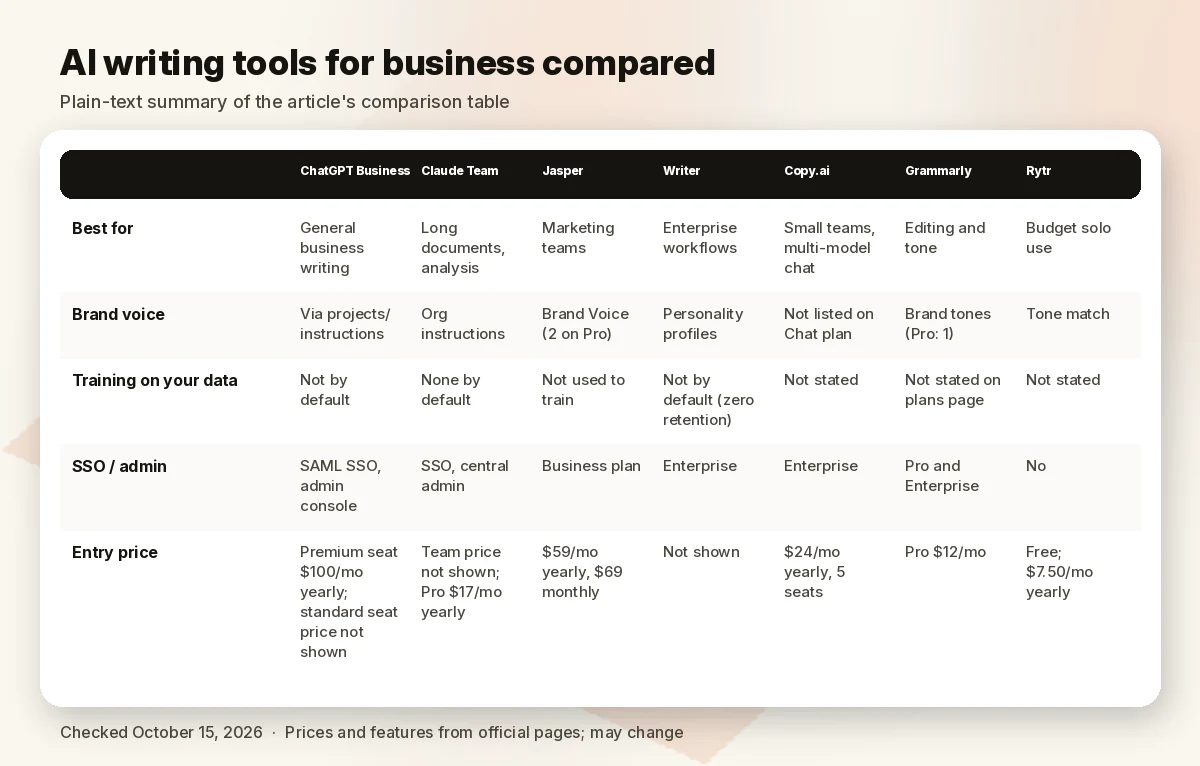
| ChatGPT Business | Claude Team | Jasper | Writer | Copy.ai | Grammarly | Rytr | |
|---|---|---|---|---|---|---|---|
| Best for | General business writing | Long documents, analysis | Marketing teams | Enterprise workflows | Small teams, multi-model chat | Editing and tone | Budget solo use |
| Brand voice | Via projects/instructions | Org instructions | Brand Voice (2 on Pro) | Personality profiles | Not listed on Chat plan | Brand tones (Pro: 1) | Tone match |
| Training on your data | Not by default | None by default | Not used to train | Not by default (zero retention) | Not stated | Not stated on plans page | Not stated |
| SSO / admin | SAML SSO, admin console | SSO, central admin | Business plan | Enterprise | Enterprise | Pro and Enterprise | No |
| Entry price (Oct 15, 2026) | Premium seat $100/mo yearly; standard seat price not shown | Team $20/seat/mo yearly ($25 monthly); premium seat $100 ($125 monthly) | $59/mo yearly, $69 monthly | Not shown | $24/mo yearly, 5 seats | Pro $12/mo | Free; $7.50/mo yearly |
Sources linked in each section; checked October 15, 2026.
How we review
We ranked tools on what matters when a company writes with AI: fit for real business tasks, documented data controls (is your data used for training?), team and admin features, brand-voice control and price per seat. All facts come from official pricing pages checked October 15, 2026. We haven’t run hands-on writing tests for this guide, so we don’t score output quality; where prices aren’t published, we say so instead of estimating.
Best AI writing tools for business
1. ChatGPT Business: best overall for teams
ChatGPT Business is a secure workspace for teams of 2 to 200, with all ChatGPT, ChatGPT Work and Codex features, connectors to Google Workspace, Slack, GitHub and Microsoft 365, SAML SSO and MFA, centralized billing, usage analytics, shared projects and workspace agents. OpenAI says it doesn’t train on business data by default, and Business is SOC 2 Type 2 compliant (ChatGPT Business pricing).
Pricing (checked October 15, 2026): a Premium seat, with 5x more usage than standard and no 5-hour limit, is $100/month billed annually or $125 monthly. The standard seat price didn’t display on the page when we checked. You can mix seat types.
Watch out for: SCIM, role-based access and data residency are Enterprise only. Individual Plus plans aren’t meant for company data governance.
2. Claude Team: best for long documents
Claude’s Team plan (2 to 150 people) includes SSO, domain verification, central billing, usage analytics, shared projects, enterprise search, connectors and Claude for Microsoft 365 and Outlook. Context windows go up to 1M tokens depending on the model, and Anthropic lists model training as “None by default” on Team and Enterprise (Claude pricing). Enterprise adds SCIM, audit logs, custom retention and a HIPAA-ready offering at $20 per seat per month plus usage at API rates.
Pricing (checked October 15, 2026): Team standard seats are $20 per seat/month billed annually or $25 monthly; premium seats, with 5x the usage of standard, are $100 per seat/month billed annually or $125 monthly. For a single user, Pro is $17/month billed annually ($200 upfront) or $20 monthly.
Watch out for: usage limits reset on rolling 5-hour windows with weekly caps on paid plans, so heavy users may need premium seats at $100 per seat/month billed annually ($125 monthly) instead of $20 ($25).
3. Jasper: best for marketing teams
Jasper is a marketing platform rather than a general assistant: Brand Voice, Knowledge assets, Audiences, a Canvas editor and agents for marketing workflows. Pro covers 1 seat with 2 Brand Voices, 5 Knowledge assets and 3 Audiences; Business adds unlimited brand settings, more seats, SSO, API access and GEO, translation and research agents (Jasper pricing). Jasper says it’s SOC 2 Type II certified and doesn’t use customer data to train models.
Pricing (checked October 15, 2026): Pro $59/month per seat billed yearly or $69 monthly; 7-day free trial. Business is custom-priced with a 12-month commitment.
Watch out for: extra seats require Business, so a team can’t simply stack Pro plans.
4. Writer: best for enterprise workflows
WRITER positions itself as an agentic AI platform for organizations: a WRITER Agent interface, Playbooks for repeatable workflows, personality (brand voice) profiles, a Knowledge Graph and governance features. Starter covers up to 5 users, 5 Playbooks and 1 team personality profile; Enterprise removes limits and adds SAML SSO, SCIM and audit logs. WRITER says it takes a zero data retention approach and doesn’t train on customer data by default (WRITER plans).
Pricing (checked October 15, 2026): not displayed on the plans page; Starter is per-seat, monthly or annual.
5. Copy.ai: best value for a small team
Copy.ai’s Chat plan includes 5 seats, unlimited words in chat, unlimited chat projects and access to OpenAI, Anthropic and Gemini models (Copy.ai pricing). Its workflow plans are aimed at go-to-market teams and start at $1,000/month.
Pricing (checked October 15, 2026): Chat $29/month billed monthly or $24/month billed $288 a year, for 5 seats.
Watch out for: data-training terms and SSO aren’t listed for the Chat plan on the pricing page.
6. Grammarly: best for editing what you write
Grammarly is the editing layer rather than a drafting tool. Pro adds full-sentence rewrites, tone adjustment, plagiarism and AI-text detection, 2,000 AI prompts per member per month, and team features such as a style guide and brand tones; Grammarly says it holds a SOC 2 (Type 2) report (Grammarly plans). Enterprise is now offered through Superhuman Go.
Pricing (checked October 15, 2026): Pro $12 (the page shows a free trial; billing period not stated alongside the price).
7. Rytr: best budget option
Rytr is a simple writer for individuals: Free gives 10K characters a month; Unlimited ($7.50/month billed yearly) adds unlimited generations, 1 tone-of-voice match and 50 plagiarism checks; Premium ($24.16/month yearly) adds multiple tone matches and 35+ languages (Rytr pricing).
Watch out for: no team admin or SSO; fine for a freelancer, not for company-wide use.
Why Writesonic isn’t ranked
Writesonic has repositioned as an AI-search visibility platform with a much higher entry price (we covered it in our Jasper review), so we no longer rank it as a business writing tool.
Best tool by task
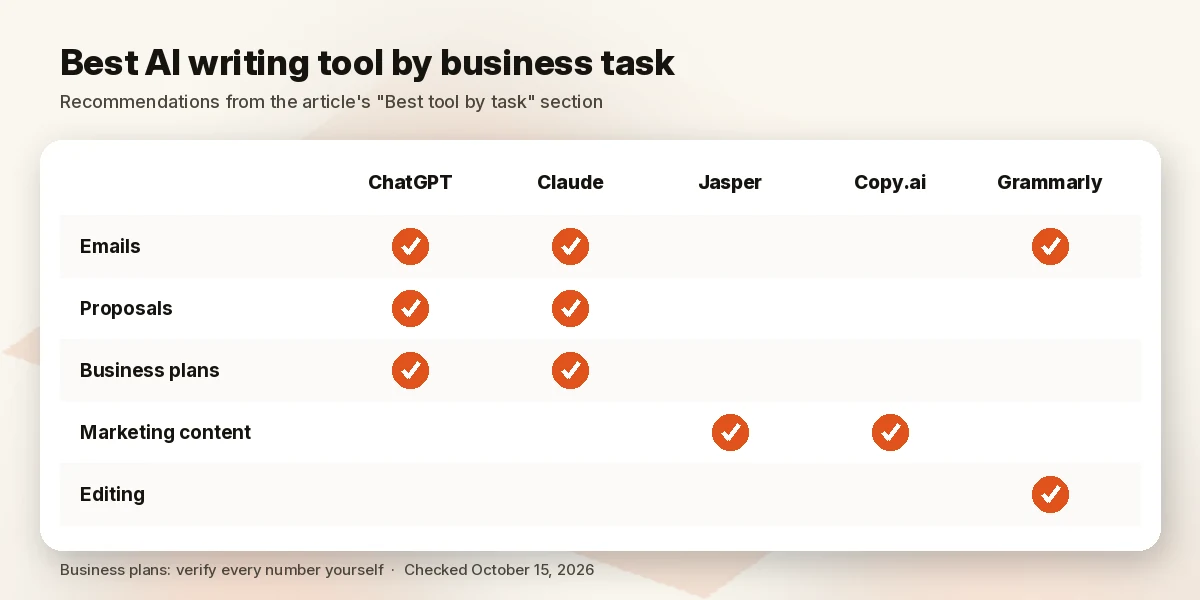
- Business emails: ChatGPT or Claude inside your mail client (ChatGPT connects to Google Workspace and Microsoft 365; Claude has Outlook integration on paid plans), then Grammarly for tone.
- Proposals and reports: Claude for long source documents (large context), or ChatGPT with shared projects so the team reuses the same briefs.
- Business plans: a general assistant with deep research (ChatGPT) or Research (Claude); verify every number yourself.
- Marketing content at scale: Jasper for brand voice governance; Copy.ai Chat if budget matters.
- Final edit: Grammarly for consistency, tone and plagiarism checks.
Data privacy and AI writing at work
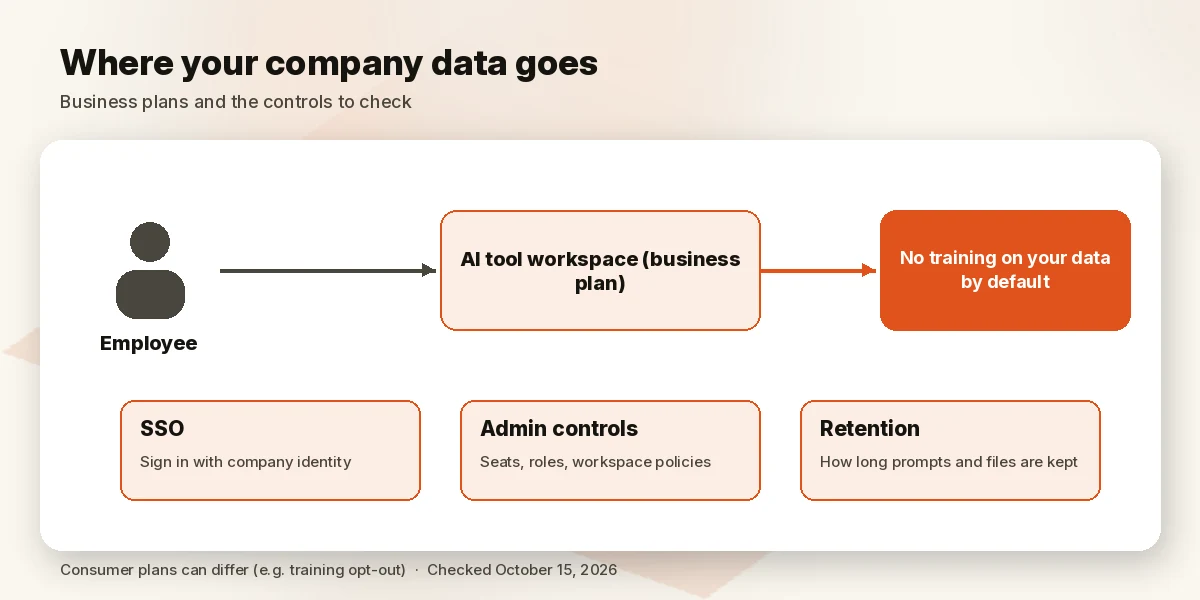
The single most important setting is whether your prompts and files train the vendor’s models. On business plans, ChatGPT (Business), Claude (Team), Jasper and WRITER all state that they don’t train on your data by default. On consumer plans the default can differ: Claude’s Free, Pro and Max plans list model training as opt-out (Claude). Put company work on a business plan, turn on SSO where offered, and set a written policy for what staff may paste in.
AI content and Google’s guidelines
Google says it rewards original, helpful content “however it is produced,” and that using AI “doesn’t give content any special gains.” Using automation to generate content mainly to manipulate rankings violates its spam policies. Google also suggests disclosing AI use where readers would reasonably ask how something was made (Google Search Central).
FAQ
What is the best AI writing tool for business? ChatGPT Business for most teams; Claude Team if you work with long documents; Jasper if brand voice for marketing is the priority.
What is the best AI tool for writing business emails? A general assistant connected to your mail (ChatGPT or Claude), with Grammarly for tone.
Which AI is best for writing a business plan? ChatGPT or Claude with their research features, but treat every figure as a draft to verify.
Is ChatGPT good enough for business writing? For most tasks, yes; use a Business plan for data controls and SSO.
Do AI writing tools use my company data for training? ChatGPT Business, Claude Team, Jasper and WRITER say they don’t by default. Check consumer plans and smaller tools individually.
Is AI-written content bad for SEO? Not by itself. Google judges quality, not how it was produced, but mass-produced content to game rankings is spam.
Verdict
ChatGPT Business is the best AI writing tool for most businesses, with Claude Team a close second for long-document work. Marketing teams that need brand governance should look at Jasper; small teams on a budget at Copy.ai Chat; and almost everyone benefits from Grammarly as an editing layer.
Try Jasper for marketing teams
Sources (official pages, checked on October 15, 2026)
- ChatGPT pricing: https://openai.com/chatgpt/pricing/
- ChatGPT Business pricing: https://openai.com/business/chatgpt-pricing/
- Claude pricing: https://claude.com/pricing
- Jasper pricing: https://www.jasper.ai/pricing
- WRITER plans: https://writer.com/plans/
- Copy.ai pricing: https://www.copy.ai/prices
- Grammarly plans: https://www.grammarly.com/plans
- Rytr pricing: https://rytr.me/pricing
- Google Search Central, guidance about AI-generated content: https://developers.google.com/search/blog/2023/02/google-search-and-ai-content