
Affiliate disclosure: AI Tools Vetted is reader-supported. Some links below are affiliate links (marked “sponsored”): if you sign up through them, we may earn a commission at no extra cost to you. Our Base44 and Hostinger links are affiliate or referral links: we may earn a commission if you sign up. Lovable, Bolt and Replit links are plain links, and we earn nothing from them. Our ranking follows the official facts below, not commissions.
Last updated October 18, 2026 · Prices checked October 18, 2026 on each vendor’s official pricing page or docs (USD).
Quick picks by profile
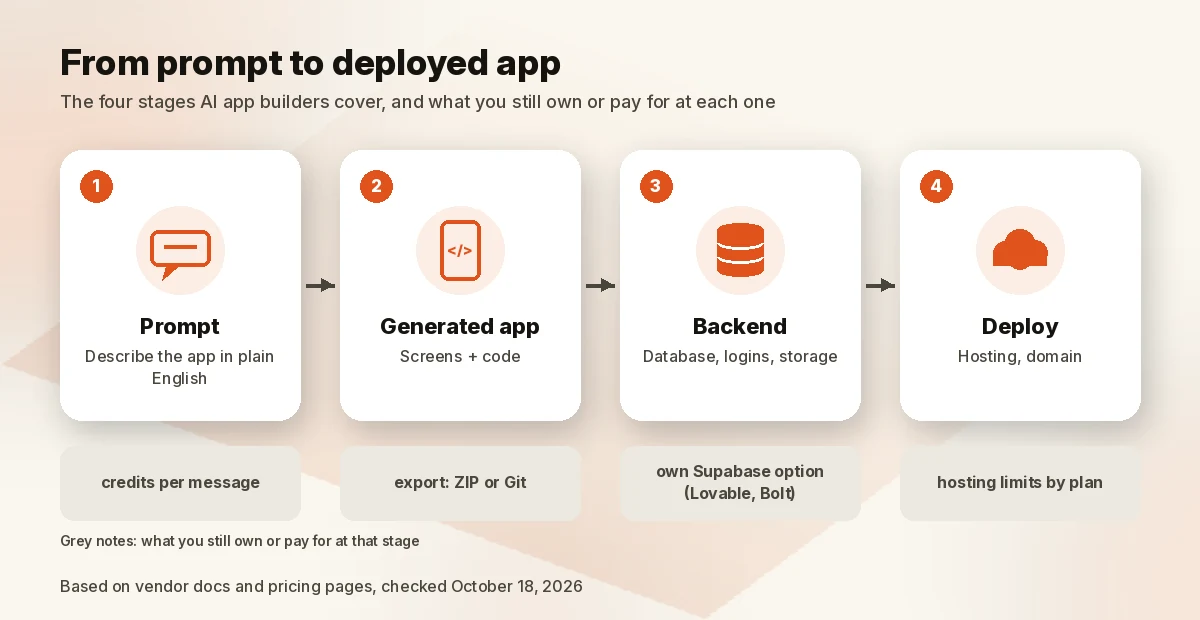
An AI app builder turns a plain-English prompt into a working app with screens, a database and logins. The demo is the easy part. What separates these tools is day 30: whether you can take the code with you, where your data lives, and how fast credits drain once real users arrive. This guide compares five builders on exactly that, from each vendor’s own pricing pages and docs.
Comparison table
| Tool | Best for | Code export / Git | Database and logins | Hosting | How usage is billed | Free plan | Paid from (checked Oct 18, 2026) |
|---|---|---|---|---|---|---|---|
| Lovable | Non-technical founders who want to own the code | Two-way Git sync (GitHub, GitLab, Bitbucket) on every plan; code download and editing on Pro and up | Built-in Cloud backend (database, auth, storage, edge functions), or your own Supabase project | Included; hosting draws on credits after a monthly grant | One credit balance for building, hosting and in-app AI | 5 build credits a day, up to 30 a month | $25/mo for 100 credits ($21/mo billed yearly) |
| Base44 (Check Base44 price) | All-in-one no-code builds | ZIP export and GitHub on Builder and up | Built-in backend (data, auth, functions) | Included | Message credits plus integration credits | 25 message credits a month, up to 5 apps | $20/mo ($16/mo yearly); GitHub from $50/mo ($40 yearly) |
| Bolt.new | Developers and fast prototypes, web or mobile | ZIP download and GitHub sync | Bolt Cloud database (auth, storage, server functions); can be claimed into your own Supabase account | Free: 10 GB / 333,333 requests a month; Pro: 30 GB / 1M | Tokens | 1M tokens a month (300K a day) | $25/mo, from 10M tokens |
| Replit | Developers who want a full cloud workspace and native apps | Full code access in the workspace; imports GitHub repos | Databases and App Storage, billed by usage | Usage-based publishing | Monthly credits plus usage | Daily Agent credits; 1 published app that goes down after 30 days | $20/mo with $20 of credits ($18/mo yearly) |
| Hostinger AI Builder (Check Hostinger price) | Budget web apps bundled with hosting, domain and email | Code editor and export on all three plans | Built-in databases, user accounts and file storage | Included while the plan is active | One-time AI credit gift, then top-ups | 5 AI credits to try | $2.99/mo on a 48-month prepay ($143.52), renews at $10.99/mo |
Sources, checked October 18, 2026: Lovable plans and credits; Base44 pricing and developer tools; Bolt pricing and hosting plans; Replit pricing and Starter plan; Hostinger AI Builder.
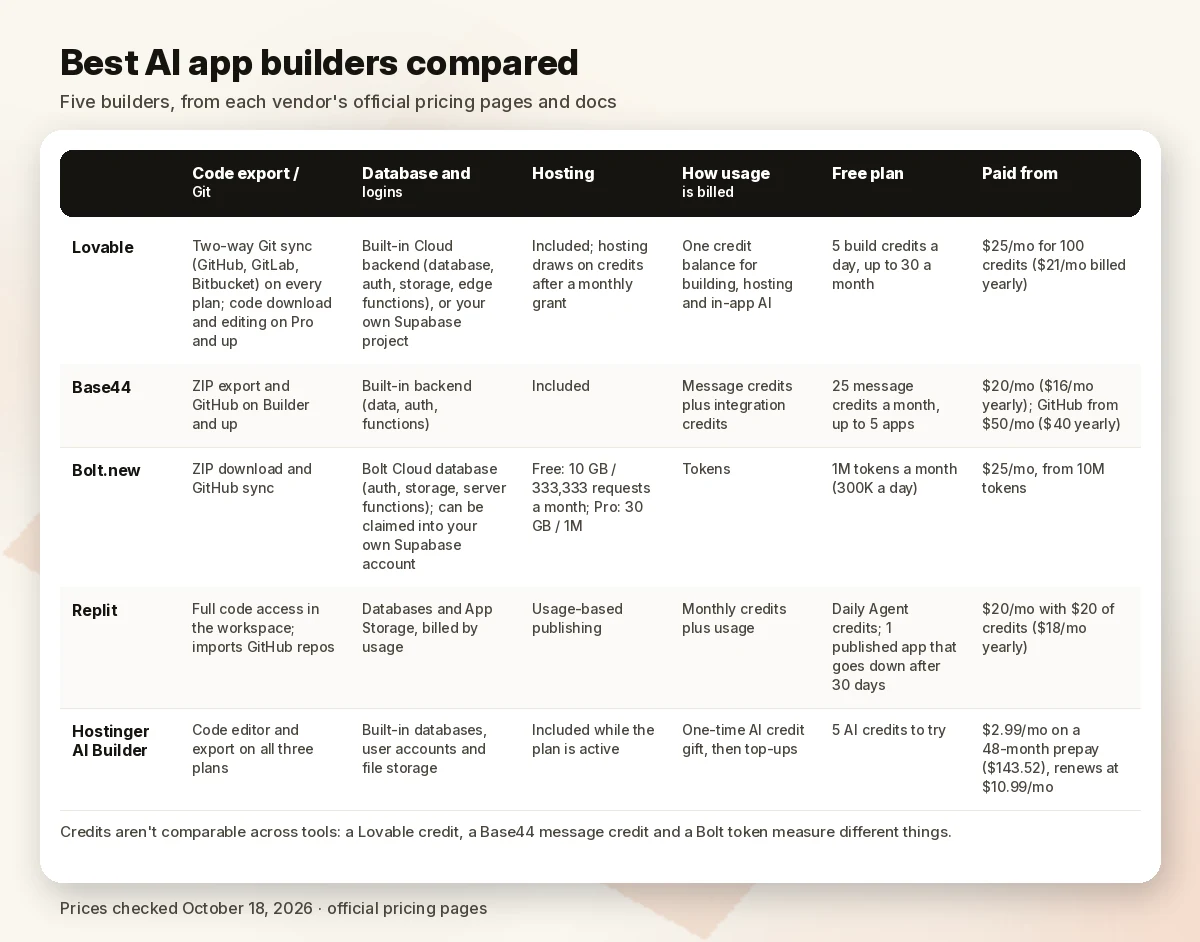
Credits aren’t comparable across tools. A Lovable credit, a Base44 message credit and a Bolt token measure different things, so compare what’s included and how each plan behaves when you run out, not the raw numbers.
Best AI app builders, ranked
We ranked on five criteria: ease for a non-technical builder, a managed backend (database and logins), code export and lock-in, how clearly credits are explained, and price. Full method under “How we evaluated.”
1. Lovable: best overall for owning your code
Lovable calls itself “an AI software engineer, which enables anyone to build for the web.” You chat, it builds the web app, and a built-in backend called Cloud handles the database, authentication, file storage and edge functions with no setup (Lovable Cloud docs). If you’d rather own the backend account, you can connect your own Supabase project instead (Supabase integration).
Two facts put it first. First, Git sync to GitHub, GitLab or Bitbucket is two-way and listed on every plan, including Free (plan comparison), so your code can live in your own repo from day one. Second, Lovable publishes example costs per prompt: “Make the button gray” costs 0.50 credits, “Add authentication” 1.20, and a Plan mode message is 1 credit plus any research it runs (credits docs).
- Pricing: Free gives 5 build credits a day, capped at 30 a month. Pro starts at $25/month for 100 credits ($250/year, or $21/month). Business starts at $50/month and adds SSO and role-based access. Top-ups cost $15 per 50 credits on Pro.
- Watch out for: one balance pays for building, hosting and in-app AI. If it hits zero, building stops, AI features in your app stop, and the backend pauses (your published pages stay up). Editing and downloading code directly needs Pro.
- Students: 50% off Pro (100 credits, monthly) for up to 12 months with a verified academic email.
Pros: Git sync on the free plan; transparent per-prompt examples; own-Supabase option; no per-seat pricing.
Cons: web apps only in Lovable’s own description; hosting and AI usage share your build credits; code editing is a paid feature.
2. Base44: best all-in-one for non-technical builders
Base44 says you describe what you need “and Base44 builds the full thing: frontend, backend, database, user auth, payments, all of it” (pricing FAQ). Every plan includes the backend and database, authentication, analytics and a visual editor. It also goes further toward phones than Lovable: you can scan your app against Apple and Google guidelines and generate store files, though the result is “a lightweight native wrapper around your web app,” and downloading those files requires Builder or higher (app store docs). You pay for the Apple and Google developer accounts yourself.
Ownership: Base44 is part of Wix. Its site footer reads “© Wix.com Ltd.” and says Base44 “runs on Wix’s enterprise security infrastructure.”
- Pricing (monthly / billed yearly): Free has 25 message credits and 100 integration credits a month for up to 5 apps. Starter is $20 / $16 for 100 message credits. Builder is $50 / $40 for 250 and adds GitHub. Pro is $100 / $80 for 500, and Elite $200 / $160 for 1,200. Yearly plans include a free domain for a year.
- Lock-in: Base44’s FAQ says “two-way GitHub sync exports the full source code,” but ZIP export and GitHub both require Builder ($50/month) or higher (developer tools). The docs also describe frontends talking to “the hosted Base44 backend” through its SDK, and we found no guide to moving that backend elsewhere. Plan on your data staying with Base44.
Pros: backend, auth and integrations included on every plan; app-store prep built in; clear credit tiers.
Cons: code export starts at $50/month; backend tied to Base44; mobile apps are web-view wrappers.
3. Bolt.new: best for developers who want speed and a way out
Bolt is “an AI app builder that turns a prompt into a working web or mobile app” (intro docs). For mobile it uses Expo, so one codebase targets iPhone and Android, and Bolt’s guide covers publishing to TestFlight, the App Store and Google Play. Its docs advise saying “mobile app” in your first prompt, because web projects “do not easily switch over to mobile” (Expo guide).
Its exit doors are good: you can download any project as a ZIP, sync it with GitHub, and claim the built-in Bolt database into your own Supabase account (projects, GitHub, database settings).
- Pricing: Free has 1M tokens a month (300K a day), Bolt branding and hosting up to 10 GB and 333,333 requests a month. Pro is $25/month billed monthly, starting at 10M tokens, with rollover for one extra month, custom domains and 30 GB / 1M requests of hosting. Teams is $30 per member a month.
- Watch out for: Bolt says most token use comes from syncing your project’s files to the AI, so “the larger the project, the more tokens used per message.” Free sites go offline when they hit the monthly hosting limit.
Pros: ZIP, GitHub and Supabase exits; native iOS and Android through Expo; generous free token allowance.
Cons: token burn grows with project size; you’ll want to read code to get the most out of it.
4. Replit: best full development environment
Replit is a full cloud workspace with an AI Agent, not a pure no-code tool. Core includes “all artifact types: web apps, mobile apps, data visualizations, slide decks” and more, plus Plan mode and connectors such as Google and Stripe (Core docs). Replit’s mobile guides build native iOS and Android apps with Expo and walk through uploading to App Store Connect with its Launch feature (upload guide).
- Pricing: Starter is free, with daily Agent credits up to a monthly cap and one published app that “will automatically go down after 30 days.” Core is $20/month ($18 billed yearly), with $20 toward more powerful models and up to 5 builders. Pro is $100/month ($90 yearly), with up to 15 builders, credit rollover and a 28-day database recovery window (pricing, Pro docs).
- Watch out for: Starter is limited to Lite build; full build, connectors and removing the “Made with Replit” badge need Core. Publishing and databases are billed by usage on top.
Pros: real development environment; native mobile path to the App Store; team plans without per-user fees.
Cons: more knobs than a beginner needs; usage billing on top of the subscription; the free published app expires.
5. Hostinger AI Builder (formerly Horizons): cheapest bundle with hosting
Hostinger Horizons is now Hostinger AI Builder, which “evolved from merging our website builder and Horizons,” and its Agentic mode is the one for “web apps, CRMs, membership sites with gated content, portals, or sites with user authentication” (Hostinger AI Builder). Plans include a built-in backend (databases, user accounts, file storage), Stripe payments, hosting, a domain and business email. A code editor with export is checked on all three plans.
- Pricing: Premium is $2.99/month on a 48-month prepay ($143.52 upfront), renewing at $10.99/month, with 250 AI credits as a one-time gift. The plan Hostinger labels Unlimited is $3.99/month on the same term (500 credits) and Cloud Startup $7.99/month (1,000 credits). Hostinger says a simple business page usually takes 5–10 credits and a SaaS-style app 15 or more on average. Manual drag-and-drop mode uses no credits.
- Watch out for: the low price needs a 48-month prepay and renews higher. Credits are a one-time gift, then top-ups. Hostinger warns that if your hosting plan expires, “your project will no longer be accessible and all data will be permanently deleted.” No native App Store or Google Play apps.
Pros: hosting, domain, email and backend in one bill; code export on every plan; 30-day money-back guarantee if you’ve used fewer than 30 credits.
Cons: long prepay for the headline price; finite credit gift; web apps only.
Why not Bubble or Glide?
Both are visual no-code builders with AI features, not prompt-to-app builders, so they’re outside this ranking. We’ll compare them in a separate guide.
App builder vs website builder
A website builder publishes pages: a portfolio, a menu, a blog. An app builder adds user accounts, a database that remembers each user’s records, and server-side logic. If your project needs people to log in and see their own data, you need an app builder. If it’s mostly pages and a contact form, a website builder is cheaper and simpler.
Hostinger’s AI Builder covers both in one product: Manual mode for sites, Agentic mode for apps.
What you still need to code (or at least check)
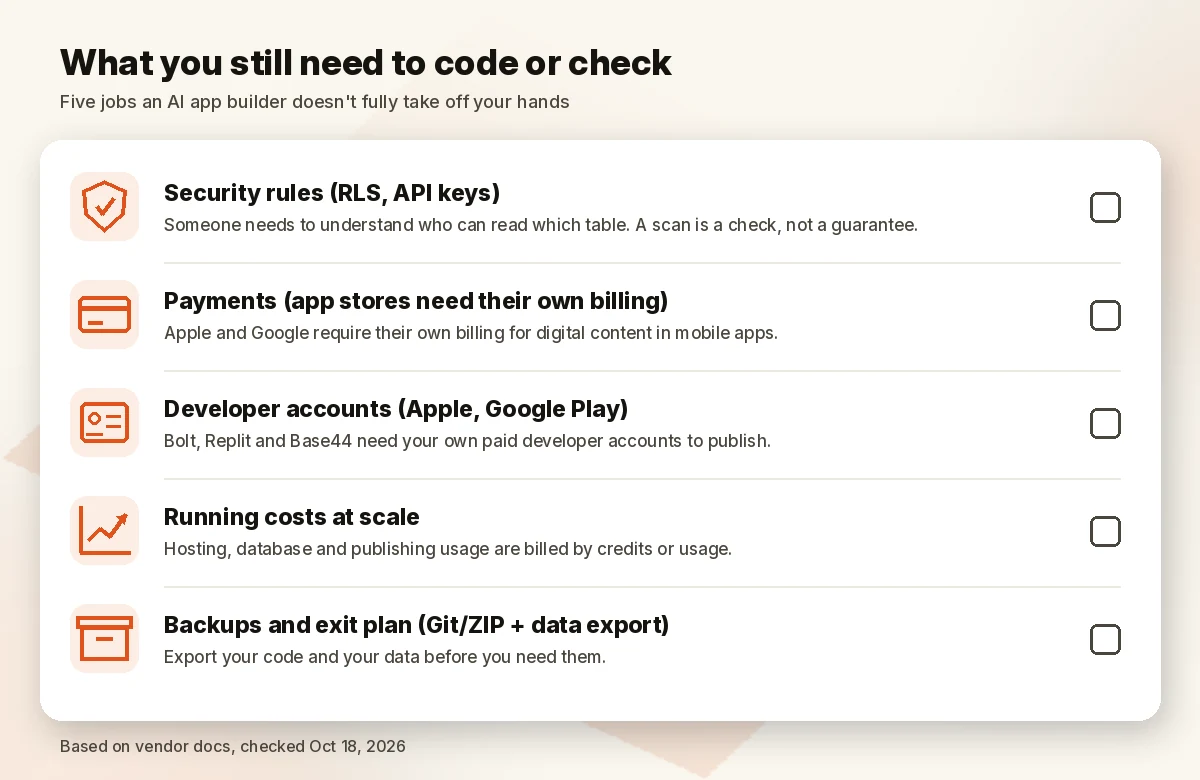
Every builder above can produce a working prototype without code. Moving to real users is where the gaps show. Here’s what the vendors’ own docs say you still own:
- Security rules. Lovable publishes security best practices covering row-level security (RLS) and protecting API keys (Lovable security). Bolt scans its database for “an open permission or a missing RLS policy,” and Base44 runs security scans with suggested fixes. A scan is a check, not a guarantee. Someone needs to understand who can read which table.
- Payments. Stripe connects easily on most of these tools. For phone apps, though, Base44 warns: “Do not use Stripe for payments inside your mobile app,” because Apple and Google require their own billing for digital content.
- App store accounts. Bolt, Replit and Base44 all need your own paid Apple Developer and Google Play developer accounts to publish.
- Running costs at scale. Lovable bills hosting and database usage in credits, and bigger database instances cost more. Bolt’s free hosting stops serving pages at its monthly limit. Replit bills publishing and databases by usage.
- Backups and exit plan. Export your code (Git or ZIP) and your data before you need them. On Lovable, a paused backend’s data can’t be exported until it runs again. On Hostinger, an expired plan means deleted data.
How we evaluated
We compared official pricing pages, help centers and developer docs for each tool on October 18, 2026, reading US/USD prices. We weighted five things: how easy it is for someone who doesn’t code, whether a database and logins come built in, how you get your code and data out (and on which plan), how clearly credits are explained, and price. We ranked prompt-to-app builders only, so visual no-code builders such as Bubble and Glide are left for a separate comparison. We didn’t build test apps for this guide, so there are no speed or quality scores here. Everything above is what the vendors document, and plan details change often.
FAQ
What is the best AI app builder? For most non-technical builders who want to keep their code, Lovable, because Git sync works on every plan and its credit costs are documented per prompt. If you want the backend, integrations and app-store prep in one place and don’t mind data staying on the platform, Base44. Developers should look at Bolt.new or Replit.
Is there a free AI app builder? All five have a free way in. Lovable gives 5 build credits a day (30 a month), Base44 25 message credits a month for up to 5 apps, Bolt 1M tokens a month, Replit’s Starter plan daily Agent credits, and Hostinger 5 AI credits to try. Free tiers are for testing; each limits publishing, branding or volume.
Can AI build an iOS or Android app? Yes, with limits. Bolt and Replit build native apps with Expo and document publishing to the App Store and Google Play. Base44 generates store files for a web-view wrapper on Builder and up. Hostinger’s builder doesn’t support native app-store apps, and Lovable describes itself as a web builder. You’ll need your own paid Apple and Google developer accounts.
Is Base44 better than Lovable? It depends on what you value. Base44 bundles more (backend, integrations, app-store prep) and starts at $20/month, but code export needs its $50/month Builder plan and the backend stays on Base44. Lovable starts at $25/month and syncs code to Git on every plan, including Free. For long-term ownership, Lovable has the edge.
Do I own the code an AI app builder creates? The vendors say yes: Lovable says “You own your code,” Base44 says “You own everything you build,” Bolt says the code “is yours to use for any legal purpose,” and Hostinger says “what you build is yours.” Owning it and being able to move it aren’t the same, though, so check which plan unlocks export and where the database lives.
Can I build a complex app without coding? You can get far, but complex apps raise security, payment and scaling questions that need technical judgment. Get a developer review before real customer data or payments go into an AI-built app.
Verdict
Choose Lovable if you’re not a developer but want an exit door from day one. Choose Base44 if you want the most done for you and accept that the backend stays on Base44. Choose Bolt.new or Replit if you can read code and want native mobile apps. Choose Hostinger AI Builder if a long prepay for hosting, domain and app in one bill suits you. Whatever you pick, connect Git or export your code early, and check the pricing page again before you upgrade.
See Lovable plans · Check Base44 price
Sources (official pages, checked on October 18, 2026)
- Lovable pricing: https://lovable.dev/pricing (the page showed BRL from our location; USD tiers taken from the official docs below)
- Lovable subscription plans (USD tiers, plan features): https://docs.lovable.dev/introduction/subscription-plans
- Lovable credits and usage: https://docs.lovable.dev/introduction/plans-and-credits
- Lovable Cloud: https://docs.lovable.dev/features/cloud · Supabase: https://docs.lovable.dev/integrations/supabase · Security best practices: https://docs.lovable.dev/tips-tricks/security-best-practices
- Base44 pricing and FAQ: https://base44.com/pricing
- Base44 developer tools: https://docs.base44.com/documentation/building-your-app/developer-tools
- Base44 app store submission: https://docs.base44.com/documentation/building-your-app/uploading-to-app-stores
- Bolt pricing: https://bolt.new/pricing · Intro: https://support.bolt.new/get-started/intro-bolt · Hosting plans: https://support.bolt.new/bolt-cloud/hosting/plans
- Bolt projects (download): https://support.bolt.new/managing-projects/projects-files · GitHub: https://support.bolt.new/integrations/git · Database (Supabase claim): https://support.bolt.new/bolt-cloud/database/advanced · Expo: https://support.bolt.new/integrations/expo
- Replit pricing: https://replit.com/pricing · Starter: https://docs.replit.com/billing/plans/starter-plan · Core: https://docs.replit.com/billing/plans/replit-core · Pro: https://docs.replit.com/billing/plans/replit-pro · iOS upload: https://docs.replit.com/build/mobile-upload-ios
- Hostinger AI Builder (formerly Horizons): https://www.hostinger.com/horizons