
Affiliate disclosure: AI Tools Vetted is reader-supported. Some links below are affiliate links (marked “sponsored”): if you sign up through them, we may earn a commission at no extra cost to you. Our QuillBot, Jasper and Grammarly links may be affiliate links; ProWritingAid, LanguageTool, Harper and Hemingway links are plain links. The order below follows how well each tool covers the job of checking and editing text, not commissions. ProWritingAid is first and we have no affiliate link for it.
Prices checked October 30, 2026, between 09:18 and 09:21 BRT on each vendor’s official pages (USD where the page showed USD, before tax). Where a page showed another currency or blocked us, we say so and leave the price out.
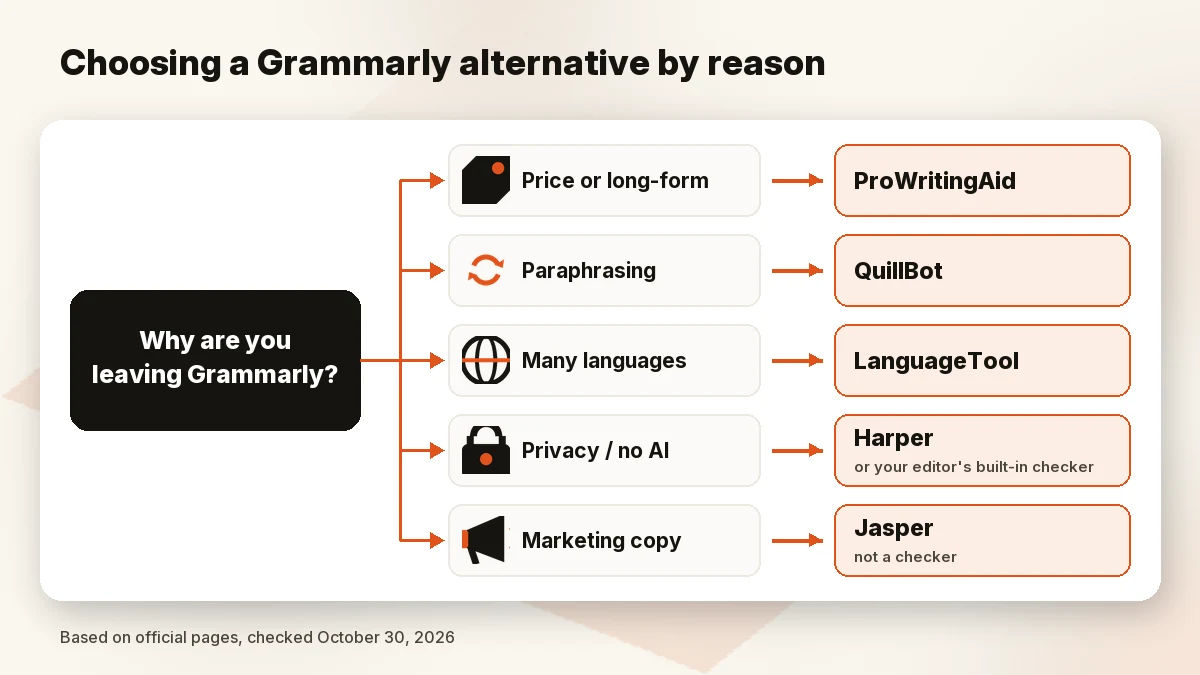
Most people searching for a Grammarly alternative have one specific reason. Some find the subscription too expensive. Some don’t want their writing sent to a cloud AI. Others write novels and need deeper style reports, or mostly rewrite text rather than fix it. So this guide is sorted by that reason, not by a single “best” ranking. These tools do different jobs, so treat the prices as a guide to cost, not a like-for-like comparison.
Quick picks
| If you’re leaving because… | Look at | Entry paid price (official, Oct 30, 2026) | Where text is checked |
|---|---|---|---|
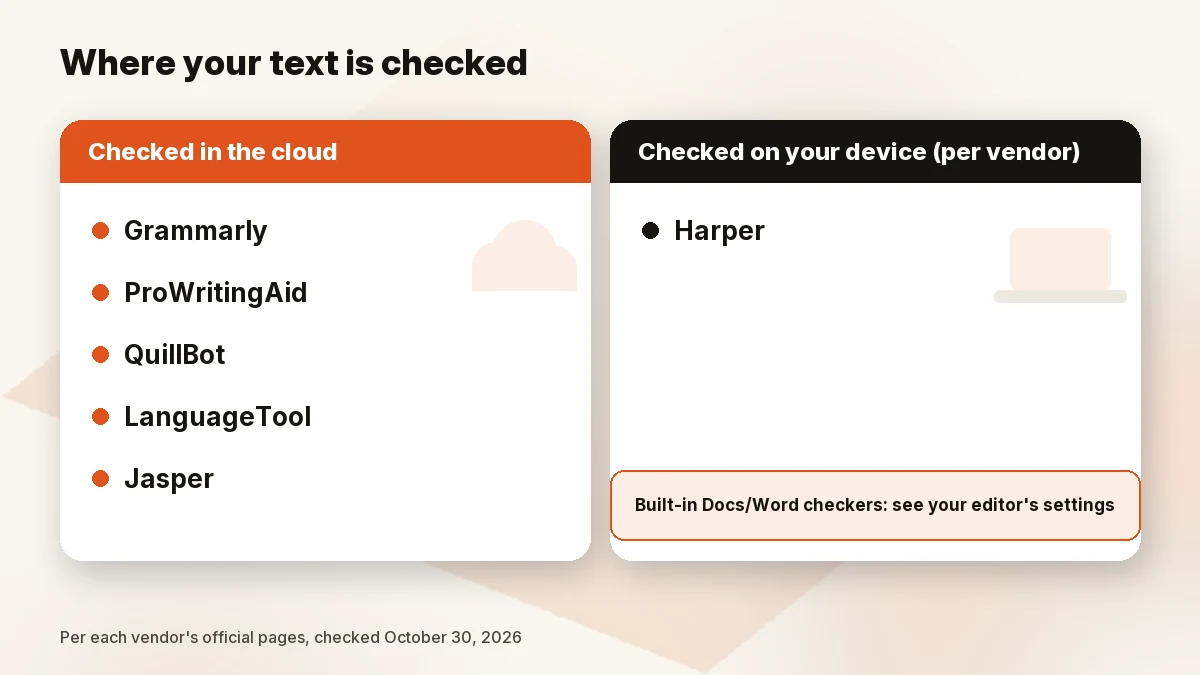
| You write long-form or fiction | ProWritingAid | $10/mo billed yearly ($120) or $30 month to month | Cloud (per its pricing FAQ, documents are uploaded to your account) |
| You mostly paraphrase or summarize | QuillBot Check QuillBot price | Not confirmed in USD today (see below) | Cloud |
| You write in several languages | LanguageTool | Not confirmed in USD today | Cloud (browser add-on texts “usually not saved,” per its FAQ) |
| You want free, private, no generative AI | Harper | $0 (open source, Apache-2.0) | On your device, per its site |
| You only want readability fixes | Hemingway Editor | Not confirmed today; Plus has a free 2-week trial | Not stated on the pages we read |
| You actually want marketing copy | Jasper Check Jasper price | $59/seat/mo billed yearly or $69 monthly | Cloud |
What Grammarly costs today and what you’d lose by leaving
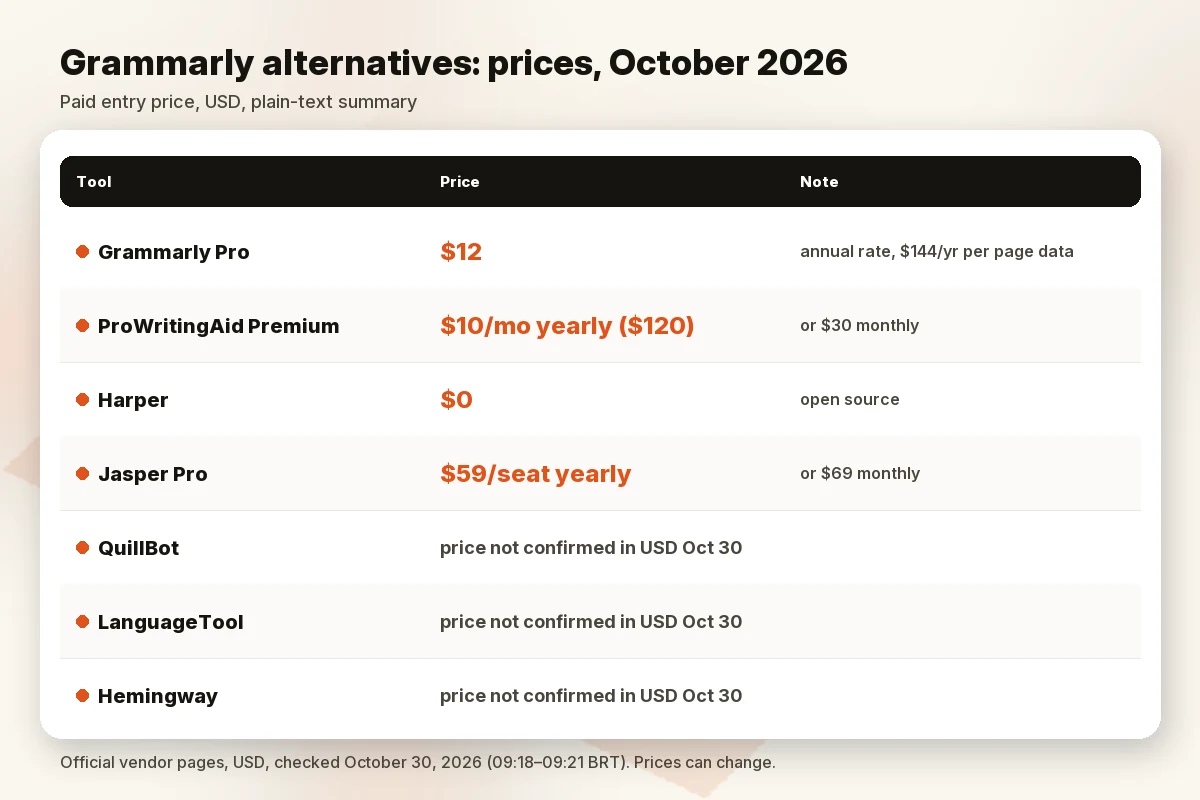
Grammarly’s official plans page showed three tiers on October 30, 2026 (09:19 BRT): Free at $0, Pro at “$12 USD” with a free trial (“Email reminder 2 days before trial ends”), and Enterprise via sales. The visible card doesn’t say how often the $12 is billed. The plan data embedded in the same page lists a $144 one-year Pro plan, plus $25 monthly (with a 7-day free trial) and $30 monthly, and $60 quarterly options. So the $12 looks like the annual rate shown per month ($144 ÷ 12). Month-to-month options on the page include both $25 and $30; confirm which rate and trial apply at checkout before you pay.
What you give up by leaving depends on what you use. Grammarly’s Free tier covers spelling and grammar, and the Pro card lists full-sentence rewrites “with a click”. If you mainly lean on those rewrites across the apps you write in, an alternative that only checks grammar will feel like a step down. If you mainly need typo catching, you may not lose much.
The alternatives, by reason
Long-form and fiction editing: ProWritingAid
ProWritingAid is built for longer documents and fiction. Its pricing page (October 30, 2026, 09:18 BRT) lists:
- Free: $0, suggestions on 500 words at a time, per the page’s FAQ.
- Premium: $10/mo billed yearly ($120), or $30 billed monthly.
- Premium Pro: $12/mo billed yearly ($144), or $36 billed monthly; adds chapter critiques and community features.
- Lifetime: $399 (Premium) or $699 (Premium Pro), one-time.
Paid plans carry a “3-day money back guarantee,” and the page says students get 25% off yearly plans through Student Beans. ProWritingAid’s FAQ says it is “only available in English” (including British and other dialects), and paid plans run line-editing reports on documents of any length. At the yearly rate, Premium ($120) costs less than Grammarly’s $144 annual Pro plan by our math, but the two products do different jobs. ProWritingAid is about style reports and manuscripts, not tone rewrites in your inbox.
Pick it if you write books, long reports or blog posts and want reports on pacing, repetition and style. Skip it if you mostly write short emails, or you need a language other than English.
Paraphrasing and cheaper all-rounder: QuillBot
QuillBot is a rewriting toolkit: paraphraser, grammar checker, summarizer, plagiarism checker, AI detector and humanizer. On October 30, 2026 (09:20 BRT) its Premium page loaded for us only in Brazilian reais, and our US-view request was blocked (HTTP 403), so we can’t give you a confirmed USD price today. When we last read the US page, on October 26, 2026, it showed $8.33/mo billed annually (a discounted rate) or $19.95 month to month. Treat those as a recent reading, not today’s price. On our last US reading (October 26, 2026), the free plan still listed paraphrasing “up to 100 words”; we could not reconfirm that free-plan limit on October 30.
Pick it if you rewrite and summarize more than you proofread. Skip it if you need deep style checking or grammar in many languages. For a head-to-head, see Grammarly vs QuillBot.
Multilingual: LanguageTool
LanguageTool’s Premium page says it “comes in 30+ languages,” and its feature table lists a 2,000-character limit per text field on Basic versus 150,000 on Premium, with AI sentence rephrasing capped at 3 per day on Basic. Its apps list covers Chrome, Edge, Firefox, Safari, Opera, Thunderbird, Windows, macOS and iOS. The FAQ offers a 14-day money-back guarantee on Premium instead of a free Premium trial. On October 30 (09:20 BRT) the page showed only non-USD prices to us, with a 50% discount label, so we leave the price out; check it in your own currency.
Pick it if you write in English plus German, Spanish, French, Dutch or Portuguese and want one checker for all of them. Skip it if you only write English and want the cheapest option, which is free (Harper, below).
Free, private, no generative AI: Harper and built-in checkers
Harper is the clearest answer to the “Grammarly alternative no AI” and “open source” searches. Its official site (October 30, 2026, 09:19 BRT) says “Every check happens locally. No cloud round-trips, no telemetry, no LLM in the loop,” that it is free with no credit card, and that the source code is under the Apache-2.0 license. It runs on-device with no GPU needed. It supports English only (American, British, Canadian, Australian and Indian), and integrations listed include a Chrome extension, a desktop app, VS Code, Obsidian, Zed and a WordPress block-editor plugin. Those privacy statements come from Harper itself; we didn’t audit the code.
The other free route is the checker already in your editor. Google Docs and Microsoft Word both include spelling and grammar checks. We didn’t review their current limits for this guide, so check what your version offers.
Pick it if privacy matters most and you write in English. Skip it if you write in other languages or want tone and rewrite suggestions.
Readability only: Hemingway Editor
Hemingway Editor highlights long sentences and hard-to-read passages. Its homepage (October 30, 2026, 09:19 BRT) lists Hemingway Editor Plus, which can “fix highlighted issues, check grammar, and adjust tone,” with a free 2-week trial and no credit card required, plus Hemingway Editor Classic and free online tools. We couldn’t load a pricing page for it today, so no price here.
Pick it if you want shorter, plainer sentences and don’t need a full grammar checker. Skip it if you need inline checks in every app you use.
If you actually want marketing copy, not a checker: Jasper
Some people leave Grammarly because they want an AI that writes, not one that corrects. Jasper is that kind of tool, built around brand voice for marketing teams. Its official pricing page (October 30, 2026, 09:18 BRT) lists Pro at $59 per seat per month billed yearly or $69 billed monthly, with a free 7-day trial. It doesn’t replace a grammar checker. Writesonic is another writing platform, now pitched mainly at search and AI visibility; see our Writesonic review. For more options, see our Jasper alternatives guide and the best AI writing tool for business.
Pick it if you produce on-brand campaign copy every week. Skip it if you only want your own writing corrected.
Comparison table
| Tool | Free plan | Paid entry price (official, Oct 30, 2026) | Languages | Apps (per official pages) | Generative AI | Where text is checked |
|---|---|---|---|---|---|---|
| Grammarly (reference) | Yes | Pro “$12 USD” (likely the annual rate; $144/yr in page data) | Not checked today | Not checked today | Yes | Cloud |
| ProWritingAid | Yes, 500 words at a time | $10/mo yearly ($120); $30 monthly | English only | Not checked today | Rephrases, critiques | Cloud |
| QuillBot | Yes, paraphrase up to 100 words | Not confirmed in USD today | Not checked today | Browser extensions, apps (per Premium page) | Yes | Cloud |
| LanguageTool | Yes, 2,000 characters per field | Not confirmed in USD today | 30+ | Chrome, Edge, Firefox, Safari, Windows, macOS, iOS and more | AI rephrasing (3/day free) | Cloud |
| Harper | Free, open source | $0 | English only | Chrome, desktop, VS Code, Obsidian, WordPress and more | No LLM, per its site | On device |
| Hemingway Editor | Free tools; Plus trial | Not confirmed today | Not checked today | Not checked today | Plus adds AI fixes | Not stated |
| Jasper | No (7-day trial) | $59/seat/mo yearly; $69 monthly | Not checked today | Not checked today | Yes (copy generator) | Cloud |
Who should stay on Grammarly
Leaving isn’t always the right call. Stay if you rely on tone and full-sentence rewrites across the apps you write in, if your team already standardized on it, or if you write in English and want one tool that works in most places without setup. Leave if you only need typo checks (Harper or your editor’s checker is free), you write fiction (ProWritingAid), you need several languages (LanguageTool), or your text can’t go to a cloud AI (Harper).
How we evaluated
We read each tool’s official pricing and product pages on October 30, 2026 (09:18–09:21 BRT), aiming for the US view in USD. We checked what the free plan limits, which languages are supported and where text is processed, and we cross-checked recent independent comparisons for gaps. QuillBot blocked our US-view request and showed us Brazilian reais in a browser; LanguageTool also showed a non-USD currency; Hemingway had no pricing page we could load. For those, we left the price out. We did not run our own accuracy test and don’t claim one. The order reflects how well each tool covers checking and editing text, not affiliate status.
FAQ
What is the best free Grammarly alternative?
For privacy, Harper: it is free, open source and runs on your device, but only in English. Your editor’s built-in checker is the other free route. QuillBot, ProWritingAid and LanguageTool all have free plans with limits (QuillBot’s free paraphraser was listed at up to 100 words on our October 26 reading; ProWritingAid 500 words at a time and LanguageTool 2,000 characters per field on October 30).
Is there a Grammarly alternative that doesn’t use AI?
Harper’s site says there is “no LLM in the loop” and every check happens locally. It still uses automated rules, so it’s not human editing, but it doesn’t send your text to a generative AI model according to the vendor.
Is QuillBot better than Grammarly?
It depends on the job. QuillBot is built around paraphrasing and summarizing; Grammarly around grammar, clarity and tone. See our Grammarly vs QuillBot comparison.
Is ProWritingAid cheaper than Grammarly?
On yearly billing, yes by our math: ProWritingAid Premium is $120 a year and Grammarly’s page data lists Pro at $144 a year (October 30, 2026). Month to month, ProWritingAid Premium is $30. Grammarly’s page data lists both $25 a month (with a 7-day free trial) and $30 a month, so confirm the rate at checkout. The features differ, so compare what you’d actually use.
Is there an open-source Grammarly alternative?
Yes. Harper’s source code is available under the Apache-2.0 license, per its official site. We didn’t confirm self-hosting options for other tools in this guide.
Can ChatGPT replace Grammarly?
A general chatbot can rewrite or proofread text you paste in, but it doesn’t check as you type in every app, and results vary from one run to the next. If you need inline checks, a dedicated checker is the closer fit. If you only clean up a few paragraphs a week, a chatbot may be enough.
Bottom line
Pick by your reason for leaving. ProWritingAid fits long-form writers, QuillBot fits people who mostly rewrite, LanguageTool fits multilingual writers, Harper fits anyone who wants free and private English checks, and Jasper is for people who really wanted a copy generator. If tone rewrites across every app are what you use most, Grammarly may still be the better buy.
Last updated: October 30, 2026.
Sources
Official pages checked October 30, 2026, 09:18–09:21 BRT:
- Grammarly plans (09:19 BRT; card “$12 USD”; page data $144/yr, $25/mo with 7-day trial, $30/mo, $60/quarter)
- ProWritingAid pricing (09:18 BRT)
- QuillBot Premium (09:19 BRT HTTP 403; 09:20 BRT browser, BRL only)
- LanguageTool Premium (09:19–09:20 BRT; non-USD prices)
- Harper (09:19 BRT)
- Hemingway Editor (09:19 BRT; /pricing returned 404 at 09:21 BRT)
- Jasper pricing (09:18 BRT)