
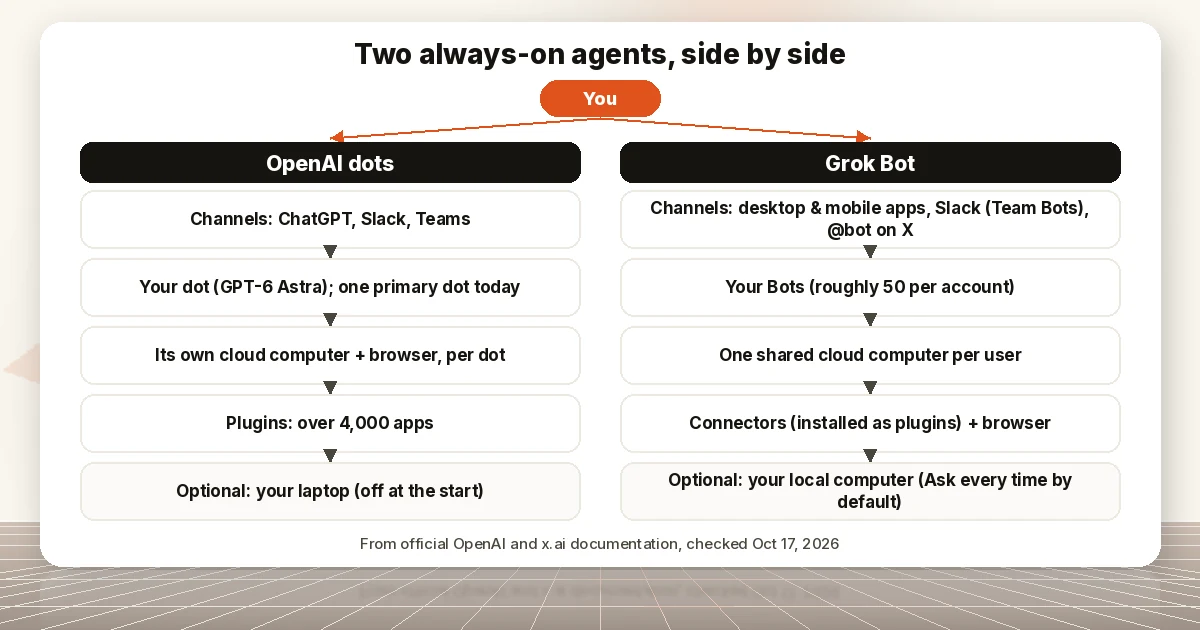
Conflict of interest: our editorial team uses Grok Bot (by SpaceXAI) in its workflow. We have no affiliate relationship with SpaceXAI or OpenAI. This comparison uses only official documentation.
Disclosure: AI Tools Vetted is reader-supported and may show ads on this page (including Adcash). Neither OpenAI nor SpaceXAI pays us for this article or for links to its pages, and every OpenAI and x.ai link here is a plain link. One sponsored add-on link sits in a separate box at the end and is not part of this comparison.
Last updated October 17, 2026 · Plans and prices checked October 17, 2026 on OpenAI’s and x.ai’s official pages (USD, before tax).
TL;DR
TL;DR
- Same idea, different homes. Both are always-on agents with their own cloud computer that keep working when you close your laptop. Dots live inside ChatGPT; Grok Bot is a separate desktop and mobile app tied to Grok and Cursor accounts.
- Plans that include them today: dots come with ChatGPT Pro ($100, $200 or $500 a month) and Business Premium seats, with an Enterprise beta. Grok Bot comes with The X Subscription Premium ($30), Super ($100) and Ultra ($200), Teams and Enterprise, plus several older SuperGrok and Cursor plans.
- Biggest structural difference: each dot works on its own cloud computer. Per x.ai’s docs, all of a user’s Grok Bots share one cloud computer, and separate Bots shouldn’t be treated as a security boundary.
- Where you are matters: dots on Pro aren’t offered in the European Economic Area, Switzerland or the UK; Business Premium is. Grok Bot’s computers run in the United States.
- No winner declared. There’s no common benchmark for these agents, and we haven’t run a head-to-head test.
This is a comparison of two products as their makers document them on October 17, 2026. It is not a review based on our own testing, and “Grok Bot vs OpenAI’s agent” is our framing, not something either company announced. If you only want to know which ChatGPT plan gets which GPT-6 model, see our GPT-6 in ChatGPT guide.
What each one is
OpenAI dots. OpenAI introduced dots on September 29, 2026 as “remarkably capable, always-on agents built to handle everything.” In OpenAI’s words: “Powered by GPT‑6 Astra, they have their own cloud computer, learn from feedback over time, and can work towards your goals 24/7. Through our ecosystem of plugins, they can readily connect to over 4,000 apps” (Introducing dots). You start with one primary dot, give it a name and reach it in ChatGPT, Slack or Teams. OpenAI also previewed “specialist dots” with their own identity for enterprise roles, starting with focused pilots.
Grok Bot. x.ai describes Grok Bot as “your team of always-on agents. They have their own computer, work inside tools and apps like you do, and keep working 24/7” (Introducing Grok Bot). x.ai’s August 26 post dates the beta launch to August 11, 2026 (Grok Bot is now included with more plans). Since then x.ai has announced Grok Bot for Enterprise (September 3), Team Bots, which are shared Bots a whole team can use (September 28), and, on October 12, The X Subscription, a single plan covering Grok, Grok Bot, Cursor and X Premium (x.ai news). The company’s pages brand it as SpaceXSI; the site footer reads © 2026 SpaceXAI LLC.
Plans and availability
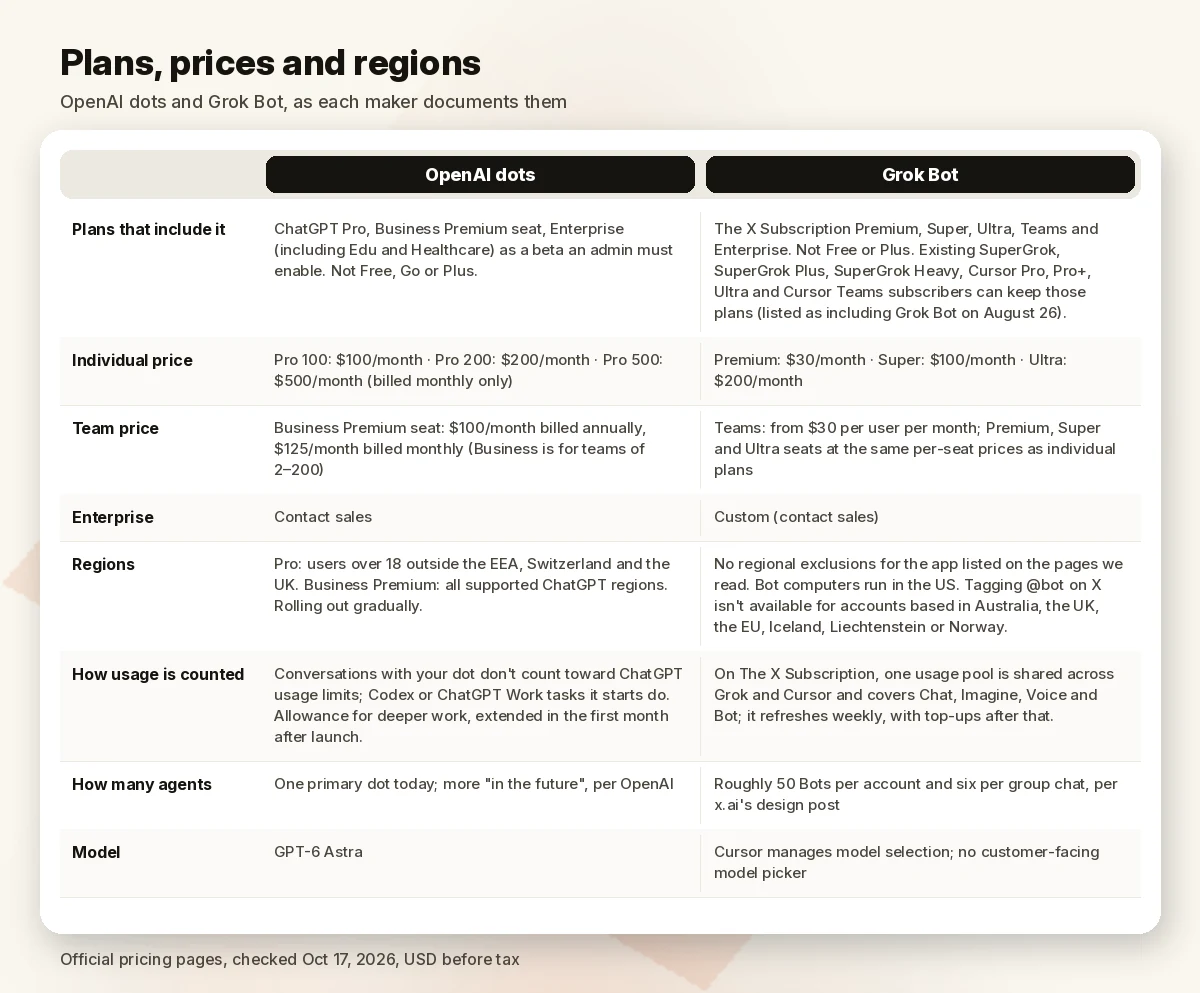
| OpenAI dots | Grok Bot | |
|---|---|---|
| Plans that include it | ChatGPT Pro, Business Premium seat, Enterprise (including Edu and Healthcare) as a beta an admin must enable. Not Free, Go or Plus. | The X Subscription Premium, Super, Ultra, Teams and Enterprise. Not Free or Plus. Existing SuperGrok, SuperGrok Plus, SuperGrok Heavy, Cursor Pro, Pro+, Ultra and Cursor Teams subscribers can keep those plans, which x.ai listed as including Grok Bot on August 26. |
| Individual price | Pro 100: $100/month · Pro 200: $200/month · Pro 500: $500/month (billed monthly only) | Premium: $30/month · Super: $100/month · Ultra: $200/month |
| Team price | Business Premium seat: $100/month billed annually, $125/month billed monthly (Business is for teams of 2–200) | Teams: from $30 per user per month; Premium, Super and Ultra seats at the same per-seat prices as individual plans |
| Enterprise | Contact sales | Custom (contact sales) |
| Regions | Pro: users over 18 outside the EEA, Switzerland and the UK. Business Premium: all supported ChatGPT regions. Rolling out gradually. | No regional exclusions for the app listed on the pages we read. Bot computers run in the US. Tagging @bot on X isn’t available for accounts based in Australia, the UK, the EU, Iceland, Liechtenstein or Norway. |
| How usage is counted | Conversations with your dot don’t count toward ChatGPT usage limits; Codex or ChatGPT Work tasks it starts do. The plan includes an allowance for deeper work, with extended limits in the first month after launch. | On The X Subscription, one usage pool is shared across Grok and Cursor and covers Chat, Imagine, Voice and Bot; it refreshes weekly, with top-ups after that. |
| How many agents | One primary dot today; OpenAI says you’ll be able to add more “in the future” | Roughly 50 Bots per account and six per group chat, per x.ai’s design post |
| Model | GPT-6 Astra | Cursor manages model selection; there’s no customer-facing model picker |
Sources, checked October 17, 2026: Introducing dots; Getting started with your dot (Help Center, updated the day before our check); ChatGPT pricing (dots: Free No, Go No, Plus No, Pro Yes); About ChatGPT Pro tiers; ChatGPT Business pricing; x.ai pricing and Cursor pricing (same X Subscription table; Grok Bot checked on Premium, Super, Ultra, Teams and Enterprise); Introducing The X Subscription; Grok Bot is now included with more plans; Designing Grok Bot; Grok Bot security; Tag @bot on X.
Four caveats on that table:
- Usage isn’t comparable. Neither company publishes its agent allowance in a unit you could line up against the other’s (tasks, hours or tokens), so a lower plan price doesn’t tell you which gets more work done per dollar.
- Grok Bot’s plan wording is in transition. x.ai’s Grok Bot docs still say Grok Bot is “included with every paid individual Cursor plan” or through a linked SuperGrok subscription (Grok Bot FAQ), while the October 12 X Subscription pricing table shows Grok Bot on Premium and above but not on the $8 Plus plan. Earlier posts also said Grok Bot usage was separate from Grok and Cursor usage; the new pricing page says the shared pool covers Bot. Check your own billing settings.
- Standalone SuperGrok prices aren’t listed on x.ai’s current pricing page, so we don’t quote them. x.ai says Premium includes “the benefits of SuperGrok, Cursor Pro, and X Premium+, previously $90/month combined.”
- x.ai’s own pages differ on the computer. Its launch and design posts say Bots have their own computer (“Each Bot has its own computer” in Designing Grok Bot); its current docs say every Bot on your account uses one persistent cloud computer, assigned per user, and say “Do not use separate Bots as a security boundary” (Grok Bot FAQ, checked October 17, 2026). We follow the docs.
How they work
| OpenAI dots | Grok Bot | |
|---|---|---|
| Cloud computer | Each dot works on its own cloud computer with its own browser; you can open it to inspect or take over | One persistent cloud computer per user, shared by all of that user’s Bots; each Bot gets its own screen. Per-user isolation runs in a dedicated Firecracker microVM. |
| Your own computer | Optional and off at the start; connect it from the ChatGPT desktop app, revoke any time | Separate capability; default is “Ask every time,” with “Never allow” recommended unless a Bot needs local files |
| Apps and tools | Plugins, “over 4,000 apps,” managed through ChatGPT app controls | Connectors installed as plugins, plus browser and computer use for services without a connector; built-in read-only search of public X posts. x.ai doesn’t publish a connector count on the pages we read. |
| Where you talk to it | ChatGPT on desktop, web and mobile (not mobile web), Slack, Microsoft Teams, voice calls; texting is a limited US beta for Pro | Desktop apps for macOS, Windows and Linux; iOS and Android; voice chat; Team Bots in Slack with their own handle; tagging @bot on X |
| Background work | “Proactive research” using connected apps through tools restricted to read-only; reminders and recurring tasks | Routines that run on a schedule or after an event (for example a new issue, a merged PR or a Slack message) |
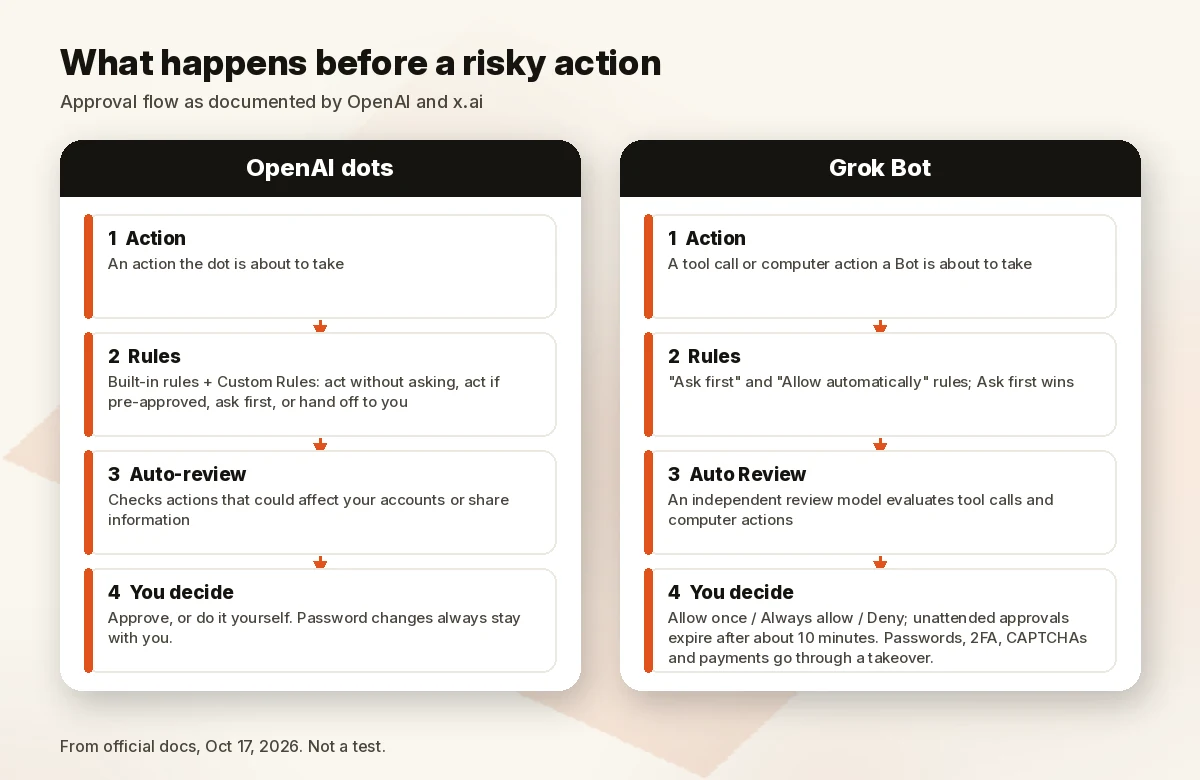
| Approvals | Built-in rules plus Custom Rules: take action without asking, take action if pre-approved, ask before taking action, or hand off to you. Auto-review checks actions that could affect your accounts or share information. Password changes always stay with you. | Auto Review, an independent review model, evaluates tool calls and computer actions; “Ask first” and “Allow automatically” rules, with Ask first winning. Approvals from unattended work expire after about 10 minutes. Passwords, 2FA, CAPTCHAs and payments go through a takeover. |
| Sign-ins and secrets | Dots can use saved passwords on supported sites without exposing them to the model | Bots act as the signed-in member; connector OAuth tokens stay on Cursor’s backend; a masked secret request keeps values out of the transcript and away from the model |
| Training on your data | Business, Enterprise and Edu workspace content isn’t used to improve models by default; on personal plans you control it. OpenAI says it doesn’t train directly on proactive research or a dot’s notes to itself. | Follows Cursor account and privacy settings; with Privacy Mode on, customer data isn’t used for training. Legacy Privacy Mode isn’t supported. |
| Admin controls | Enterprise workspace owners can toggle dots, Slack/Teams, local computer access, custom rules, cloud browser, network and computer use, and password manager use | Teams: Team Rules, connector policy, local-execution ceiling. Enterprise only: network allowlists, audit logs, Action Recording, enforced Auto-review, SCIM. |
| Hosting | Not stated on the pages we read | Only Cursor-hosted cloud computers, running in the US; no on-premises option |
Sources, checked October 17, 2026: Introducing dots; Getting started with your dot; Manage dots in ChatGPT workspaces; Grok Bot overview; Use the computer and apps; Approvals, security, and privacy; Grok Bot security; Grok Bot for teams and enterprises; Team Bots; Designing Grok Bot.
What this changes for you
No benchmark here, on purpose. OpenAI and x.ai don’t evaluate their agents on a shared task set, and a score from one vendor’s harness says little about the other product. What you can compare is where each one fits, what it costs to get in and what it can touch.
Start from the subscription you already pay for
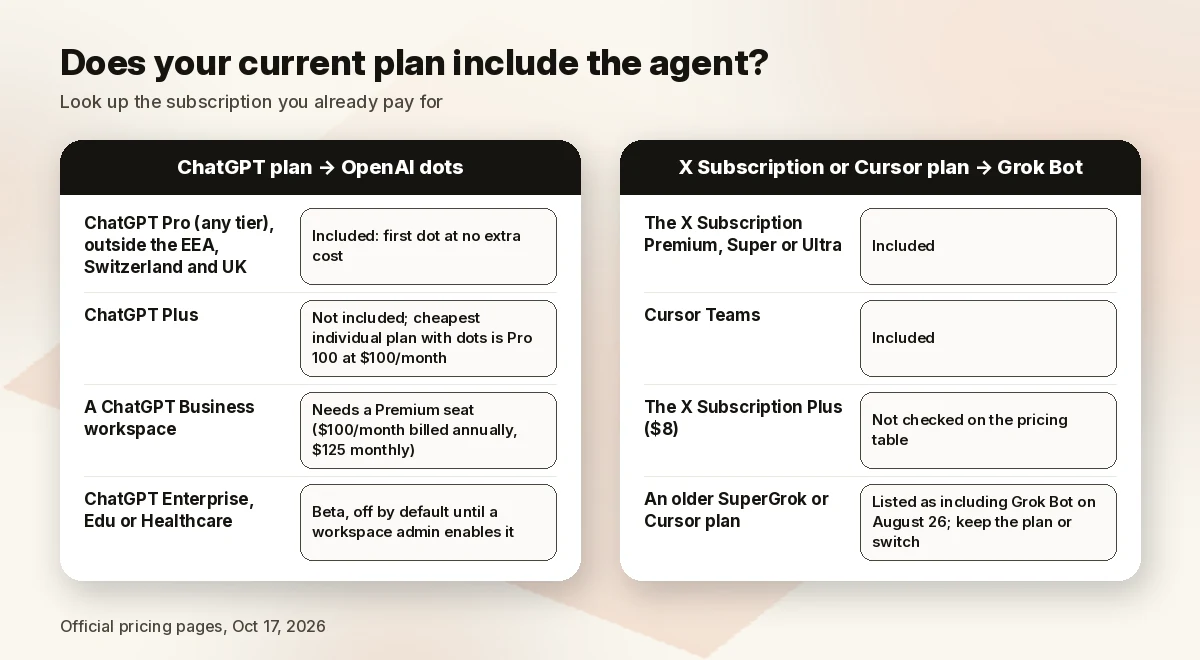
| If you already have… | What the official pages say |
|---|---|
| ChatGPT Pro (any tier) outside the EEA, Switzerland and UK | Your first dot is included at no extra cost |
| ChatGPT Plus | No dots; the cheapest individual plan with dots is Pro 100 at $100/month |
| A ChatGPT Business workspace | Dots require a Premium seat ($100/month billed annually, $125 monthly) |
| ChatGPT Enterprise, Edu or Healthcare | Beta, off by default until a workspace admin enables it |
| The X Subscription Premium, Super or Ultra, or Cursor Teams | Grok Bot is included |
| The X Subscription Plus ($8) | Grok Bot isn’t checked on the pricing table |
| An older SuperGrok or Cursor plan | Listed as including Grok Bot on August 26; you can keep the plan or switch |
Our arithmetic on list prices, for one person paying for a year from scratch: the cheapest plan that includes dots (Pro 100) is $100 × 12 = $1,200; the cheapest that includes Grok Bot (Premium) is $30 × 12 = $360. That’s the price of access, not of equal work, and each bundle carries different extras. Pro also covers ChatGPT’s Pro reasoning, Codex and ChatGPT Work; Premium also covers Grok, Cursor and X Premium features. Our opinion: if you already pay for one of these bundles, adding the other mostly buys you a second set of logins, memories and approval rules to manage.
Agents with your logins are a new kind of risk
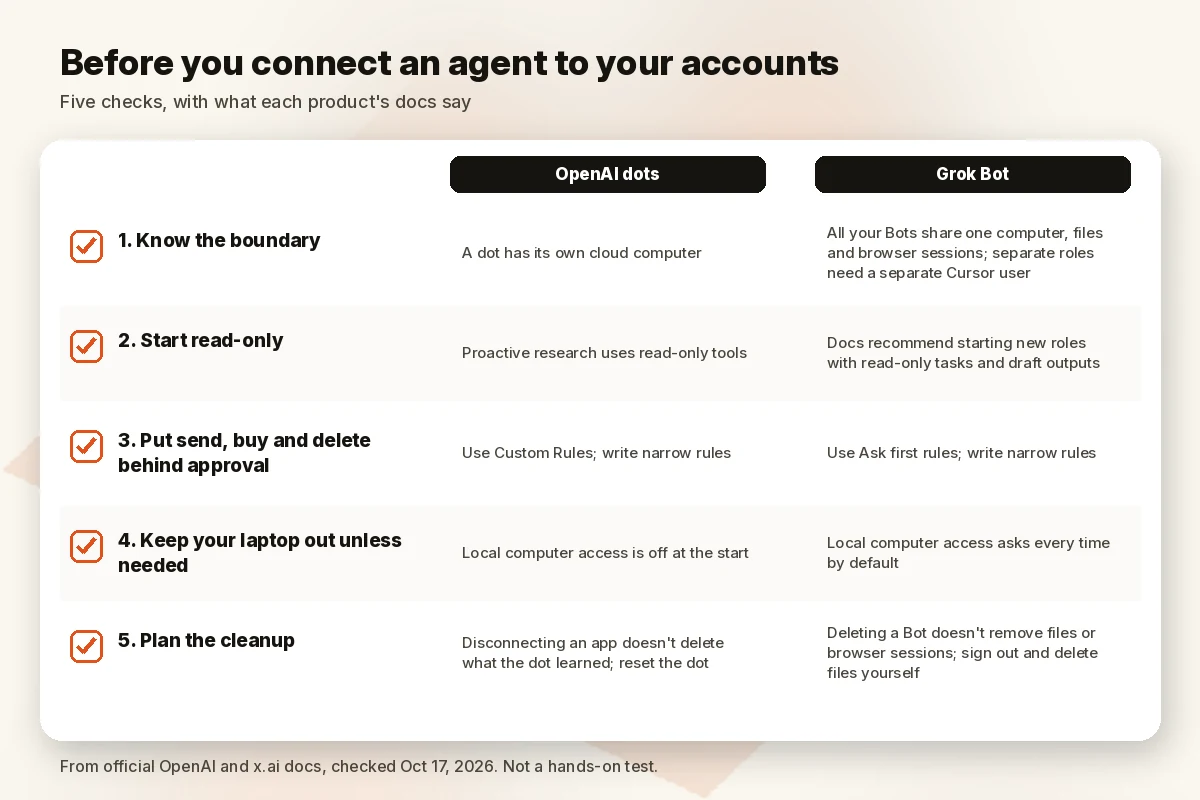
Both products sign into real accounts and act inside them. The official docs from both companies admit the limits plainly: OpenAI says “Dots can still make mistakes, so always review consequential work,” and x.ai’s security page says its defenses against malicious content “reduce, but do not eliminate, risk.” From the documentation, these are the points we’d check before connecting anything important:
- Know the boundary. A dot has its own cloud computer. All of your Grok Bots share one computer, files and browser sessions, so a login you give one Bot is available to all of them. If two roles need different access, x.ai’s answer is a separate Cursor user, not a separate Bot.
- Start read-only. OpenAI limits dots’ proactive research to read-only tools. x.ai’s docs recommend starting new roles “with read-only tasks and draft outputs.” Both are good defaults whichever product you use.
- Put send, buy and delete behind approval. Dots’ Custom Rules and Grok Bot’s Ask first rules both exist for this. Write narrow rules (“ask before sending any external email”) rather than broad allows.
- Keep your laptop out of it unless needed. Local computer access is off at the start on dots and asks every time on Grok Bot by default. Leave it that way unless a task needs local files.
- Plan the cleanup. On dots, disconnecting an app doesn’t delete what your dot already learned from it; you have to reset the dot. On Grok Bot, deleting a Bot doesn’t remove files or browser sessions from the shared computer; you sign out and delete files yourself.
When to wait on both
- You need data residency outside the US. x.ai says Grok Bot computers run in the US and points to the account team for written residency commitments. OpenAI’s dots pages we read don’t say where dot computers run.
- You need on-premises deployment. Grok Bot doesn’t support it, and the OpenAI dots pages we read don’t mention an on-premises option.
- You can’t review consequential work. Both vendors expect you to. If no one on your team has time to approve and check, an always-on agent adds risk faster than it saves time.
- You’re a Pro user in the EEA, Switzerland or UK. Dots on Pro aren’t offered there yet, though Business Premium is.
Limitations
- No head-to-head test. We haven’t run the same tasks through both agents, and we don’t report speed, quality or reliability.
- Both are early. Dots are rolling out gradually and are in beta for Enterprise. Grok Bot launched in beta in August 2026, and its plan structure changed with The X Subscription on October 12.
- Conflict of interest. Our team uses Grok Bot. We used only official documentation, gave both products the same table rows, and left out any recommendation.
- Unpublished details. Agent usage allowances in comparable units, standalone SuperGrok prices on the current pricing page, where dots’ computers run, and an exact connector count for Grok Bot weren’t on the official pages we read.
FAQ
What are OpenAI dots? Always-on agents in ChatGPT, powered by GPT-6 Astra, each with its own cloud computer. They connect to apps through plugins, keep working between conversations and ask you before actions you’ve told them to check.
Which ChatGPT plans include dots? Pro and Business Premium, with an Enterprise beta (including Edu and Healthcare) that an admin must turn on. The ChatGPT pricing table shows dots as unavailable on Free, Go and Plus.
Which plans include Grok Bot? On The X Subscription: Premium ($30/month), Super ($100), Ultra ($200), Teams and Enterprise. Earlier SuperGrok, SuperGrok Plus, SuperGrok Heavy, Cursor Pro, Pro+, Ultra and Cursor Teams plans were also listed as including it.
Are dots available in the UK or EU? Not on Pro yet: OpenAI’s Help Center lists Pro availability outside the European Economic Area, Switzerland and the UK. Business Premium is available across all supported ChatGPT regions.
Grok Bot vs ChatGPT: what’s the difference? ChatGPT is OpenAI’s assistant, and dots are its always-on agent layer on Pro and Business Premium. Grok Bot is a separate app for persistent agents that comes with Grok and Cursor plans. Both run work on cloud computers; the main structural difference is one computer per dot versus one shared computer per Grok Bot user.
Can either agent use my own computer? Both can, if you allow it. Dots start with local access off; Grok Bot asks every time by default, and admins can turn it off for a whole team.
Which one is better? We don’t name one. There’s no common benchmark, we haven’t tested them side by side, and our team uses one of them. Choose by the plan you already have, the region you’re in and the controls your team needs.
How we compared
We used only official pages, checked on October 17, 2026 (America/Sao_Paulo): OpenAI’s dots announcement, two OpenAI Help Center articles on dots, the ChatGPT and ChatGPT Business pricing pages and the Pro tiers article; x.ai’s news posts on Grok Bot and The X Subscription, the x.ai and Cursor pricing pages, and x.ai’s Grok Bot documentation. Third-party comparisons were not used as sources. We make no claims about how well either agent performs.
Sources (official pages, checked on October 17, 2026 ~01:05–01:15 BRT)
- OpenAI, Introducing dots (Sep 29, 2026): openai.com/index/introducing-dots (WebFetch OK; curl 403 from our server)
- OpenAI Help Center, Getting started with your dot: help.openai.com/en/articles/20001530-getting-started-with-your-dot (WebFetch OK; “Updated: yesterday”)
- OpenAI Help Center, Manage dots in ChatGPT workspaces: help.openai.com/en/articles/20001554-manage-dots-in-chatgpt-workspaces (WebFetch OK)
- OpenAI, ChatGPT pricing (dots row by plan): openai.com/chatgpt/pricing (WebFetch OK; dollar amounts not rendered in our fetch)
- OpenAI Help Center, About ChatGPT Pro tiers ($100 / $200 / $500): help.openai.com/en/articles/9793128-about-chatgpt-pro-tiers (WebFetch OK; “Updated: 4 days ago”)
- OpenAI, ChatGPT Business pricing (Premium seat, dots row): openai.com/business/pricing (WebFetch OK)
- x.ai, News index: x.ai/news (HTTP 200)
- x.ai, Introducing Grok Bot: x.ai/news/introducing-grok-bot (HTTP 200)
- x.ai, Grok Bot is now included with more plans (Aug 26, 2026): x.ai/news/grok-bot-more-plans (HTTP 200)
- x.ai, Grok Bot for Enterprise (Sep 3, 2026): x.ai/news/grok-bot-for-enterprise (HTTP 200)
- x.ai, Designing Grok Bot for a world of persistent agents (Sep 4, 2026): x.ai/news/designing-grok-bot (HTTP 200)
- x.ai, Team Bots (Sep 28, 2026): x.ai/news/team-bots (HTTP 200)
- x.ai, Introducing The X Subscription (Oct 12, 2026): x.ai/news/x-subscription (HTTP 200)
- x.ai, Pricing: x.ai/pricing (HTTP 200)
- Cursor, Pricing (same X Subscription table with Grok Bot row): cursor.com/pricing (HTTP 200)
- x.ai Docs, Grok Bot overview, FAQ, Use the computer and apps, Approvals, security, and privacy, Grok Bot security, Grok Bot for teams and enterprises, Tag @bot on X: docs.x.ai/grok-bot/overview, faq, computer-and-apps, approvals-security-and-privacy, security, teams-and-enterprises, tag-on-x (all HTTP 200)
Tools we use alongside (outside this comparison, not a ranking of OpenAI dots or Grok Bot)
If what you actually want from an agent is a working app, Base44 is a no-code AI app builder you can try without either agent. That link is sponsored; the OpenAI and x.ai links above are not.