

Disclosure: AI Tools Vetted is reader-supported. Some links below are affiliate links (marked “sponsored”): if you buy through them we may earn a commission at no extra cost to you. Rankings are based on the official facts in each section, not on commissions.
Last updated October 10, 2026 · Prices and features checked October 10, 2026 on each provider’s official pages (USD).
“Text to speech app” means two different things. Some people want an app that reads to them: PDFs, articles, ebooks and email, on the bus or at the gym. Others want to create audio: voiceovers for videos, courses or podcasts they publish. The best app for one is rarely the best for the other, so we split our picks by use.
Quick picks
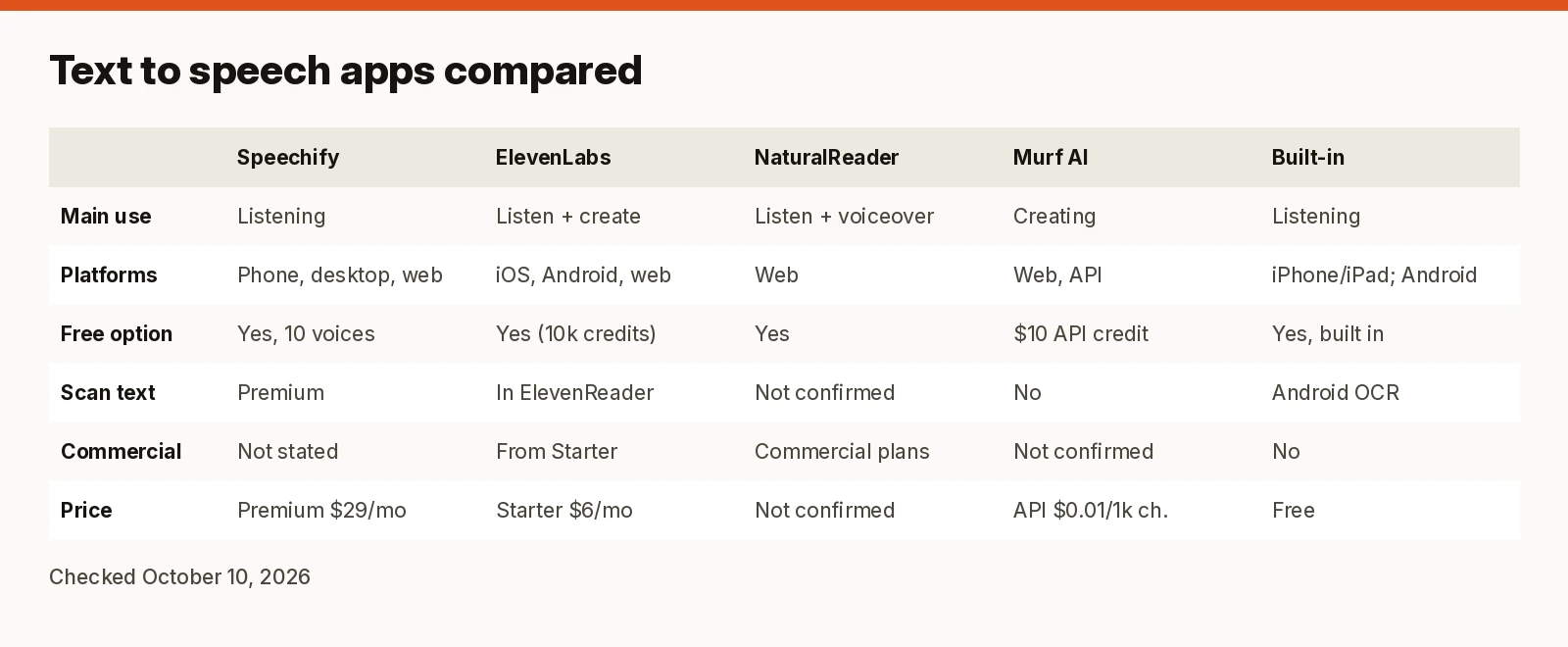
Comparison table
| Speechify | ElevenLabs / ElevenReader | NaturalReader | Murf AI | Built-in (Apple / Android) | |
|---|---|---|---|---|---|
| Main use | Listening | Listening (ElevenReader) and creating (web) | Listening and voiceover | Creating (studio and API) | Listening |
| Platforms | iPhone/iPad, Android, Mac, Windows, web, Chrome, Edge | ElevenReader: iOS, Android; studio: web | Web (see site) | Web, API | iPhone/iPad; Android |
| Free option | Yes: 10 “robotic” voices, up to 1.5x | ElevenReader free; web Free plan with 10k credits/month | Yes (see site) | $10 free API credit | Yes, built in |
| Scan text from images | Scan & Listen (Premium) | Yes, in ElevenReader | Not confirmed | No | Android: camera OCR via Select to Speak |
| Commercial use of audio | Not stated on pricing page | From Starter ($6/mo) | Commercial plans offered | Studio terms not confirmed | No |
| Price checked | Premium $29/mo monthly; yearly “save 60%” | Starter $6/mo, Creator $22/mo ($11 first month) | Prices load in-app; not confirmed | API from $0.01 / 1,000 characters | Free |
Sources linked in each section below; all checked October 10, 2026.
How we review
We compared these apps using only official pages, checked October 10, 2026: pricing pages, product pages, FAQs and Apple and Google support documentation. We ranked reading apps on platforms, reading features (documents, scanning), free plan and price, and voiceover tools on commercial rights and price. Voice quality is subjective; where we mention it, it’s the vendor’s own description. We haven’t run our own listening tests for this guide, and we leave out any feature we couldn’t confirm.
Best text to speech apps
1. Speechify: best for listening across devices
Speechify is built for people who want to listen to what they’d otherwise read. It has apps for iPhone and iPad, Android, Mac and Windows, plus a web app and Chrome and Edge extensions (Speechify), so a document you start on your laptop can follow you to your phone. Speechify says it reads web pages, PDFs, Google Docs and more.
Free vs Premium (checked October 10, 2026): the free plan gives you listening at up to 1.5x with “10 robotic sounding voices,” text to speech only. Premium is $29/month billed monthly and adds 1,000+ natural voices in 60+ languages, speeds up to 5x, Scan & Listen (point your camera at printed text), AI summaries and chat, and Google Drive, Dropbox and OneDrive integrations. Speechify advertises up to 60% off with yearly billing, but the yearly price wasn’t displayed in a checkable form when we looked, so confirm it at checkout (pricing).
Watch out for: the free voices are, in Speechify’s own words, robotic. If you want natural voices for free, ElevenReader is the better start. Premium bundles voice typing and an AI assistant that you may not need.
2. ElevenLabs: ElevenReader for free listening, the studio for voiceovers
ElevenLabs has two products, and the split matters.
ElevenReader (listening). A free app for iOS and Android that reads ePubs, PDFs, articles from links, scanned images and pasted text aloud, with hundreds of voices, 32 languages and word highlighting in sync with the audio. ElevenLabs says the app is “completely free to download and use today,” that listening doesn’t use credits from a web plan, and that it plans a premium version later while keeping “a generous free plan.” You can’t export audio from the app; it’s for personal listening (ElevenReader).
ElevenLabs web plans (creating). For audio you publish, the web platform is where ElevenLabs charges. Per its pricing FAQ: Free $0 (10,000 credits/month), Starter $6/month (30,000 credits), Creator $22/month (121,000 credits, $11 for the first month), Pro $99 (600,000 credits), with annual billing at the price of 10 months. Starter adds the commercial license and instant voice cloning; Creator adds professional voice cloning. Text to speech costs about 1 credit per character, and unused credits roll over for up to two months on active paid plans (pricing). The pricing page also showed a time-limited Eleven v4 launch promotion when we checked; we haven’t included it because it expires within days.
Watch out for: credits are shared across every ElevenLabs product, so dubbing or music eats into your text to speech budget.
3. NaturalReader: a long-running alternative for readers and teams
NaturalReader offers apps for personal, commercial and education use, including school licenses and accessibility features such as a dyslexia font and hotkey controls (NaturalReader). Its prices load inside the web app, and we couldn’t confirm them on a static official page today, so we don’t quote them. NaturalReader is not one of our affiliate partners; this is a plain link.
Watch out for: check the plan details on its site before you buy, especially whether you need a personal or commercial license.
4. Murf AI: for voiceovers, not for reading
Murf is a creation tool: a web studio and an API rather than a reading app. We couldn’t confirm a mobile reading app on Murf’s official pages, so we don’t recommend it for listening to documents. Its API pricing is published: text to speech from $0.01 per 1,000 characters (Falcon, built for real-time voice agents) or $0.03 per 1,000 characters (studio-quality voiceovers), $10 of free API credit, 150+ voices in 35+ languages, and purchased credit that never expires (Murf pricing). The studio plan prices load by script and weren’t confirmable today.
Watch out for: if you want a ready-to-use reading app on your phone, pick one of the apps above.
5. Built-in options: free and already on your phone
- iPhone and iPad. Go to Settings > Accessibility > Read & Speak. Speak Screen reads everything on screen when you swipe down with two fingers from the top; Speak Selection reads text you highlight; Accessibility Reader gives you a full-screen reading view with autoplay. You can choose voices, speaking rate and pronunciations (Apple Support).
-
Android. Select to Speak reads items you tap or everything on screen, can keep reading in the background while you switch apps, and can read text you point the camera at in 18 languages, including English, Spanish and Portuguese. On many devices you can also select text and tap Read aloud without turning Select to Speak on (Android Help).
-
Microsoft Edge. Read aloud is built into the browser: go to Settings and more > More tools > Read aloud, or select text, right-click and choose Read aloud selection. Microsoft says it offers natural-sounding voices and accents and works online and offline, with only a few voices available offline (Microsoft Edge).
For an occasional article, these may be all you need.
Reading vs voiceover: which app for which job
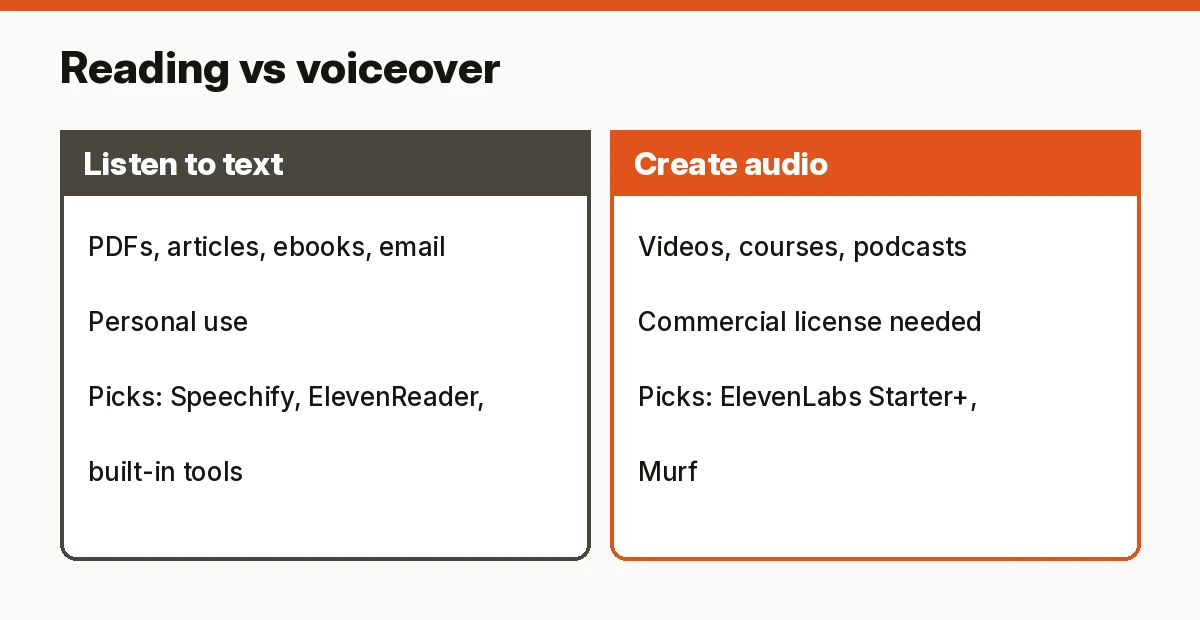
- You want to listen to documents and articles: Speechify if you want one subscription across phone, desktop and browser; ElevenReader if you want natural voices free on your phone; the built-in tools if your needs are light.
- You want audio you’ll publish: you need a plan that grants commercial rights. ElevenLabs lists a commercial license from Starter ($6/month). ElevenReader can’t export audio at all. For Murf’s studio and Speechify’s creator tools, read the plan terms before publishing.
- You’re a developer: Murf and ElevenLabs both publish API pricing.
FAQ
What is the best free text to speech app? On a phone, ElevenReader: ElevenLabs says it’s completely free today with hundreds of voices. The built-in tools on iPhone and Android are free too. Speechify’s free plan works but uses 10 voices it calls robotic.
What is the best text to speech app for iPhone? Speechify if you also want desktop and browser apps; ElevenReader for free natural voices; Speak Screen if you just need occasional read-aloud.
Can text to speech read Kindle books? We couldn’t confirm Kindle support on these vendors’ official pages, so we don’t recommend any app for it. ElevenReader officially supports ePubs and PDFs you import.
Which text to speech app has the most natural voices? That’s subjective and we haven’t run listening tests. Speechify says Premium has 1,000+ “high quality, natural voices”; ElevenLabs calls its ElevenReader voices “ultra realistic.”
Can I use AI text to speech audio commercially? Only if your plan allows it. ElevenLabs grants a commercial license from Starter; its free plan and ElevenReader don’t cover published audio. Check each vendor’s terms.
Is Speechify better than ElevenLabs? For reading across many devices, Speechify has the wider set of apps. For free listening on your phone, or for creating voiceovers with commercial rights, ElevenLabs is the stronger pick.
Verdict
For most people who want an app that reads to them, Speechify is the best text to speech app thanks to its apps on every platform, though its best voices sit behind a $29/month Premium plan. Start with ElevenReader if you want natural voices for free on your phone, and use ElevenLabs’ paid plans if you’re creating voiceovers. Try your phone’s built-in tools first if you only need them now and then.
Sources (official pages, checked on October 10, 2026)
- Speechify pricing: https://speechify.com/pricing/
- ElevenLabs pricing: https://elevenlabs.io/pricing
- ElevenReader app: https://elevenlabs.io/text-reader
- NaturalReader: https://www.naturalreaders.com/
- Murf AI pricing: https://murf.ai/pricing
- Apple, Hear iPhone speak the screen: https://support.apple.com/guide/iphone/hear-iphone-speak-the-screen-selection-iph96b214f0/ios
- Microsoft Edge, Read aloud: https://www.microsoft.com/en-us/edge/features/read-aloud
- Android, Use Select to Speak: https://support.google.com/accessibility/android/answer/7349565?hl=en