
Affiliate disclosure: AI Tools Vetted is reader-supported. If you subscribe through an affiliate link, marked sponsored, we may earn a commission at no extra cost to you. Our Descript links may be affiliate links. Otter, Sonix, Rev and Whisper links below are ordinary non-affiliate links. Our picks follow the source of your audio, not commission rates.
Prices checked November 5, 2026, at 19:35–19:39 BRT on official English-language pages (USD, before tax). Annual prices require annual billing. Hourly examples below are calculations, not performance measurements or checkout quotes.
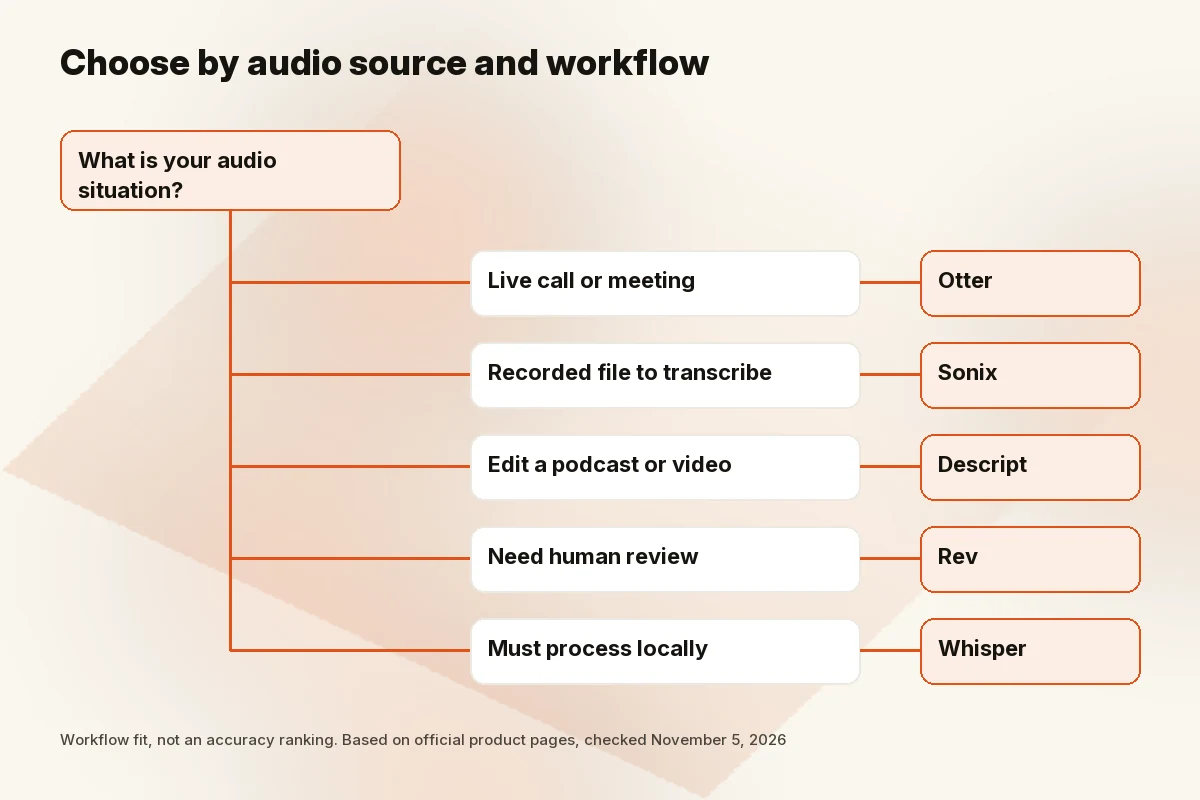
Choose Otter for live meeting notes, Descript when you will edit the recording as well as transcribe it, and Sonix for a file-upload workflow with clearly priced audio hours. Choose Rev’s human transcription when a human-reviewed deliverable justifies the cost. Choose the open-source Whisper package when you want local processing and can manage the setup.
The first decision is not which tool claims the highest accuracy. It is where the audio comes from, who may access it and what you need to do with the transcript afterward.
Quick picks
| Where your audio comes from | Pick | Official entry price checked Nov 5 | Free option |
|---|---|---|---|
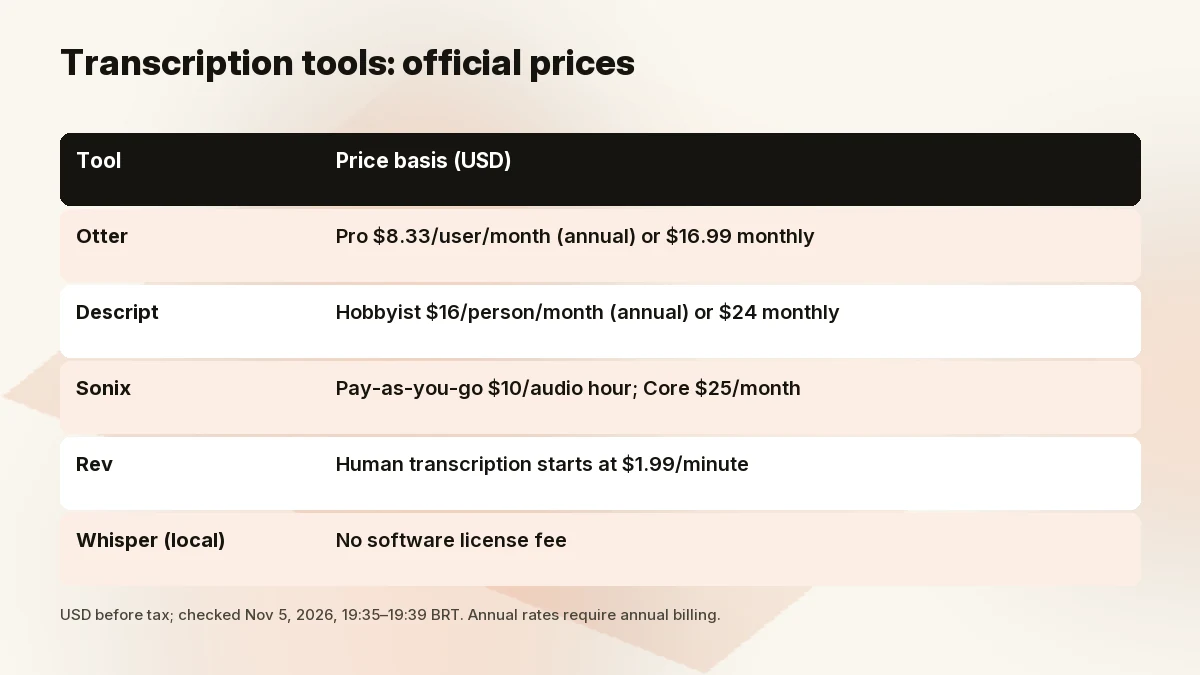
| Live Zoom, Meet or Teams calls | Otter | Pro $8.33/user/month annually or $16.99 monthly | Basic: 300 minutes/month; three lifetime file imports |
| Podcast or video you also need to edit | Descript Check Descript price | Hobbyist $16/person/month annually or $24 monthly | Free: one media hour/month |
| Recorded interviews or batches of files | Sonix | Pay As You Go $10/audio hour; Core $25/month | 30-minute trial |
| Audio needing human review | Rev human transcription | Starts at $1.99/audio minute | Not a free human service |
| Files you want to process locally | OpenAI Whisper | No software license fee for the open-source package | MIT-licensed code and model weights |
“Free” needs a qualifier. Otter’s file-import allowance is lifetime on Basic, not renewed each month. Descript meters media you process, not only the words exported. Whisper avoids a service subscription but still uses your computer, electricity and setup time.
How to choose: meetings vs recorded files vs editing vs privacy
For meetings, follow the conversation workflow. You want a recording policy, visible participant consent and a way to correct names before sharing the notes. A meeting assistant is convenient when it can join the call, but a bot joining does not establish that every participant has agreed to recording.
For recorded files, follow the upload allowance. A three-hour interview may be awkward on a plan with short per-conversation limits. A monthly minute quota is also not the whole story: count file imports, supported languages and whether additional seats add any hours.
For podcasts and video, decide whether text is the deliverable. If you need to remove a sentence from the recording, text-based media editing can be useful. If you only need a document for a researcher, paying for a media editor may add work rather than remove it.
For sensitive audio, decide where processing is allowed before uploading. Client confidentiality, workplace policy and regulated information may rule out a consumer cloud account. A local model can avoid uploading the recording to a transcription service, but it does not secure an unencrypted laptop or a folder synchronized to a public cloud.
The best AI transcription tools
Live meetings: Otter
Otter’s pricing page lists Zoom, Microsoft Teams and Google Meet support, live transcription, speaker identification and meeting summaries. That makes it our first shortlist choice for recurring calls where notes are part of the meeting process.
Basic includes 300 monthly transcription minutes, a thirty-minute per-conversation limit and three lifetime audio/video imports. Pro lists 1,200 monthly minutes in a shared transcription pool, ten monthly file imports and up to ninety minutes per conversation. Do not add the live-recording allowance to the import allowance and count the same pool twice.
We checked the billing display in a rendered browser because extracted versions disagreed. The annual Pro card showed $8.33 per user per month; monthly billing showed $16.99. Business’s monthly card also showed a temporary first-subscriber offer. We have not treated that promotion as its standard ongoing rate.
Skip if you mainly transcribe a backlog of recorded files. Otter can import recordings, but import counts and conversation limits deserve a closer look before you commit. Sonix’s file-oriented pricing may be simpler for that workload.
Transcribe + edit podcasts/video: Descript
Descript turns a recording into text you can edit alongside the audio or video. That makes it our pick when the transcript is a route to editing a podcast, not merely the final document.
Its free plan includes one media hour monthly. Hobbyist includes ten media hours monthly at $16 per person per month billed annually, or $24 monthly. Media hours measure imported or recorded material processed in Descript; AI features have a separate credit allowance.
Skip if you only need text and have no use for editing. Our Descript review covers the wider product; see best AI video editors if editing is the primary purchase.
Recorded files in bulk, many languages: Sonix
Sonix provides a browser-based transcript editor and advertises transcription in more than fifty-four languages. Its Pay As You Go option costs $10 per audio hour without a subscription. That is easy to budget for an occasional interview: you pay for recording length, not the time the software spends processing it.
For steady workloads, Core costs $25 monthly and includes five transcription-and-translation hours. Advanced costs $50 with twenty hours, while Pro costs $80 with forty. Annual options are also published, but the calculations below use monthly billing so a long-term commitment is not hidden in the comparison.
The important catch is that included hours belong to the workspace. Extra seats cost more and do not add hours. Translation also draws from the transcription allowance, so using multiple services against the same recording can change your effective cost.
Skip if your main need is a meeting bot rather than a file workflow. Sonix’s comparison lists an AI meeting recorder, so this is not a claim that it has no meeting features. Check the exact integrations and plan availability before buying it primarily for live calls; we have not verified those details here.
Human-verified accuracy: Rev
Rev sells both an AI platform and human transcription. We are recommending the human service for a different job from the automated tools: a deliverable that needs human review, such as an interview being quoted extensively.
The official page says human transcription starts at $1.99 per minute. That is $119.40 for one hour before add-ons, taxes or any qualifying subscription discount. Legal-formatted transcripts are a separate service priced by the page; do not assume a general human transcript satisfies a court’s requirements.
A human service still needs the right instructions. Decide whether you need verbatim speech, timestamps or specialized formatting before ordering. Review key names and consequential statements against the recording rather than assuming the handoff removes your responsibility.
Rev publishes its own accuracy guarantees, but we have not compared them against a common audio sample. Skip if you have a minimal budget, clean recordings and time to correct an automated draft yourself. Its human price buys a different service, not proof that Rev wins an AI accuracy benchmark.
Free/offline: OpenAI Whisper
OpenAI Whisper is an open-source speech-recognition package, not a hosted meeting assistant. Its official repository releases the code and model weights under the MIT License. The README documents command-line and Python use, multilingual transcription and translation of speech into English.
For local processing, install the package and dependencies, download the model, then run it against your recording on your own machine. After the required software and weights are available, local inference does not require sending that recording to a transcription service. Do not confuse this with a hosted API or a third-party app using the Whisper name; those can have different fees and data practices.
Whisper requires technical setup, including FFmpeg. Model size and hardware affect memory needs and processing time; we did not benchmark either. Its standard documented workflow is not a complete named-speaker labeling system. If you need diarization, meaning separating who spoke when, plan for additional tooling and review.
Skip if you want a ready-made meeting bot, support-led onboarding or speaker labels without configuring anything. Also check translation requirements carefully: the README says the turbo model is not trained for translation tasks. “Multilingual transcription” and “translate this recording into English” are different jobs.
Cost per audio hour
The denominator is the length of your source recording, not turnaround time. These examples use official prices checked November 5, 2026. They assume one user unless noted and full use of the stated allowance. Editing time is excluded.
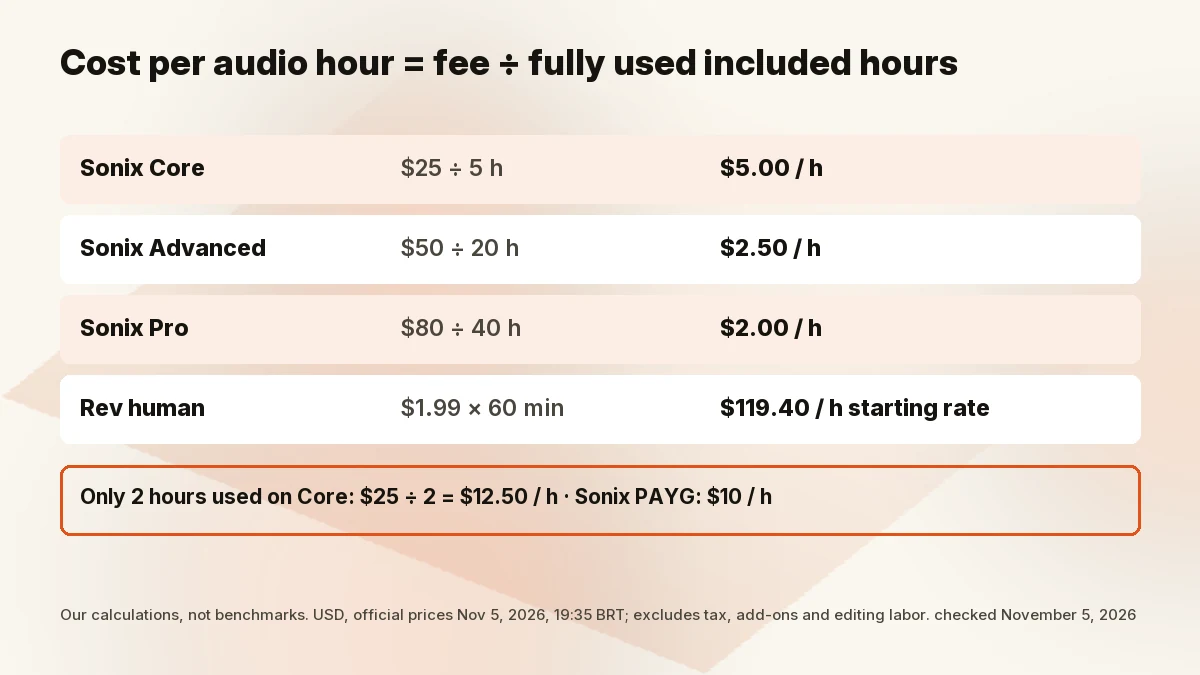
Formula: subscription fee ÷ included audio hours = effective cost per included hour. For a per-minute service, rate × 60 = price per audio hour.
| Service and billing basis | Visible calculation | Calculated cost |
|---|---|---|
| Sonix Pay As You Go | Published hourly rate | $10/audio hour |
| Sonix Core, monthly, all five hours used | $25 ÷ 5 | $5/included hour |
| Sonix Advanced, monthly, all twenty hours used | $50 ÷ 20 | $2.50/included hour |
| Sonix Pro, monthly, all forty hours used | $80 ÷ 40 | $2/included hour |
| Descript Hobbyist, monthly, all ten media hours used | $24 ÷ 10 | $2.40/media hour |
| Descript Hobbyist, annual rate, all ten monthly hours used | $16 ÷ 10 | $1.60/media hour equivalent; annual commitment |
| Otter Pro, monthly, full 1,200-minute shared pool used | $16.99 ÷ (1,200 ÷ 60) | About $0.85/included hour; import and duration limits apply |
| Rev human transcription, starting rate | $1.99 × 60 | Starts at $119.40/audio hour |
| Local Whisper | No license charge ÷ processed hours | No software license fee; hardware, power and labor excluded |
These figures are not interchangeable unit prices. Descript’s media allowance covers processed media, even when not transcribed. Otter limits individual recordings and file counts. Sonix’s additional hours cost $10 each on subscription plans, and translation consumes the same hour pool. Rev’s line includes human work; Whisper’s excludes your technical labor.
Underuse can reverse the apparent winner. Our calculation: if you process only two hours in a month, Sonix Core costs $25 ÷ 2 = $12.50 per used hour, compared with $20 total on its $10/hour Pay As You Go option. At the other end, do not assume the lowest subscription ratio applies to unlimited overages.
Privacy & data checklist
Do not reduce this decision to “encrypted” versus “not encrypted.” Encryption does not answer who can review a recording, whether it helps improve models or when backups disappear.
Training and product improvement: Otter’s privacy policy describes training its proprietary AI on de-identified audio recordings and transcripts, which may contain personal information. Do not assume its standard account means no training use.
Descript’s privacy policy treats project information as confidential but also says projects may be used to analyze and improve the service. It describes opting out by disabling “Share Data with Descript.” Check that control before adding sensitive material; voice features have additional provisions.
Sonix’s security page says files are never used to train AI models. It says users can delete audio and transcripts, while Enterprise accounts can set automatic retention rules. Treat those as the vendor’s commitments, not an independent audit we performed.
Rev’s pricing FAQ says customer data is not used to train external LLMs. That is narrower than a blanket claim about every internal use. Its privacy policy describes purpose-based retention and backups that may remain longer than original personal data. We did not verify a universal deletion deadline for uploaded transcription files.
Before uploading, establish:
- Who has consented to recording and transcription, under the relevant rules?
- Who can open the original audio, transcript and shared links?
- Does the exact plan offer the training controls and retention settings you need?
- Does deleting a project also address exports, backups and integrations?
- Do you need a signed data-processing agreement or an approved organizational account?
Local Whisper keeps the service-provider question smaller, but responsibility shifts to you. Protect the device and decide where temporary files, transcripts and backups live. Local processing alone is not a legal or security certification.
Comparison table: November 5, 2026
| Tool | Best-fit input | What you are buying | Main constraint to inspect |
|---|---|---|---|
| Otter | Recurring live meetings | Meeting capture, notes and transcripts | Shared minute pool, import counts, conversation length |
| Descript | Podcast/video recordings | Transcription linked to media editing | Media hours plus separate AI credits |
| Sonix | Uploaded recordings | Pay-as-you-go or workspace-hour allowance | Translation usage, seat charges and overages |
| Rev human | Recordings needing human review | A human-produced transcript | Per-minute starting rate; add-ons and legal format separate |
| Whisper local | Files on your own machine | Open-source model and code | Setup, hardware and additional speaker-labeling work |
Need the reverse direction, turning a script into speech? See our best AI voice generator guide.
Skip if
Skip Otter if most of your work is a file backlog that clashes with import limits. Skip Descript if you only want a text document. Skip Sonix as your default meeting bot until its integrations fit your calls. Skip Rev human transcription if the cost cannot be justified over an automated draft plus your own corrections. Skip Whisper if you want local processing without technical work or additional speaker-labeling setup.
How we evaluated
We read official pricing, feature information and privacy or security pages on November 5, 2026. We grouped tools by audio source and calculated hourly costs only from published rates and allowances. Otter’s rendered billing tabs resolved contradictory extracted prices; Descript’s billing controls were also inspected. Whisper’s official README and license establish what the open-source package is.
We did not run an accuracy test, time transcription jobs or measure correction effort. We have not assigned accuracy percentages or claimed independent-review validation. This guide compares workflow and documented costs; the right final check is your own representative recording, including its accents, jargon and speaker overlap.
FAQ
What is the most accurate AI transcription tool?
We cannot name a universal winner without comparing the same recordings under documented conditions. Audio quality, language and overlapping speakers matter. For consequential work, consider Rev’s human service and review the important passages yourself; that is a different service from an AI-only benchmark.
Is there a free AI transcription tool?
Whisper’s open-source code and weights have no license fee. Otter Basic and Descript offer limited free plans; Sonix offers a thirty-minute trial. Free cloud plans still have data policies, and local Whisper still requires hardware and setup.
What is best for meetings?
Otter is our first shortlist pick for live Zoom, Meet and Teams workflows. Check the per-conversation limit and recording-consent requirements before enabling it across a calendar. Free Basic’s three lifetime imports make it less suitable for an ongoing file-upload workflow.
What is best for podcasts?
Descript fits when you want to edit the recording through its transcript. Sonix is worth comparing if the transcript itself is the deliverable. Read our Descript review before paying for editing features you may not need.
Is AI transcription private?
It depends on the exact service, plan and settings. Read training, access, retention and deletion terms before uploading. Local Whisper can process files on your device instead of a transcription provider’s servers, but you remain responsible for device security and backups.
Verdict
Match the tool to the audio before comparing subscription prices. Otter fits meeting capture, Descript connects text to media editing, Sonix makes file-hour budgeting explicit, Rev offers a human-reviewed route, and Whisper offers local processing for people willing to manage it. Correct names and consequential claims against the recording whichever route you choose.
Sources
Official sources checked November 5, 2026, 19:35–19:39 BRT:
- Otter pricing and plan limits
- Descript pricing and media-hour definitions
- Sonix pricing, shared allowances and overages
- Rev human transcription pricing and platform FAQ
- Whisper README and MIT License
- Otter, Descript and Rev privacy policies and Sonix security commitments, linked in the privacy section.