
Affiliate disclosure: AI Tools Vetted is reader-supported. If you subscribe through our affiliate links, marked sponsored, we may earn a commission at no extra cost to you. Our Descript and InVideo links may be affiliate links. The decision framework below follows each vendor’s official pricing and docs. Commission differences do not set the verdict.
Prices checked November 6, 2026, at 01:05–01:09 BRT on official English-language pricing pages (USD, before tax). Descript and InVideo annual rates require annual billing where noted. These are public page prices, not checkout quotes. InVideo says plan prices can vary by region.
The short answer
Descript is built to edit footage you already have by editing a transcript. InVideo AI is built to generate video from prompts and models, with a full timeline editor that does not spend credits on ordinary cuts. There is no single winner—pick by job.
| If you… | Choose | Why |
|---|---|---|
| Record podcasts, interviews or talking-head takes and cut by deleting text | Descript Check Descript price | Text-based editing; Studio Sound / filler removal / clips on paid plans |
| Need a video from a script or brief when you have little or no footage | InVideo Check InVideo price | Generative models + agents; credits pay for generation, not timeline edits |
| Run a faceless channel from prompts and stock-like scenes | InVideo | Prompt-to-video and model catalog on Plus/Max |
| Polish a recorded course or webinar | Descript | Record/edit/mix on Free; watermark-free export from Hobbyist up |
| Comparing generators only (avatars vs prompt video) | Neither as “vs” | See HeyGen vs InVideo or InVideo vs Pictory |
Check Descript price · Check InVideo price
The core difference: edit vs generate
Descript treats your timeline like a document. You upload or record media, get a transcript, and cut the video by editing the text. Its pricing page highlights Underlord (AI co-editor), Studio Sound, Remove Filler Words, Create Clips, AI Speech and—on Creator and above—“Generate video with the latest AI models.” Generation exists, but the product’s center of gravity remains text-based editing of real recordings. Full product notes: our Descript review.
InVideo AI sells monthly credits for generative work (models, Agent Two, paid stock and related operations) while stating that timeline edits and exports/downloads do not use credits. Starter, Plus and Max differ by credit allowance, agent modes and model access—not by whether you get a timeline. Full product notes: our InVideo review (scheduled).
If your raw material is a microphone and a camera, start with Descript. If your raw material is a prompt, start with InVideo. For a wider editor shortlist, see best AI video editors.
Head-to-head
Transcription and text-based editing
Descript’s differentiator is editing video by editing a doc. Media hours on paid plans track uploaded/recorded media; AI credits track AI features such as Underlord, Studio Sound and generated media. For transcription-focused buying criteria, use our best AI transcription tools guide.
InVideo’s docs say timeline edits (trim, split, rearrange) use no credits, whether you or an outside agent make them. That is useful after generation, but it is not the same as Descript’s transcript-first cutting model. We did not find InVideo documenting Descript-style “delete a sentence in the transcript to cut the video” as its primary editor metaphor on the pages we read today.
Generating video from a prompt or script
InVideo is the stronger default here: Agent Two (Lite on Starter; Lite/Pro/Ultra on Plus and Max), a catalog of third-party video and image models billed in credits, and explicit Seedance access differences by plan (Starter: no Seedance 2.5 / 2.0 full access; Plus/Max: included per today’s pricing matrix).
Descript lists “Generate video with the latest AI models” on Creator (and higher AI tooling on Business). That narrows the gap for teams already living in Descript, but it does not turn Descript into InVideo’s credit-metered model marketplace. Do not assume feature parity without checking current model lists inside each product.
Audio cleanup, voice and captions
Descript documents Studio Sound, Remove Filler Words, AI Speech with custom voice clones, captions/subtitles and translate/dub (Business calls out translate and dub in 30+ languages with proofread). Those tools sit next to the transcript workflow.
InVideo documents generative audio/voice models on the wider platform and caption/editing recipes in its docs hub. For cleanup of a messy interview recording, Descript’s positioning is clearer from the pricing feature lists we read.
Stock, templates and AI models
InVideo’s pricing matrix lists premium stock clip allowances (100 / 200 / 500 on Starter / Plus / Max) and model-by-model credit examples (for example Seedance 2.5 1080p ~96 credits per 5 seconds; Nano Banana Pro ~2.5 credits per image). Creator on Descript includes unlimited access to a royalty-free stock media library per the pricing card.
Export, watermark and free plans
Descript Free is $0 and, per Descript’s FAQ, does not require a card to try recording, editing and mixing. The plan comparison on the pricing page lists watermark-free video export as not included on Free and included from Hobbyist up. Free AI credits were shown as 100 (one-time) in the comparison grid we parsed.
InVideo did not show a free tier in the Starter/Plus/Max plan cards on November 6, 2026. Docs state exporting/downloading uses no credits; generation does. Refunds: terms allow a request within seven (7) days of initial purchase or renewal if the plan was not used (nothing generated or downloaded in the period); used plans are not refundable under that exception.
Pricing (checked November 6, 2026)
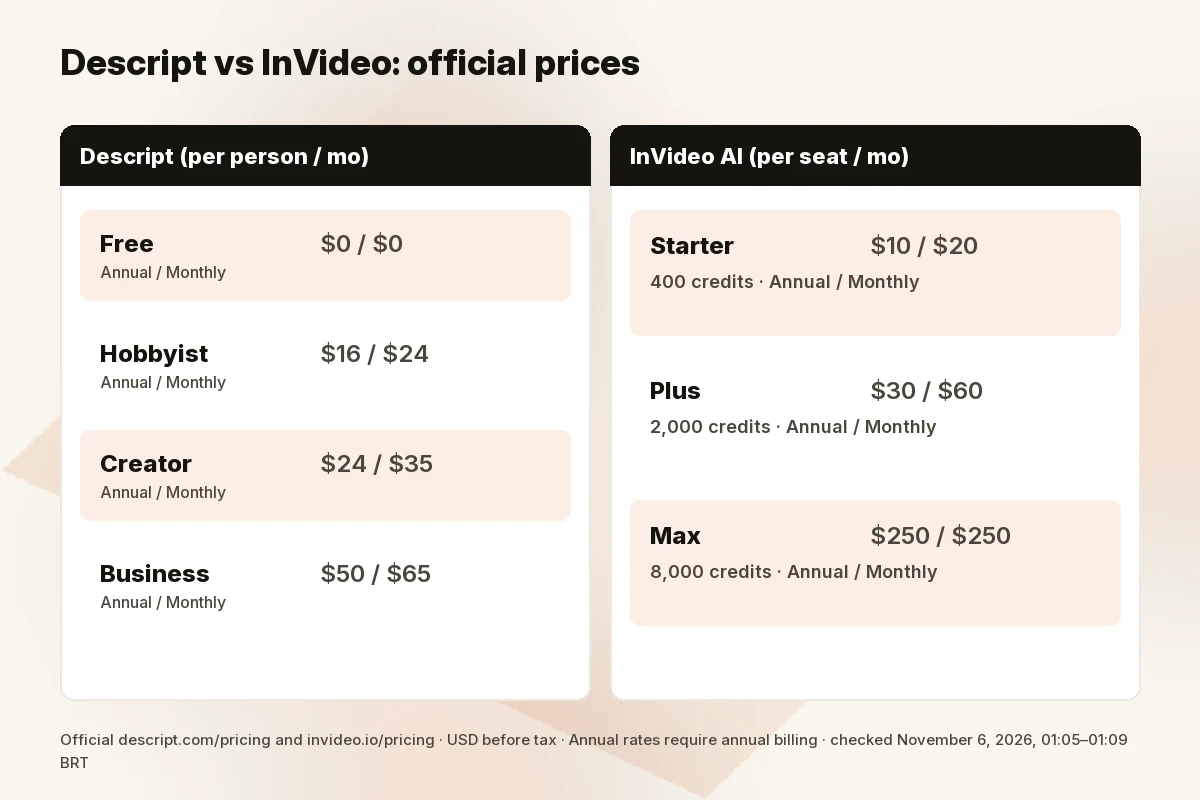
Descript (per person / month; Annual toggle pressed by default on the page we rendered):
| Plan | Annual | Monthly | Media hours / mo | AI credits / mo | Notes |
|---|---|---|---|---|---|
| Free | $0 | $0 | — | 100 one-time (comparison grid) | Watermark-free export not included |
| Hobbyist | $16 | $24 | 10 | 400 | 1080p watermark-free; Underlord access |
| Creator | $24 | $35 | 30 | 800 | 4K watermark-free; generate video with latest AI models; stock library |
| Business | $50 | $65 | 40 | 1500 | Brand Studio; translate/dub; custom avatars; priority support SLA |
InVideo AI (per seat / month):
| Plan | Annual | Monthly | Credits / seat / mo | Notes from today’s cards |
|---|---|---|---|---|
| Starter | $10 | $20 | 400 | Agent Two Lite; up to 5 seats; no guest seats; 200 GB; 100 premium stock; Seedance 2.5/2.0 full access not included |
| Plus | $30 | $60 | 2,000 (5,000 option) | Agent Two Lite/Pro/Ultra; +10 guest seats (190 credits each); 600 GB; 200 stock; Seedance 1080p/4K |
| Max | $250 | $250 | 8,000 (10k/15k options) | Page says “No difference compared to monthly”; +20 guest seats; 2,000 GB; 500 stock |
No separate plan labeled “Generative” appeared on InVideo’s public cards today—only Starter, Plus and Max (plus team/business entry points on the page chrome). Older third-party posts quoting different Max or Plus prices are not today’s official page.
Check Descript price · Check InVideo price
Which one for your job?
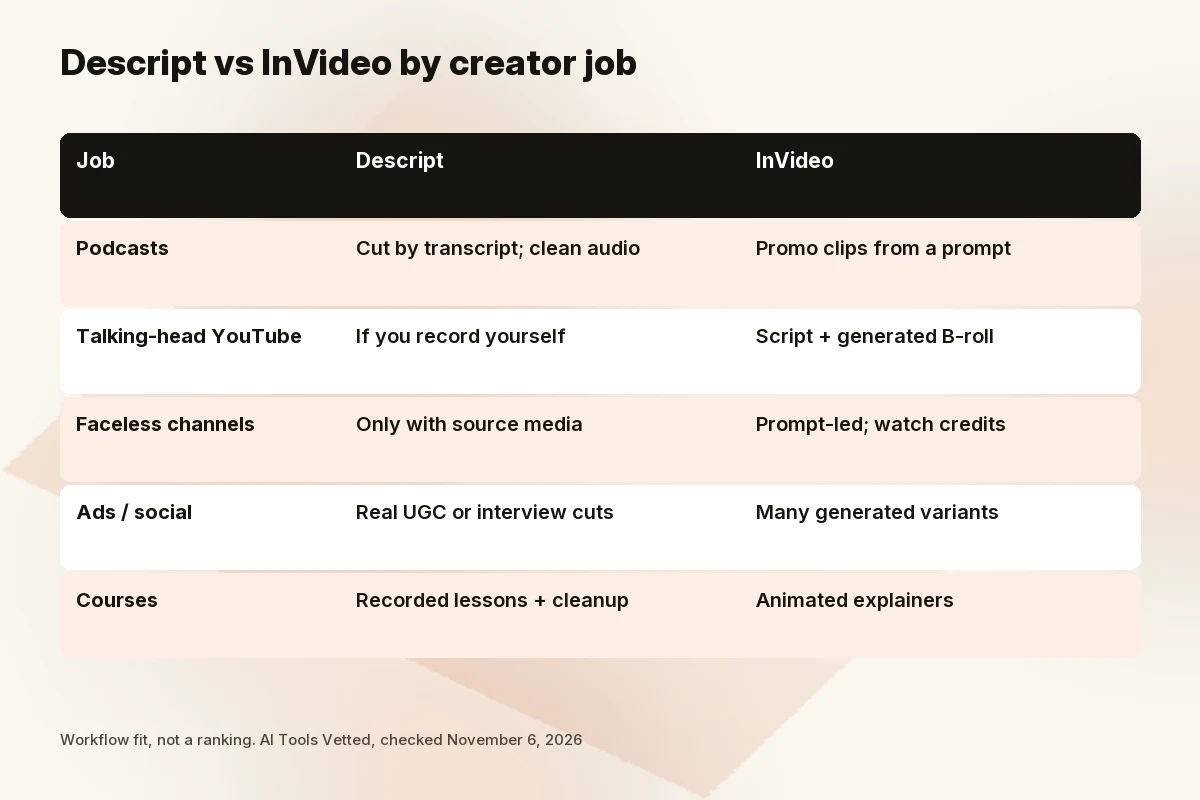
Podcasts: Descript. Cut by transcript, clean audio, pull clips. InVideo can help with promo videos from a prompt, but it is not the better episode editor.
Talking-head YouTube: Descript if you record yourself; InVideo if you only script and want generated B-roll or fully generated segments.
Faceless channels: InVideo for prompt-led production; watch credit burn on premium video models. Descript only if you still shoot or screen-record source media.
Ads / social: InVideo when you need many generated variants; Descript when you are cutting real UGC or interview takes into ads.
Courses: Descript for recorded lessons and cleanup; InVideo for animated explainers you do not want to film.
Can you use both?
A sensible pipeline some teams consider is: generate scenes in InVideo → finish pacing, captions or audio polish elsewhere. Descript can import media and edit by transcript, so polishing exported InVideo files inside Descript is plausible when you want transcript cutting. We are not claiming an official “InVideo → Descript” integration partner workflow beyond each tool’s ordinary import/export behavior—verify formats and rights in both docs before you build a handoff. Paying for both only makes sense if you regularly both generate and heavily re-edit recorded or exported footage.
Skip if
Skip Descript if you never record anything and only want prompt-to-video. Skip InVideo if your main job is editing podcasts or interviews you already filmed and you care most about transcript-first cutting. Skip Max at $250/seat/mo until you have modeled credit use; Plus’s annual rate is often enough to learn real consumption. Skip stacking both until one clear bottleneck (generation vs edit) is proven.
How we evaluated
We read Descript’s and InVideo’s official pricing pages on November 6, 2026 (browser renders plus HTML), mapped each product to creator jobs, and cross-checked InVideo help docs on credits, free editor actions, refunds and terms. We discounted vendor blog “vs” posts and competitor-authored comparisons as sales content. Where a historical plan name (for example a separate “Generative” label) was not on today’s cards, we say it was not confirmed. We did not run our own head-to-head production test and do not claim one.
FAQ
Is Descript or InVideo better for YouTube?
If you film talking-head or podcast-style videos, Descript. If you publish faceless or prompt-generated videos, InVideo. Many channels eventually need both generation and editing—but buy the bottleneck first.
Can InVideo transcribe and edit my existing footage?
InVideo’s editor can work with your own footage; docs say timeline edits and exports do not use credits. It is not positioned primarily as Descript-style transcript-as-timeline editing. Confirm transcription features in current InVideo docs for your account region.
Can Descript generate video from text?
Creator’s pricing card lists generating video with the latest AI models, and Underlord is framed as an AI co-editor. That is not the same as InVideo’s credit-metered multi-model catalog. Check current model availability inside Descript before you buy Creator solely for generation.
Which is cheaper?
On annual billing, Descript Hobbyist ($16/mo) and InVideo Starter ($10/seat/mo) are both entry options—but they buy different things (media hours/AI credits vs generative credits). Compare the job, not the sticker alone. InVideo Max at $250/seat/mo is a different budget class.
Do both have free plans with a watermark?
Descript Free is $0; watermark-free export is not included on Free per the comparison grid. InVideo’s Starter/Plus/Max cards today did not present a free plan tier.
Verdict
Choose Descript to edit reality; choose InVideo to generate when reality is missing. Equal-weight next steps: try Descript Free or Hobbyist if you already record, or InVideo Starter/Plus if you are budgeting generative credits. Read the dated tables above before you trust any older “vs” post’s prices.
Check Descript price · Check InVideo price
Sources
Official pages checked November 6, 2026, 01:05–01:09 BRT:
- Descript pricing (Annual and Monthly toggles; browser captures)
- InVideo pricing (browser + HTML aria-labels)
- InVideo plans and credits docs
- InVideo editor free / credits docs
- InVideo refunds docs
- InVideo terms (7-day unused-plan refund exception)