
Affiliate disclosure: AI Tools Vetted is reader-supported. If you subscribe through our affiliate links, marked sponsored, we may earn a commission at no extra cost to you. Our InVideo, Pictory and Descript links may be affiliate links. Order follows creator workflow fit and official plan facts, not commissions. HeyGen is mentioned for context only—no affiliate
/go/—because it is not on our eligible affiliate list.
Prices checked November 9, 2026, at 09:15–09:20 BRT on official English pricing pages (USD, before tax). InVideo’s page currently promotes 50% off annual figures beside struck monthly list prices and uses plan names Basic / Pro / Ultra (not the older Starter / Plus / Max labels). Pictory shows annual cards with “Was” strikethroughs and a Black Friday label on Professional. Confirm checkout before you buy—promos move.
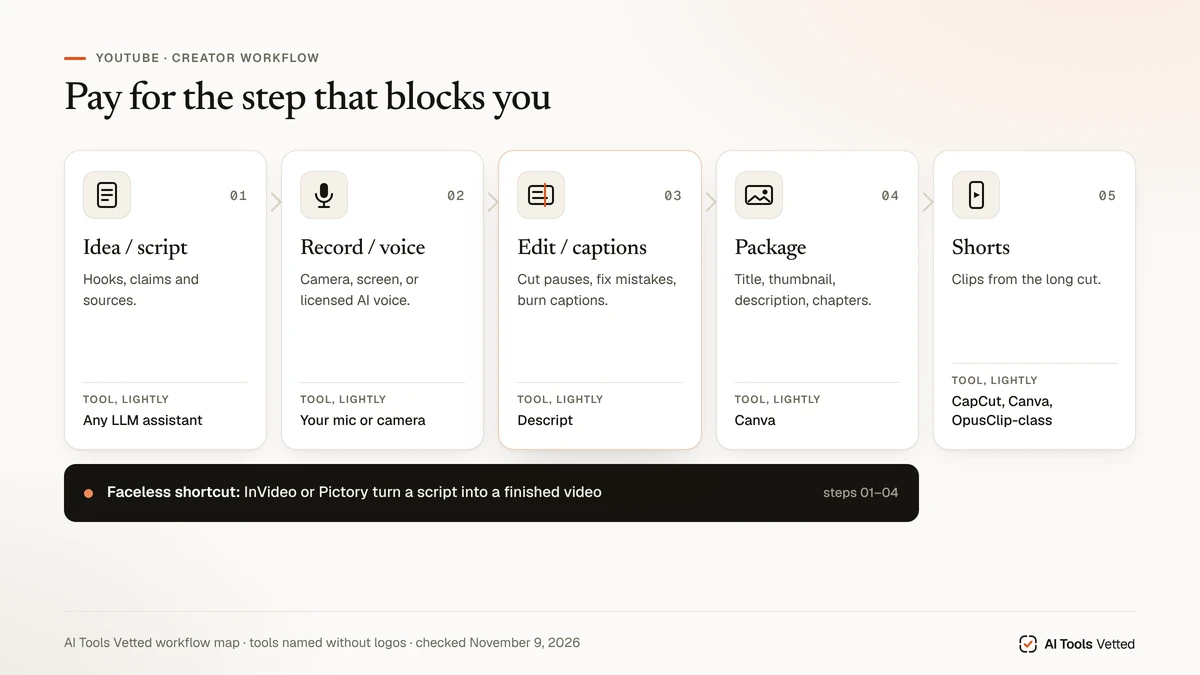
YouTube creators do not need “the best AI video generator.” They need a stack by step: ideas/script → record or voice → edit/captions → package/thumbnails → Shorts repurpose. This guide anchors three affiliate tools that map cleanly to those steps—InVideo, Pictory, Descript—and links deeper reviews instead of turning into another generic generator listicle.
Quick stack picks
| Workflow step | Tool | Entry price verified Nov 9, 2026 | Free / trial |
|---|---|---|---|
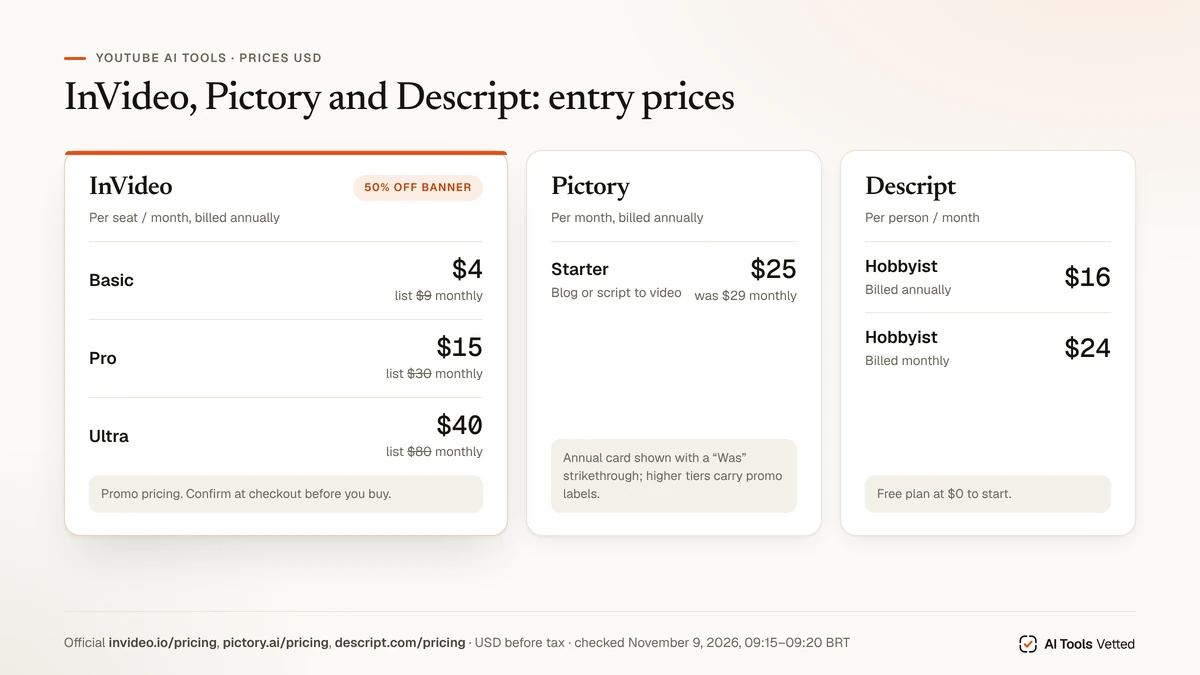
| Prompt/script → finished video / Shorts | InVideo | Basic $4/seat/mo billed annually (list $9 monthly shown); Pro $15 annual (list $30); Ultra $40 annual (list $80) — all under a 50% off banner | Sign-up / promo banners present; treat trial claims as checkout-confirmed |
| Blog/script → video | Pictory | Starter $25/mo billed annually (Was $29 monthly); Professional annual card showed $29.50 (Was $59) with Black Friday labeling; Teams $119 annual (Was $199 monthly) | “Start free trial” on cards (14-day wording has appeared on Pictory pricing historically—confirm on page) |
| Talking-head / podcast edit-by-text + captions | Descript | Free $0; Hobbyist $16 annual / $24 monthly; Creator $24 / $35; Business $50 / $65 (per person/month; “Saving up to 35%”) | Free plan to start |
Creator workflow map
- Idea / script — outline hooks, claims and sources (general LLM assistants are fine; we do not affiliate ChatGPT here).
- Record or synthesize — camera talking-head, screen recording, or licensed AI voice.
- Edit / captions — cut pauses, fix mistakes, burn captions.
- Package — title, thumbnail, description, chapters.
- Repurpose — Shorts/clips from the long cut.
Pay for the bottleneck. Beginners often waste money on a full video generator when a free LLM + Canva + one editor would unblock them.
Script & ideas
Use any capable assistant for outlines, title variants and chapter drafts. Keep factual claims sourced. AI scripts still need your judgment on what you can prove on camera. Thumbnail copy can be drafted the same way, then validated with YouTube’s own Test & Compare when available on your channel.
Turn script or blog into a YouTube video
InVideo
InVideo sells AI video creation with seat-based plans, credit pools and an editor. Plan names on invideo.io/pricing today are Basic, Pro and Ultra (we did not see Starter/Plus/Max cards on this November 9, 2026 fetch). Under a sitewide 50% off annual promotion:
| Plan | Monthly list shown | Annual per seat/mo shown | Credits called out on card |
|---|---|---|---|
| Basic | $9 | $4 | 190 credits/seat/mo |
| Pro | $30 | $15 | 1,000 credits/seat/mo (card also showed 2,000 in the UI cluster) |
| Ultra | $80 | $40 | 3,000 credits/seat/mo (sliders also showed higher bundles) |
Cards emphasize agents/models, timeline editor access and storage that scale by plan. Promo math and credit sliders make totals easy to misread—confirm the checkout line before you treat any figure as final. Buy InVideo if you want prompt/script-to-video for YouTube or Shorts. Skip if you only edit real talking-head footage by transcript—use Descript. Deeper write-up: InVideo review.
Pictory
Pictory focuses on turning URLs, scripts and docs into videos. From pictory.ai/pricing on November 9, 2026:
- Starter: $25/mo billed annually (Was $29 monthly); 24,000 annual / 2,000 monthly credits called out on the card we read
- Professional: Black Friday offer showing $29.50 (Was $59) on the annual framing beside $59 monthly; higher credit/minute allotments than Starter
- Teams: $119/mo billed annually (Was $199 monthly)
Buy Pictory if your raw material is a blog post or long script. Skip if you need transcript-first editing of podcasts you already recorded. Review: Pictory review. Versus InVideo: InVideo vs Pictory.
InVideo vs avatar tools
Avatar/talking-head generators (including HeyGen) solve a different job than blog-to-b-roll tools. We compare that lane in HeyGen vs InVideo. HeyGen is not affiliate-eligible here—plain research link only if you pursue it on your own.
Edit talking-head / podcasts by editing text: Descript
Descript is the pick when the master is a recording you already have. You edit the transcript; the timeline follows. Official descript.com/pricing on November 9, 2026 (annual figures first, monthly struck beside them on the annual toggle we read):
| Plan | Annual | Monthly | Highlights from cards |
|---|---|---|---|
| Free | $0 | $0 | Text-based editing entry; try AI tools |
| Hobbyist | $16 / person / mo | $24 | 10 media hours/mo; 400 AI credits; 1080p export watermark-free |
| Creator | $24 / person / mo | $35 | 30 media hours; 800 AI credits; 4K export; fuller Underlord access |
| Business | $50 / person / mo | $65 | 40 media hours; 1500 AI credits; Brand Studio; translate/dub callouts |
Buy Descript if podcasts, interviews or camera talks are your format. Skip if you only want faceless prompt-to-video. Review: Descript review. Versus InVideo: Descript vs InVideo.
Voice & captions
AI voice can fill narration gaps, but commercial license terms on free tiers are often restricted—read the vendor terms before monetized uploads. For voice shortlists see best AI voice generator and Speechify review. We keep this article’s /go/ set to InVideo + Pictory + Descript (max three affiliates) rather than adding a fourth voice CTA.
Captions: Descript’s transcript workflow covers many talking-head cases; Shorts tools below also burn captions.
Shorts & packaging
For clipping long videos into Shorts, creators commonly use CapCut, Canva or OpusClip-class tools. We link them as plain product options when needed (no affiliate /go/ in this article). Packaging still matters more than the clipper: title clarity, thumbnail contrast and a first-three-seconds hook.
YouTube monetization & AI content
YouTube’s Help pages are the source of truth:
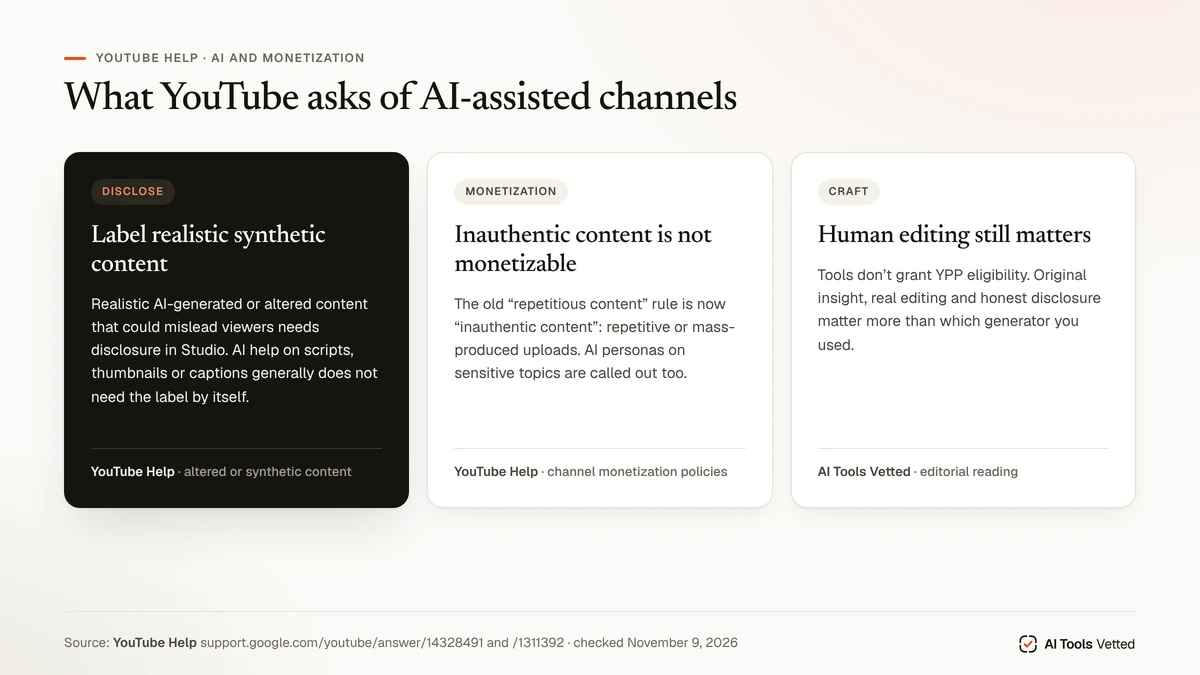
- Disclosing use of altered or synthetic content — realistic AI-generated or altered content that could mislead viewers needs disclosure in Studio. Scripts, thumbnails and captions made with AI generally do not require that label by themselves.
- Channel monetization policies — YouTube renamed the old “repetitious content” rule to inauthentic content, covering repetitive or mass-produced uploads. Original, authentic work remains the monetization standard. AI personas on sensitive topics are called out as not monetizable under the policy language YouTube publishes.
Tools do not grant YPP eligibility. Human editing, original insight and honest disclosure matter more than which generator you used.
Comparison table
| Tool | Best step | Entry paid (Nov 9, 2026) | Skip if |
|---|---|---|---|
| InVideo | Prompt/script → video | Basic from $4/seat/mo annual under 50% off banner (list $9 mo) | You only edit real talking-head by transcript |
| Pictory | Blog/script → video | Starter $25/mo annual | You do not start from long text |
| Descript | Edit recording + captions | Hobbyist $16/mo annual | You only want faceless prompt video |
Skip if / stacks we recommend
Beginner stack (low spend): free LLM for script + Canva for thumbnail + one editor trial. Pay only when a step blocks weekly uploads.
Faceless / script-to-video stack: InVideo or Pictory (not both on day one) + human fact pass + YouTube disclosure when required. See also AI tools for YouTube automation if automation is the real keyword intent.
Talking-head / podcast stack: Descript for edit-by-text + captions; add a licensed voice tool only if you need narration fills.
Skip all three paid tools if you publish rarely and a phone editor already ships your videos on time.
If your channel is early, resist buying all three. Run a two-week experiment on the single step that fails most often—blank page (script), messy takes (Descript), or no footage at all (InVideo/Pictory)—then keep only the tool that changed your publish rate.
Credit pools and “50% off” banners also change what “unlimited feeling” means in practice. When a card shows both a struck monthly price and a discounted annual per-seat figure, budget the annual checkout total, not the marketing per-month number alone.
How we evaluated
We mapped a YouTube creator workflow, read official pricing pages for InVideo, Pictory and Descript (US English, USD) on November 9, 2026, noted InVideo’s Basic/Pro/Ultra rename and 50% off annual banners, noted Pictory’s Black Friday labeling on Professional, and cross-checked YouTube Help pages on AI disclosure and monetization/inauthentic content. We did not film a channel test and do not claim one. Promo banners and credit sliders that obscure totals are called out as checkout-dependent.
FAQ
What are the best AI tools for YouTube beginners?
Start free: outline with an LLM, design a thumbnail in a free editor, then trial one paid tool at your bottleneck (Descript for talking-head, Pictory for blog-to-video, InVideo for prompt-to-video).
InVideo or Pictory for YouTube?
InVideo leans prompt/full AI video creation with credit seats; Pictory leans blog/script-to-video. Compare details in InVideo vs Pictory, InVideo review and Pictory review.
Is Descript good for YouTube?
Yes when your master is a recording—podcasts, interviews, camera talks—and you want transcript editing plus captions. See Descript review.
Best AI voice for YouTube?
See best AI voice generator. Check commercial license terms before monetized uploads; free tiers often restrict commercial use.
Will YouTube monetize AI videos?
YouTube monetizes original, authentic content and flags inauthentic / mass-produced uploads. Disclose realistic synthetic content when required. AI tooling alone neither guarantees nor blocks YPP—your edit quality and honesty do. Sources: YouTube Help links above.
Best AI tools for YouTube Shorts?
Repurpose long videos with captions and strong hooks; a generator helps only if Shorts are your primary production path. InVideo’s Shorts-oriented creation and Descript/CapCut-class clippers are common patterns—pick based on whether you start from a prompt or from a long recording.
Verdict
Build a workflow stack, not a trophy shelf of generators. InVideo for prompt-to-video (confirm Basic/Pro/Ultra promo pricing at checkout), Pictory for blog/script-to-video, Descript for transcript-first talking-head. Read YouTube’s disclosure and inauthentic-content rules before you scale AI volume.
Sources
Checked November 9, 2026, 09:15–09:20 BRT:
- InVideo pricing (Basic/Pro/Ultra; 50% off annual banners)
- Pictory pricing (Starter/Professional/Teams; BF label on Professional)
- Descript pricing (Free/Hobbyist/Creator/Business)
- YouTube Help: disclosing altered or synthetic content
- YouTube channel monetization policies
- YouTube Test & Compare
- Internal: InVideo review · Pictory review · Descript review · HeyGen vs InVideo · Descript vs InVideo · InVideo vs Pictory · best AI voice generator · AI tools for YouTube automation