
Affiliate disclosure: AI Tools Vetted is reader-supported. Some links below are affiliate links (marked “sponsored”): if you sign up through them, we may earn a commission at no extra cost to you. Our Speechify, ElevenLabs and Murf links may be affiliate links. The verdict below follows Speechify’s official pricing, usage-limit and terms pages, and we point you to a competitor where it fits you better.
Prices checked October 31, 2026, at 01:08–01:13 BRT on each vendor’s official pricing page (USD, before tax).
Quick take
Verdict in 30 seconds
Speechify Premium is a listening app. It reads books, articles, PDFs, emails and photographed pages aloud on your phone, computer and browser, with one account across all of them. If you read a lot for school or work and would rather listen, the yearly plan is where the price makes sense: $139 a year versus $348 if you paid $29 every month for twelve months (our arithmetic).
Buy Speechify Premium if you listen to long documents most days, want the same library on iPhone, Android, Mac, Windows and Chrome, and are fine paying yearly.
Skip it if:
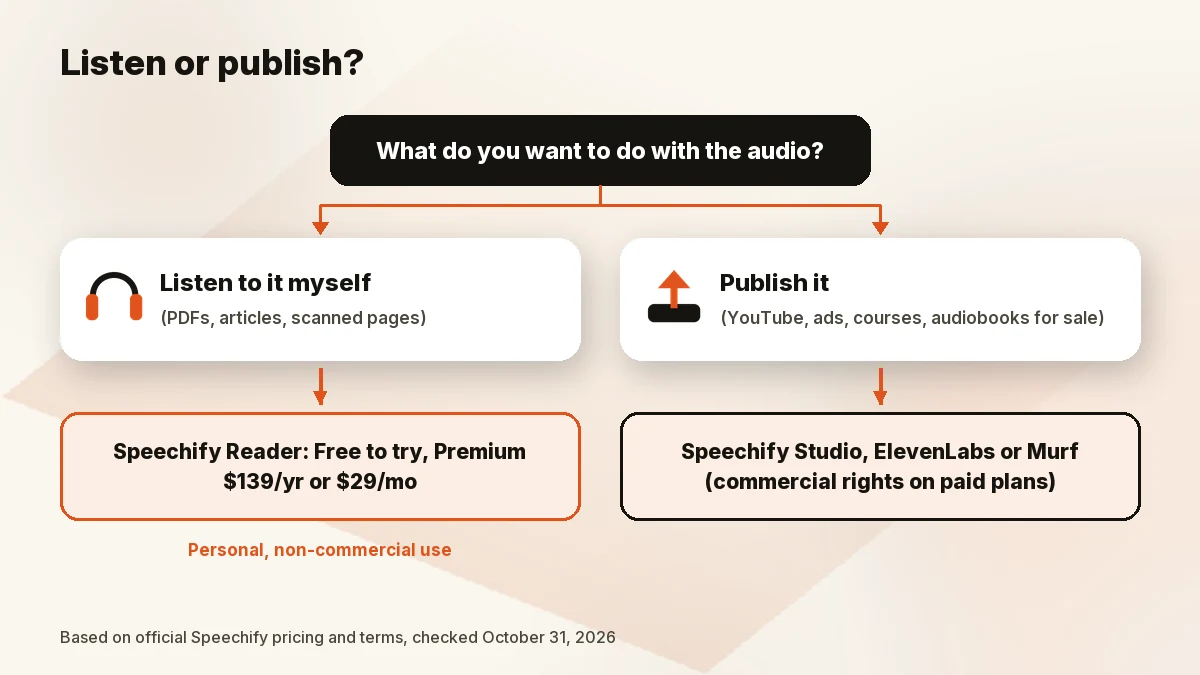
- You want to publish the audio (YouTube voiceovers, ads, audiobooks for sale). Premium is licensed for personal, non-commercial use. That job belongs to Speechify Studio, ElevenLabs or Murf.
- You only listen occasionally. The free plan may be enough.
- You’d pay monthly. At $29 a month, the yearly plan pays for itself in under five months.
- You’d want a refund after a few weeks. Speechify’s refund policy is narrow (details below).
What Speechify is in 2026: three products, three bills
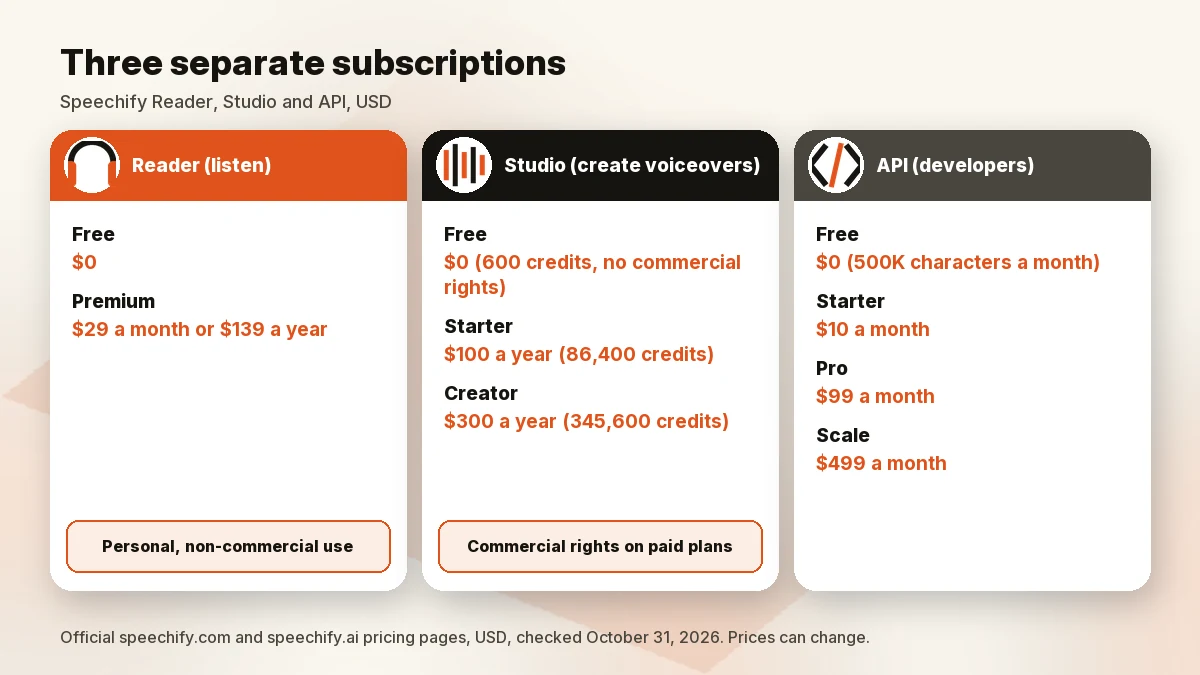
The Speechify name covers three separate subscriptions. Its Studio pricing FAQ says it directly: Studio and the Text to Speech Reader “are two different subscriptions.” The API is a third, sold under the SpeechifyAI name.
| Product | What it’s for | Price (official, Oct 31, 2026) | Commercial use |
|---|---|---|---|
| Speechify Reader (Free / Premium) | Listening to text you read: PDFs, web pages, docs, scanned pages | Free $0; Premium $29/mo or $139/yr | No: terms grant “personal non-commercial use” |
| Speechify Studio | Creating voiceovers, dubbing, voice changer | Free $0 (600 credits); Starter $100/yr; Creator $300/yr | Starter and Creator list “Commercial usage rights”; Free says “No commercial usage rights” |
| SpeechifyAI API | Adding text-to-speech to your own app | Free $0 (500K characters/mo); Starter $10/mo; Pro $99/mo; Scale $499/mo | Free tier lists “Commercial use” |
This review covers the Reader, because that’s what most people searching “is Speechify worth it” are buying. A Reader subscription doesn’t include API usage, per the API pricing FAQ, and it doesn’t include Studio.
Speechify pricing: Free and Premium
The official pricing page listed two Reader plans on October 31, 2026 (01:08 BRT):
| Free | Premium | |
|---|---|---|
| Price | $0 | $29/month, or $139 billed yearly |
| Voices | 10 voices (the pricing page calls them “robotic sounding”; the pricing blog says “basic”) | 1,000+ voices |
| Languages | Not stated on the card | 60+ |
| Max speed | 1.5x | 5x on the pricing page; “up to 4.5x” in the official pricing blog |
| Features | Text-to-speech only | Scan & Listen, AI Summaries & Chats, Google Drive/Dropbox/OneDrive, Voice Typing, AI Podcasts, Voice AI Assistant |
The two official pages disagree on top speed, so we don’t promise either number. The blog post (updated October 1, 2026) adds that the free plan needs no credit card and that, in the iPhone app, it keeps up to five files in your library. It also notes that App Store and Google Play prices are set by the store and “can differ slightly.”
Monthly $29 vs yearly $139
The pricing page labels the yearly toggle “SAVE 60%.” The math holds: twelve months at $29 is $348, and $139 is about 60% less. The blog puts the yearly plan at “about $11.58 a month.” If you’re a verified student, Speechify’s student page (updated July 14, 2026) says you can get 25% off Premium through UNiDAYS, with Student Beans “running similar offers.” We didn’t see a Black Friday banner on the Reader pricing page at 01:08 BRT on October 31; if one appears later, check what it applies to before you buy.
Premium word limits: 150,000 baseline, 1,000,000 for 2026
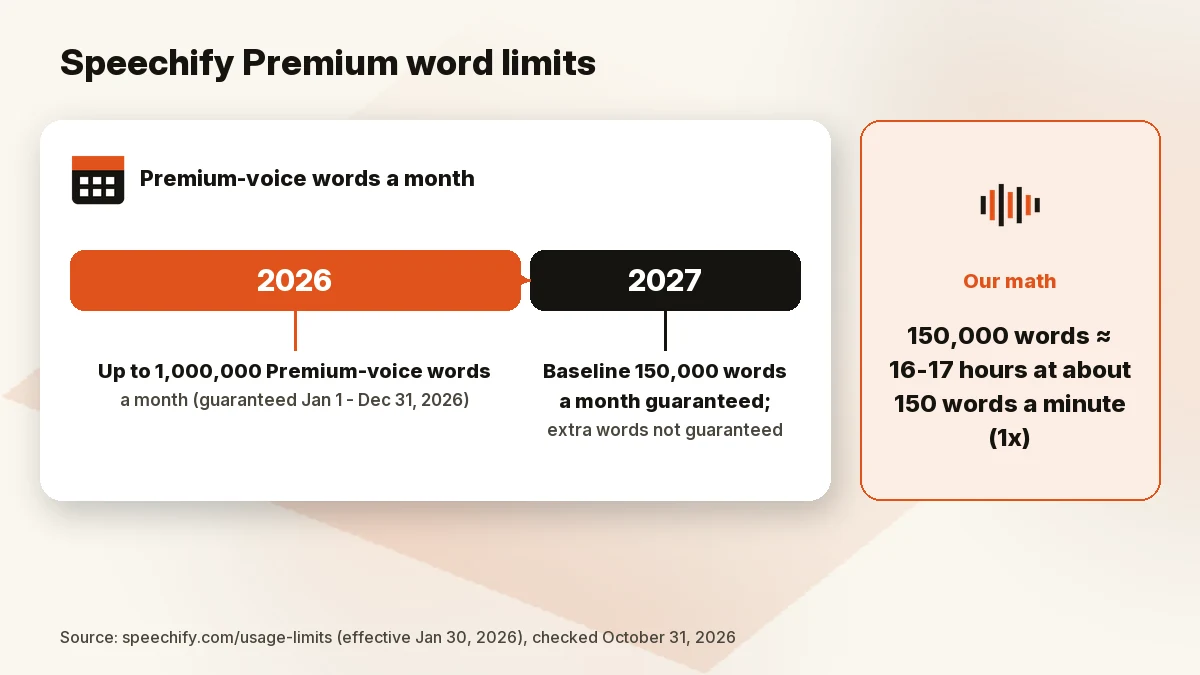
Premium isn’t unlimited. Speechify’s usage-limits page (effective January 30, 2026) sets two numbers for Premium voices, meaning any voice marked Premium, HD or AI:
- Baseline: “All Premium subscribers are contractually guaranteed at least 150,000 words per month.” Speechify says it won’t reduce this without at least 30 days’ notice.
- 2026 extension: “From January 1 through December 31, 2026,” every Premium subscriber gets up to 1,000,000 words a month.
What happens after 2026 isn’t promised. The page says later extensions “are not guaranteed” and “can be changed or revoked at any time without notice.” One line in the same section says the 2026 guarantee “expires automatically on January 1, 2026,” which contradicts the December 31, 2026 date above it. We read that as a typo, but it’s Speechify’s page, not ours, so check the page again before you renew in 2027.
What 150,000 words means (our math, not Speechify’s): at a typical audiobook pace of around 150 words a minute at 1x, 150,000 words is roughly 16–17 hours of listening a month. At 2x, you’d move through the same words in about half the time, so heavy listeners at high speed are the ones who’d notice the baseline. The 1,000,000-word figure is far more than most people will use in 2026.
The same page says Speechify may restrict Premium voices if an account is shared, used to make audio “for resale, distribution, or broadcasting,” or run by bots. If you need more words for a documented accessibility need, such as a visual or reading impairment, the page says you can email Speechify with the subject “Accessibility Waiver,” at no extra cost.
Speechify Studio plans
If you came here for voiceovers, Studio is the product to price. Its official page (October 31, 2026, 01:11 BRT) listed:
- Free: $0, 600 Studio credits, 1,000+ voices, Voiceover Studio, Dubbing Studio and Voice Changer, “No commercial usage rights.” The FAQ says downloading your work as an MP3 is the point where you upgrade.
- Studio Starter: $100 a year, 86,400 credits, stock music, video, images and sound effects, commercial usage rights.
- Studio Creator: $300 a year, 345,600 credits, everything in Starter.
The page doesn’t convert credits into minutes, so we don’t either.
Free trial, cancellation and refunds
Speechify’s terms describe the Premium free trial as “currently three (3) days unless a different period is stated at sign-up.” It converts to a paid plan automatically unless you cancel before it ends, and paid plans auto-renew.
To cancel a subscription bought on Speechify’s website, the terms point you to the “Cancel Subscription” button under “Subscription” in your account settings (app.speechify.com/settings?tab=subscription). If you subscribed through Apple or Google, you cancel through that store. Either way, you keep Premium until the end of the term you paid for.
Refunds are narrow. The refund policy lists refunds within 7 days for account takeover or charges made in error. For annual plans, you must contact Speechify within 7 days of payment and have used no more than 500 HD words. Monthly, quarterly and discounted subscriptions are listed as non-refundable, and App Store purchases are final. Decide during the free plan and trial, and set a reminder before the trial converts.
Key features
From the official pricing page and pricing blog (October 31, 2026):
- Apps everywhere: iPhone and iPad, Android, Mac, Windows, a Chrome extension and a web app, all on one account and free to download. The menu also lists an Edge extension.
- Scan & Listen: photograph a printed page and have it read aloud (Premium).
- 1,000+ voices in 60+ languages on Premium, versus 10 voices on Free.
- AI Summaries & Chats: summaries of, and questions about, what you’re reading.
- Cloud integrations: Google Drive, Dropbox and Microsoft OneDrive.
- Voice Typing: dictation with auto-punctuation.
- AI Podcasts and a Voice AI Assistant you can talk to about a website or book.
Pros and cons
Pros
- One subscription covers phone, desktop and browser apps.
- Clear official prices, and the yearly plan is about 60% cheaper than paying monthly.
- A published, contractual word baseline (150,000 a month) plus 1,000,000 a month for 2026.
- Scan & Listen and cloud-drive integrations cover printed and stored documents, not just web pages.
Cons
- Premium is for personal, non-commercial use; publishing audio needs Studio or another tool.
- The word allowance after December 31, 2026 isn’t guaranteed beyond the 150,000 baseline.
- Refunds are limited: monthly plans are non-refundable, and annual refunds need a 7-day window and 500 HD words or fewer.
- Short free trial (three days, per the terms).
- Official pages disagree on top speed (5x vs 4.5x), and the usage page has a date error.
Who should (and shouldn’t) buy Speechify
Students. The free plan is enough to try listening to readings at up to 1.5x. Premium makes sense if you’d use Scan & Listen on textbooks and handouts, or listen faster than 1.5x. Check the 25% UNiDAYS discount first. If your school licenses Speechify, the student page says institutions can get central licenses on custom quotes.
People who read a lot of PDFs and articles for work. This is the core use case. The cross-device library and integrations are the reason to pay, and the yearly plan is the one to price.
Book listeners. Speechify reads the files you bring. For an included audiobook catalog, compare ElevenReader (below).
Etsy sellers and other creators who need voiceovers. Not the Reader. Speechify’s terms say its services, “with the exception of Speechify Voice Over Studio, are not intended for your commercial use.” Look at Studio, ElevenLabs or Murf instead.
Speechify alternatives
These are ordered by use case, not commission.
- ElevenReader (listening): ElevenLabs’ separate listening app for books, PDFs and articles. Its site advertises 200,000+ included audiobooks and a $1 first-month offer; we couldn’t confirm its regular price on October 31, so check it in the app. It’s the most direct “listen” alternative.
- ElevenLabs (creating audio): credit-based plans for voiceovers, cloning and dubbing. The official page listed Free $0 (10,000 credits a month), Starter $6 a month with a commercial license and Instant Voice Cloning, Creator $22 a month with Professional Voice Cloning, and Pro $99 (01:08 BRT). Yearly billing is listed as two months free. A banner advertising “30,000 credits for $1” still said “Ends September 30,” so treat that offer as expired unless checkout shows it. Read our ElevenLabs review. Check ElevenLabs price
- Murf AI (video and course narration): a voiceover studio, not a document reader. On October 31 (01:13 BRT), its Studio tab listed Creator at $19/mo billed yearly ($228) with 24 hours of voice generation a year and commercial rights, and Business at $66/mo billed yearly ($792). See ElevenLabs vs Murf. Check Murf price
- NaturalReader (listening and voiceovers): NaturalSoft’s reader for PDFs, Word files, ePub and web pages, with separate Personal and Commercial products listed on its Check NaturalReader price. We couldn’t find a pricing page to verify on October 31, so we don’t list prices.
For a ranked list of reader and voice apps, see our best text-to-speech app guide. Creators should also read best AI voice generator for YouTube.
How we evaluated
We read Speechify’s official Reader pricing page, its pricing blog (updated October 1, 2026), its usage-limits page, its Studio and API pricing pages, its terms of service, its refund policy and its student page on October 31, 2026 (01:08–01:12 BRT). The Reader and Studio prices appear in the page HTML in USD; we saved the pages. We also read the official ElevenLabs and Murf pricing pages (Murf in a browser at 01:13 BRT, since its prices load with JavaScript) and the ElevenReader and NaturalReader homepages. We did not run our own listening, OCR or speed test and don’t claim one.
FAQ
Is Speechify worth it in 2026?
For people who listen to long documents most days, the yearly Premium plan ($139) is the version worth paying for, with up to 1,000,000 words a month guaranteed through 2026. If you listen occasionally, or need audio you can publish, it isn’t the right buy.
How much does Speechify cost?
On October 31, 2026, Speechify’s official page listed Premium at $29 a month or $139 billed yearly. Studio is separate: $100 or $300 a year. App store prices can differ slightly.
Is there a free Speechify plan? What are its limits?
Yes. The free plan has 10 voices, speeds up to 1.5x and text-to-speech features only, with no credit card needed. In the iPhone app it keeps up to five files in your library.
Does Speechify have word limits?
Yes. Premium has a contractual baseline of 150,000 Premium-voice words a month, extended to 1,000,000 a month from January 1 to December 31, 2026. Extensions after 2026 aren’t guaranteed.
Can I use Speechify audio commercially?
Not with the Reader. Speechify’s terms license it for personal, non-commercial use, and the usage-limits page bans audio “for resale, distribution, or broadcasting.” Speechify Studio’s paid plans list commercial usage rights.
Speechify vs ElevenLabs: quick take?
Speechify Premium is for listening to what you read. ElevenLabs is mainly for creating audio, with a commercial license from its $6 Starter plan; its separate ElevenReader app competes with Speechify for listening. See our best text-to-speech app guide.
How do I cancel Speechify?
If you subscribed on the website, use “Cancel Subscription” under “Subscription” in your account settings. If you subscribed through Apple or Google, cancel in that store. Premium stays active until the paid term ends.
Bottom line
Speechify Premium is a well-defined product: a cross-device reader with a published word allowance, at $139 a year. Buy it yearly if listening is a daily habit. Don’t buy it to make voiceovers, don’t count on 1,000,000 words a month after 2026, and decide during the free plan and trial, because refunds are hard to get.
Last updated: October 31, 2026.
Sources
Official pages checked October 31, 2026, 01:08–01:13 BRT (USD):
- Speechify pricing (01:08 BRT)
- How much does Speechify cost? (official blog, updated October 1, 2026; 01:08 BRT)
- Speechify usage limits (01:08 BRT)
- Speechify Studio pricing (01:11 BRT)
- SpeechifyAI API pricing (01:11 BRT)
- Speechify terms of service (01:08 BRT)
- Speechify refund policy (01:11 BRT)
- Is Speechify free for students? (official, updated July 14, 2026; 01:11 BRT)
- ElevenLabs pricing (01:08 BRT)
- ElevenReader (01:08 BRT)
- Murf pricing (Studio tab, browser render 01:13 BRT)