Affiliate disclosure: AI Tools Vetted may earn a commission if you sign up through some links on this page, at no extra cost to you. It doesn’t change our picks, and we list the limits of each tool.
Top picks (October 2026)
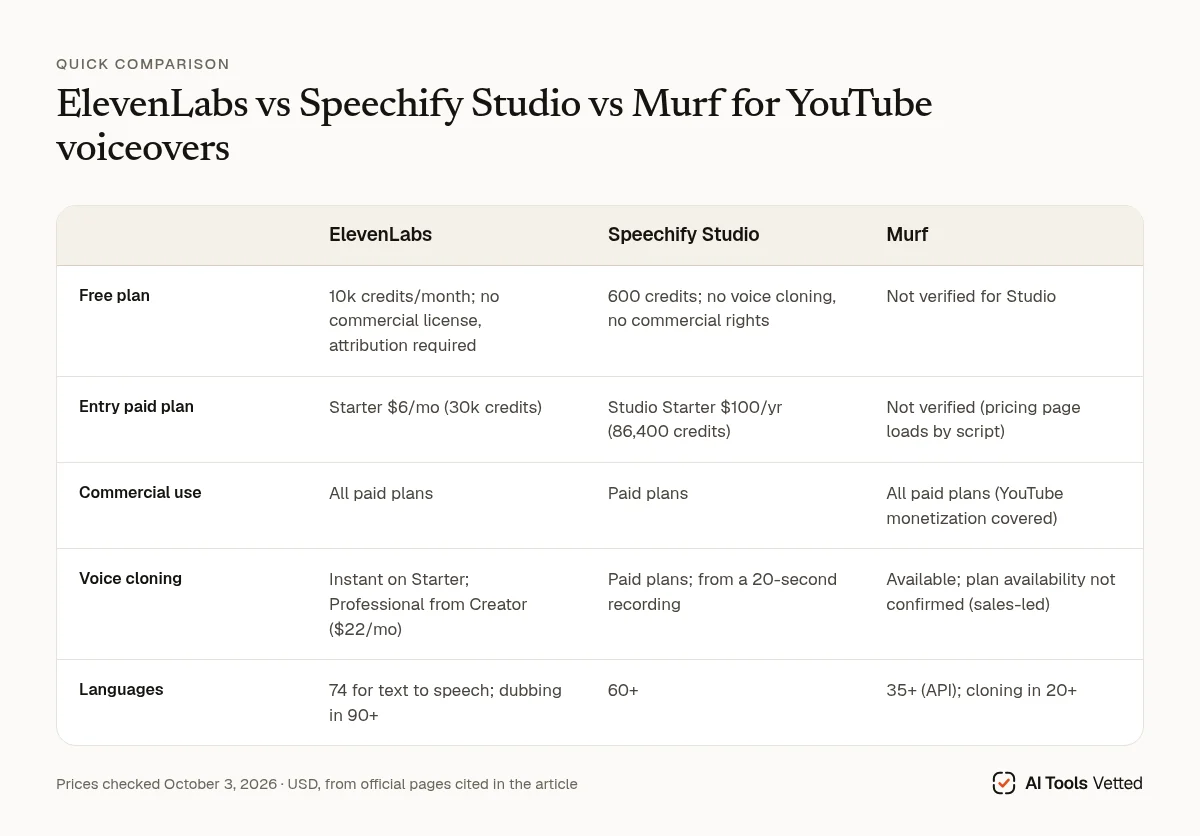
Comparison table
| ElevenLabs | Speechify Studio | Murf | |
|---|---|---|---|
| Free plan | 10k credits/month; no commercial license, attribution required | 600 credits; no voice cloning, no commercial rights | Not verified for Studio |
| Entry paid plan | Starter $6/mo (30k credits) | Studio Starter $100/yr (86,400 credits) | Not verified (pricing page loads by script) |
| Commercial use | All paid plans | Paid plans | All paid plans (YouTube monetization covered) |
| Voice cloning | Instant on Starter; Professional from Creator ($22/mo) | Paid plans; from a 20-second recording | Available; plan availability not confirmed (sales-led) |
| Languages | 74 for text to speech; dubbing in 90+ | 60+ | 35+ (API); cloning in 20+ |
| Link | ElevenLabs | Speechify | Murf |
Last updated October 3, 2026 · Prices checked October 3, 2026 (USD; taxes may apply).
How we review
We compared the three tools using their official pricing pages, help centers, terms of service and acceptable-use policies, plus YouTube’s AI disclosure and monetization pages, all checked on October 3, 2026. For a YouTube channel, the deciding factors are commercial rights, the price of the first paid plan, voice cloning and its consent rules, and language coverage for dubbing. We haven’t produced test voiceovers with each tool yet, so we don’t rank voice quality here.
Our picks
ElevenLabs: best overall for YouTube voiceovers
ElevenLabs has the lowest entry price with a commercial license of the three. Starter is $6 a month and includes a commercial license, Instant Voice Cloning, Dubbing Studio, Image & Video tools and 30k credits a month. Creator ($22/mo) adds Professional Voice Cloning and 121k credits, and Pro ($99/mo) has 600k (pricing). The plan comparison lists 74 languages for text to speech, and the dubbing page says it localizes into 90+ languages (Dubbing Studio). Instant cloning works from less than 2 minutes of audio. Professional cloning trains a dedicated model, which usually takes 3–6 hours (help).
Limits: the free plan can’t be used commercially. If you publish free-plan content, you must credit ElevenLabs (“elevenlabs.io” or “11.ai”) in the title (help). The first-month discounts shown when we checked are time-limited, so budget at the regular price. Credits are shared across text to speech, dubbing and other tools, so heavy dubbing uses them up faster.
ElevenLabs: See the current deal
Speechify Studio: best value on an annual plan
Speechify is best known for its text-to-speech reader app, but Speechify Studio is the separate product for voiceovers and dubbing. Studio Starter costs $100 a year for 86,400 credits and includes voice cloning, commercial usage rights and stock music, video and images. Studio Creator is $300 a year for 345,600 credits (Studio pricing). Voiceover uses 1 credit per second, so Starter covers roughly 24 hours of generated voiceover a year. Dubbing uses 3 credits per second. Re-exporting unchanged audio is free. Speechify lists 1,000+ voices in 60+ languages, 13 emotions, and cloning from a 20-second recording (AI voice generator).
Limits: the free Studio plan has no voice cloning and no commercial rights, and Speechify says you need a paid plan to download your work as MP3. We could only verify annual prices; check whether a monthly option fits you better. Don’t confuse it with the $29/month Speechify Premium reader plan, which is for listening to text, not making voiceovers (pricing).
Speechify Studio: See plans and pricing
Murf: best for clearly licensed voices
Murf’s strength is licensing clarity. Its help center says all paid plans include commercial rights for voiceovers made in its Studio, and specifically covers videos on YouTube and other platforms, as long as your content is original and doesn’t infringe copyright. It recommends a Business license for registered businesses (help). Murf says its stock voices come from “active collaboration and explicit consent” from voice artists, and that it supports commercial customers against copyright claims over its voices (Ethical AI). Its voice cloning supports 20+ languages (voice cloning).
Limits: Murf’s Studio pricing loads by script, and we couldn’t read the plan prices, so check them before you buy. Voice cloning goes through a sales contact form. Murf’s API pricing lists Professional Voice Cloning under Enterprise (pricing), so we can’t confirm that self-serve plans include it. Its API pricing page lists 150+ voices in 35+ languages; we didn’t find a separate Studio figure on an official page.
Murf: See plans and pricing
Voice cloning: consent and rules
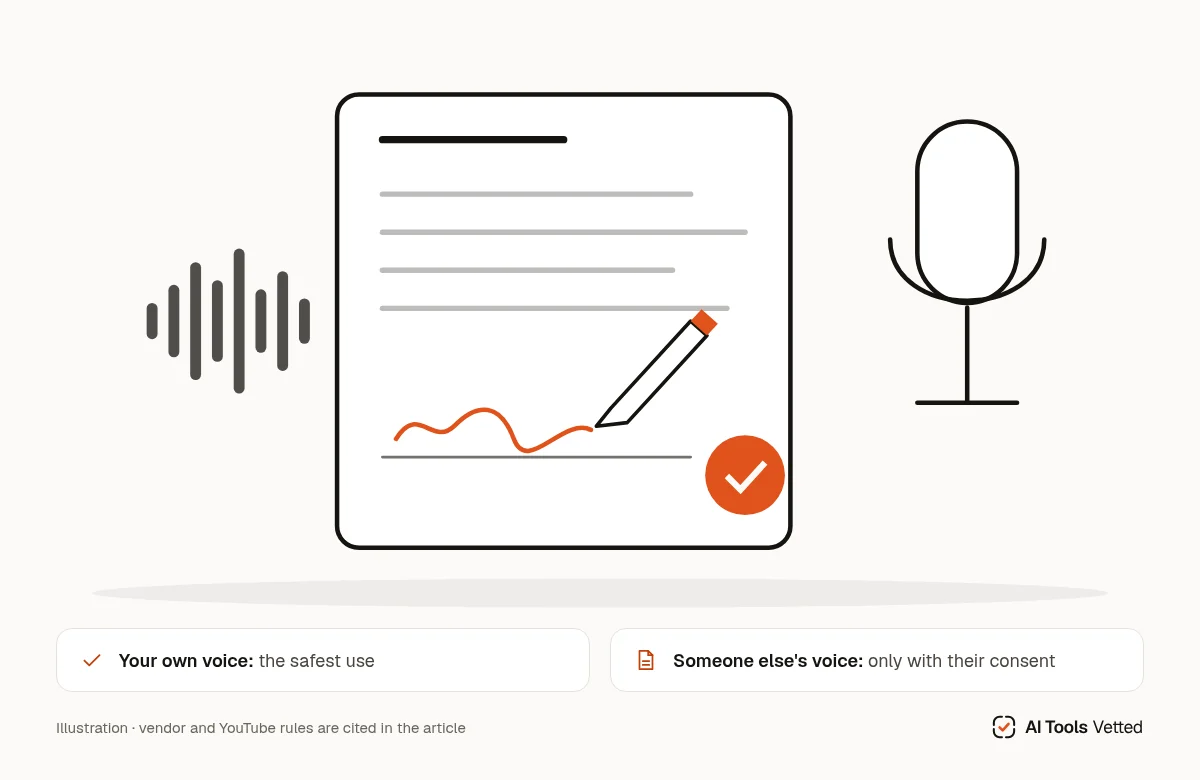
Cloning your own voice is the safest way to use these tools on YouTube, and it’s the use case all three vendors are designed around. Cloning someone else’s voice is where you can get into trouble, with the vendor and with YouTube.
What the vendors say:
- ElevenLabs prohibits using its output to intentionally replicate another person’s voice without consent or legal right, to harass or harm them, or “in a manner intended to deceive others about whether the voice was generated by artificial intelligence.” It also bans impersonating political candidates and elected officials, even with authorization (Prohibited Use Policy, last updated August 17, 2026).
- Speechify has you confirm that the voice is yours, or that you represent the person and “have received explicit written consent to clone it for their use” (Studio terms).
- Murf says on its voice cloning page that voice cloning itself isn’t illegal, but “using voice duplication without consent can be considered illegal,” and that using a celebrity’s voice without permission can lead to IP infringement or identity theft (voice cloning FAQ).
Laws on voice cloning and the use of someone’s voice vary by country, so check the rules where you and the speaker live. This section summarizes vendor and platform policies; it isn’t legal advice.
What YouTube says (AI disclosure rules):
- Cloning your own voice for voiceovers or dubs is on YouTube’s list of uses that don’t need disclosure.
- Making a real person appear to say something they didn’t, including “making it appear as if someone gave advice that they did not actually give,” does need disclosure under Attributes > “AI use” in YouTube Studio.
- YouTube’s list doesn’t specifically address stock AI narrator voices. Our reading: a generic AI narrator reading your own script doesn’t depict a real person, but if a voice could be mistaken for a real, identifiable person, disclose.
- Disclosure “won’t limit a video’s audience or impact its eligibility to earn money,” according to YouTube.
Monetization is a separate question. YouTube’s policies exclude mass-produced, template-based AI content that adds no original insight. They also exclude AI personas presented as human experts giving health, legal, financial or political advice (monetization policies). An AI voice reading a generic script on repeat is a monetization risk, whichever tool you use.
FAQ
What’s the best AI voice generator for YouTube? For most channels, ElevenLabs. It has the cheapest entry plan with commercial rights ($6/mo), instant voice cloning on that plan, and dubbing into 90+ languages.
Can I monetize YouTube videos with an AI voice? Yes, on a paid plan with commercial rights, as long as the content is original and not mass-produced. Murf’s help center explicitly covers YouTube monetization. Free plans from ElevenLabs and Speechify don’t include commercial rights.
Do I need to disclose an AI voice on YouTube? Not if you cloned your own voice for voiceovers or dubs. You do if the audio makes a real person appear to say something they didn’t.
Can I clone a celebrity’s voice? Not without their consent. ElevenLabs and Speechify require consent in their terms, and Murf warns it can be illegal.
Which AI voice generator is free? ElevenLabs Free (10k credits a month) and Speechify Studio Free (600 credits) both exist, but neither includes commercial use, so they’re for testing only.
Verdict
Choose ElevenLabs if you want the lowest-cost commercial plan, voice cloning on the entry tier and broad dubbing. Choose Speechify Studio if you’ll commit for a year and want cloning and commercial rights bundled at $100. Choose Murf if your channel is a business and licensing clarity matters more than price, but confirm its pricing and cloning access first. Pair any of them with a video tool from our best AI video generators for YouTube.
ElevenLabs: Check today’s price
Sources (official pages, checked on October 3, 2026)
These are the official pages cited above. Prices and plans change often, so confirm them on the provider’s site before you buy.
- ElevenLabs pricing: elevenlabs.io/pricing
- ElevenLabs Dubbing Studio: elevenlabs.io/dubbing-studio
- ElevenLabs help: voice cloning: help.elevenlabs.io/hc/en-us/articles/13313681788305
- ElevenLabs help: free-plan attribution and commercial use: help.elevenlabs.io/hc/en-us/articles/13313564601361
- Speechify Studio pricing: speechify.com/pricing-studio
- Speechify AI voice generator: speechify.com/ai-voice-generator
- Speechify pricing (Premium reader plan): speechify.com/pricing
- Murf help: commercial rights: help.murf.ai/do-i-have-commercial-rights-over-the-voice-over-created
- Murf ethical AI: murf.ai/ethical-ai
- Murf voice cloning: murf.ai/voice-cloning
- Murf pricing: murf.ai/pricing
- ElevenLabs prohibited use policy: elevenlabs.io/use-policy
- Speechify Studio terms: speechify.com/studio-terms
- YouTube Help: disclosing altered or synthetic content: support.google.com/youtube/answer/14328491
- YouTube Help: monetization policies: support.google.com/youtube/answer/1311392