Affiliate disclosure: AI Tools Vetted may earn a commission if you sign up through some links on this page, at no extra cost to you. It doesn’t affect which tools we recommend, and we list each tool’s limits.
Top picks (October 2026)
Add-on, not ranked: ElevenLabs for voiceover and dubbing (see the add-on section below).
Comparison table
| InVideo AI | Synthesia | HeyGen | ElevenLabs (voice add-on) | |
|---|---|---|---|---|
| Best for | Faceless/narrated videos from a prompt | Avatar presenter videos | Talking-head avatar videos and translation | Voiceover and dubbing for videos you make (not a video generator) |
| Free plan | Yes; limited credits, reset weekly | Basic: 10 min/month, watermarked | 3 videos/month, up to 1 min each | 10k credits/month; no commercial license, attribution required |
| Entry paid plan | Starter $20/seat/mo (billed annually, same as monthly), 400 credits | Starter $29/mo monthly or $18/mo billed yearly | Creator $29/mo, or $24/mo billed annually; 600 credits | Starter $6/mo |
| Max video length | Not stated | Limited by monthly credits | Up to 30 min (Creator, Pro) | n/a |
| Vertical 9:16 | Yes (plan availability not confirmed) | Yes, 1080×1920 (plan availability not confirmed) | Yes, portrait in AI Studio (plan availability not confirmed) | n/a (audio) |
| Unused credits roll over? | No | No (monthly); annual credits granted upfront | Monthly plans: 1 month; annual: until renewal | Not confirmed |
| Link | InVideo AI | Synthesia | HeyGen | ElevenLabs |
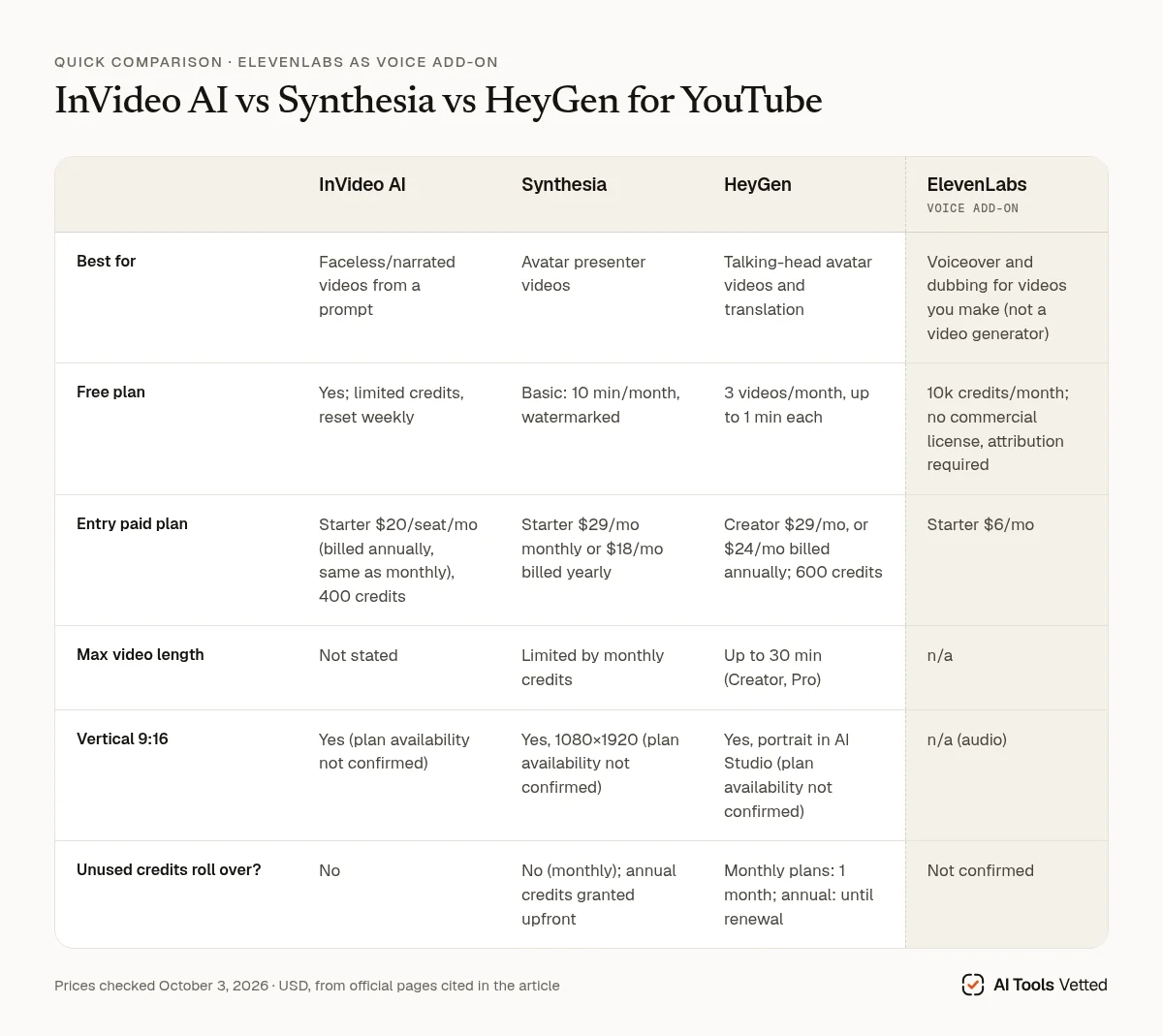
Last updated October 3, 2026 · Prices checked October 3, 2026 (USD; taxes may apply).
How we review
We picked these tools using their official pricing pages, help centers and terms, plus YouTube’s own policy pages, all checked on October 3, 2026. We compared free-plan limits, the entry paid plan, how credits work, vertical (Shorts) support and commercial-use terms. We haven’t produced test videos with each tool yet, so we don’t rate output quality here.
Best AI video generators for YouTube
InVideo AI: best for faceless channels
InVideo turns a prompt into a full video with stock footage and narration, then lets you fix it in a timeline editor. Manual timeline edits don’t use credits; only AI generation does (help). Starter is $20 per seat per month billed annually, and InVideo says there’s “no difference compared to monthly”. It includes 400 credits, 100 premium stock clips and 200 GB of storage, but only the “Agent Two Lite” agent. Plus costs $36/seat/mo billed annually ($60 monthly) with 2,000 credits (pricing).
Limits: unused credits don’t roll over. The free plan needs no card, and its credits reset every Monday at midnight UTC (free plan). Videos you export before upgrading keep their watermark. InVideo doesn’t state a maximum video length on its pricing page.
InVideo AI: See plans and pricing
HeyGen: best for talking-head videos and translation
HeyGen is built around avatar presenters, including a custom avatar of yourself, and translating videos into other languages. The free plan gives you 3 videos a month, each up to 1 minute, with 500+ stock avatars and 1 custom video avatar. Creator ($29/mo, or $24/mo billed annually) adds 600 credits, videos up to 30 minutes, 1080p export, watermark removal, voice cloning and 175+ languages and dialects; Pro ($49/mo) adds 4K export (pricing). Unused credits roll over for one month on monthly plans and until renewal on annual plans. AI Studio lets you pick portrait, square or landscape when you start a project (HeyGen blog).
Limits: free videos are capped at 1 minute, and Creator stops at 1080p. It’s avatar-first, so it’s less suited to stock-footage faceless videos than InVideo. Why it ranks above Synthesia for YouTube creators: Creator allows videos up to 30 minutes each, 4K costs $49 a month on Pro (Synthesia exports at 1080p, and its Pro plan is $89), the paid plans include 700+ stock avatars against Synthesia’s 125+ on Starter, and unused credits roll over. Our Synthesia vs HeyGen comparison reaches the same conclusion for creators. We have no affiliate relationship with HeyGen.
Synthesia: best for tutorials and explainers
If you want a presenter on screen without filming yourself, Synthesia is built for it. Starter costs $29 a month billed monthly, or $18 a month billed yearly, and includes 1,250 credits a month (about 22 minutes of video in total, by Synthesia’s estimate), downloads, no Synthesia logo, 125+ stock avatars and, per its comparison table, 3 personal avatars (a custom avatar of you). Pro ($89/mo, or $64/mo yearly) raises that to 5 personal avatars and about 60 minutes. All plans list 160+ languages and voices, with dubbing in 70+ languages, and export as 1080p MP4 (pricing).
Limits: the free Basic plan is watermarked, and monthly credits don’t roll over. Features like SCORM export show Synthesia is aimed mainly at training and corporate video, so it fits explainers and tutorials better than entertainment channels. That’s why it ranks below HeyGen here. It still wins on two points: a bigger free plan (10 minutes of video a month against HeyGen’s three 1-minute videos) and a cheaper yearly entry plan ($18 a month against $24).
Synthesia: See plans and pricing
Add-on: voiceover and dubbing (ElevenLabs)
ElevenLabs isn’t a video generator, so it’s not part of our ranking. We include it because many faceless channels need a better voice or want to dub videos into other languages, and it pairs with any of the tools above. Starter ($6/mo) includes a commercial license, Instant Voice Cloning, Dubbing Studio and 30k credits a month. Creator ($22/mo) adds Professional Voice Cloning (pricing). Its dubbing page says it localizes content into 90+ languages (Dubbing Studio).
Limits: the free plan has no commercial license. If you publish free-plan content, ElevenLabs requires you to credit it (“elevenlabs.io” or “11.ai”) in the title (ElevenLabs help). You’ll still need a video tool. For a full comparison of voice tools, see our best AI voice generators for YouTube.
ElevenLabs: See the current deal
Shorts vs long videos
YouTube treats square or vertical videos of up to three minutes as Shorts. Shorts longer than one minute with an active Content ID claim are blocked globally, so be careful with music (YouTube Help).
- InVideo: a September 2025 help article says to type “Change the aspect ratio to Portrait” in the Magic Box (help). A July 2026 InVideo article says its agent keeps a vertical frame for vertical projects (blog).
- Synthesia: offers a 9:16 Portrait size at 1080×1920 (help).
- HeyGen: AI Studio offers a portrait option, and its Video Podcast tool lists 9:16 for Shorts (help).
For long videos, the limit is your credits. Synthesia Starter covers about 22 minutes a month, so one 20-minute video uses nearly all of it. HeyGen Creator allows videos up to 30 minutes, and its free plan stops at 1 minute. InVideo also meters AI generation in credits, though manual timeline edits are free. Plan the script first, then generate in sections.
YouTube’s AI disclosure rules
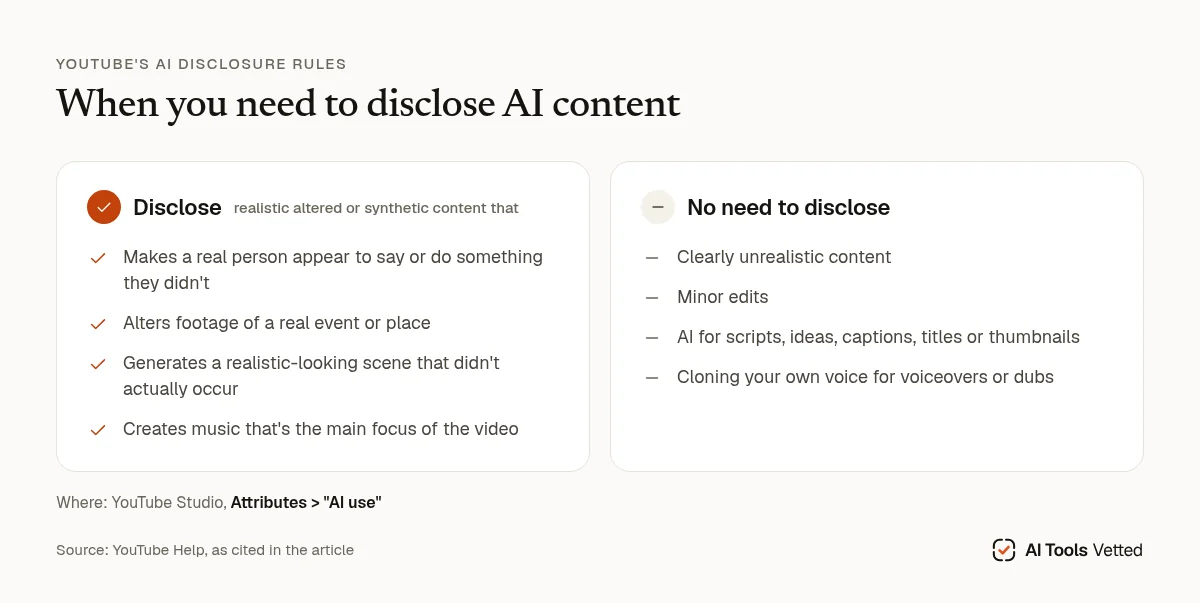
YouTube requires creators to disclose realistic altered or synthetic content when it:
- makes a real person appear to say or do something they didn’t;
- alters footage of a real event or place;
- generates a realistic-looking scene that didn’t actually occur; or
- creates music that’s the main focus of the video.
You disclose in YouTube Studio under Attributes > “AI use”. You don’t need to disclose clearly unrealistic content, minor edits, or using AI for scripts, ideas, captions, titles or thumbnails. Cloning your own voice for voiceovers or dubs doesn’t need disclosure either. YouTube says disclosing “won’t limit a video’s audience or impact its eligibility to earn money,” but creators who consistently choose not to disclose may get a label applied by YouTube or face penalties, including removal of content or suspension from the YouTube Partner Program.
Monetization has separate rules (monetization policies). YouTube excludes “AI-generated content made with generic or unoriginal templates giving the impression of mass production without adding the creator’s original, authentic insights or perspective.” Channels using AI personas presented as human experts giving health, legal, financial or political advice can’t monetize, and YouTube’s examples include an AI “doctor”. If you plan an avatar-led channel, keep it out of those topics or present it honestly.
FAQ
Is there a free AI video generator for YouTube? All three have free plans: InVideo’s free credits are limited, HeyGen’s free videos are capped at 1 minute, and Synthesia’s free videos are watermarked.
Do I have to label AI videos on YouTube? Only realistic altered or synthetic content in the cases above, plus AI music that’s the main focus. Using AI for scripts, captions or thumbnails, or cloning your own voice, doesn’t need a label.
Can AI videos be monetized? Yes, if they’re original and add your own insight. Mass-produced template content and AI personas giving expert advice on health, legal, financial or political topics can’t be monetized.
Which is best for YouTube Shorts? InVideo, HeyGen and Synthesia all document vertical output. None confirms which plans include it, so check before you pay.
Is ElevenLabs a video generator? No. It’s a voice tool for voiceover and dubbing. We list it as an add-on, not as part of the ranking.
Verdict
Start with InVideo AI if you run a faceless channel and want prompt-to-video plus a real editor. Pick HeyGen if you want an avatar or talking-head channel: long videos on Creator, 4K on Pro, a big avatar library and rolling credits. Choose Synthesia for tutorials and explainers, especially if you want the bigger free plan or the cheaper yearly entry price. Whichever you choose, add ElevenLabs if the voice is what makes or breaks your videos, or if you want to dub into other languages. Related: best AI voice generators for YouTube.
InVideo AI: Check today’s price
Sources (official pages, checked on October 3, 2026)
These are the official pages cited above. Prices and plans change often, so confirm them on the provider’s site before you buy.
- InVideo AI help: editing and credits: help.invideo.io/en/articles/16920220
- InVideo AI pricing: invideo.io/pricing
- InVideo AI help: free plan: help.invideo.io/en/articles/9380226
- HeyGen pricing: heygen.com/pricing
- HeyGen blog: AI Studio: heygen.com/blog/how-to-edit-ai-videos-faster-with-ai-studio
- Synthesia pricing: synthesia.io/pricing
- ElevenLabs pricing: elevenlabs.io/pricing
- ElevenLabs Dubbing Studio: elevenlabs.io/dubbing-studio
- ElevenLabs help: free-plan attribution and commercial use: help.elevenlabs.io/hc/en-us/articles/13313564601361
- YouTube Help: Shorts length: support.google.com/youtube/answer/15424877
- InVideo AI help: changing the aspect ratio: help.invideo.io/en/articles/9380486
- InVideo AI blog: vertical shot generation (July 2026): invideo.io/blog/ai-micro-drama-vertical-shot-generation
- Synthesia help: video sizes (9:16): help.synthesia.io/en/articles/8272053
- HeyGen help: Video Podcast (9:16): help.heygen.com/en/articles/15707329
- YouTube Help: disclosing altered or synthetic content: support.google.com/youtube/answer/14328491
- YouTube Help: monetization policies: support.google.com/youtube/answer/1311392