
Affiliate disclosure: AI Tools Vetted is reader-supported. If you subscribe through our affiliate links, marked sponsored, we may earn a commission at no extra cost to you. Our Grammarly, QuillBot and Jasper links may be affiliate links. Recommendations below follow documented features and workflow fit, not commission rates. Ownership note: Grammarly’s official plans page footer read “2026 © Superhuman Platform” on November 9, 2026, and Enterprise is described as available through Superhuman Go. Treat Grammarly as part of that Superhuman Platform branding when you evaluate vendor risk—not as a freestanding brand story.
Prices checked November 9, 2026, at 09:15–09:20 BRT on official English-language pages (USD, before tax, US view via desktop UA). Grammarly Pro list prices come from the embedded plan JSON and the visible $12/mo annual headline on grammarly.com/plans. QuillBot’s Premium page rendered in BRL in our browser today—USD list prices were not shown in that session, so we do not convert currencies. These are public page prices, not checkout quotes.
Grammarly is still the writing assistant most people mean when they say “AI grammar checker”: browser extension, desktop and mobile apps, Docs, tone and rewrite tools, plus Pro extras for plagiarism checks, AI-text detection and higher AI-prompt limits. The Free plan is useful for spelling, basic grammar and a light AI prompt quota. Pro is the plan that unlocks full-sentence rewrites, tone control, fluency help, plagiarism and AI detection. This review maps Free vs Pro from the official page, dates the prices we could verify, and tells you when to skip Pro for a paraphraser or a long-form marketing writer instead.
Verdict in 30 seconds
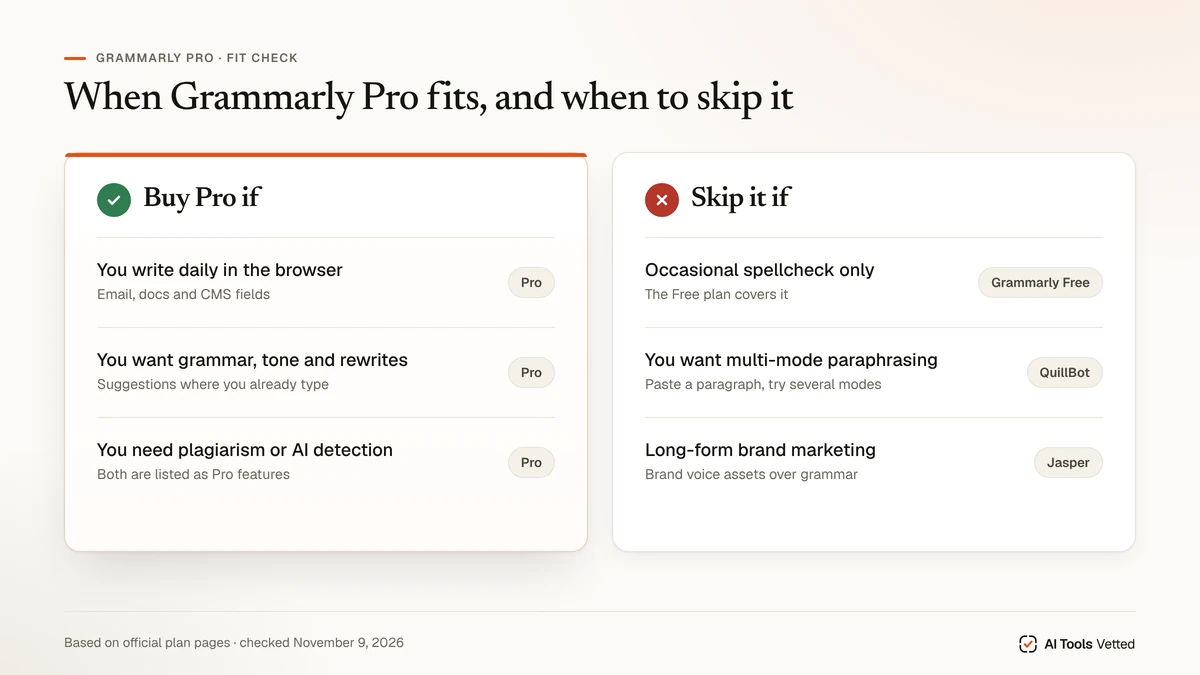
Buy Grammarly Pro if you write every day across email, docs and the browser, you want rewrites and tone control in that workflow, and you will use plagiarism or AI-detection checks enough to justify ~$12/mo on annual billing (or $30/mo month-to-month).
Skip Pro if you only need occasional spellcheck (stay on Free), you mainly need multi-mode paraphrasing (see QuillBot review), or you need long-form marketing drafts with brand systems (see Jasper AI review).
| Need | Fit | Why |
|---|---|---|
| Daily grammar, tone and in-browser rewrites | Grammarly Pro | Pro unlocks full-sentence rewrites, tone adjustment, plagiarism + AI detection |
| Occasional spelling/grammar only | Grammarly Free | $0; basic corrections, tone readout, 100 AI prompts/month |
| Multi-mode paraphrase | QuillBot | Dedicated paraphraser modes — not a Grammarly clone |
| Long-form on-brand marketing copy | Jasper | Brand Voices / Knowledge on Pro; higher entry price |
What Grammarly is in 2026
Grammarly markets a writing stack that sits where you already type: browser extension, desktop and mobile apps, and Grammarly Docs, plus a menu of AI writing tools (grammar checker, paraphrasing tool, plagiarism checker, AI Detector, and more) and AI agents such as Resume Builder, Citation Finder, AI Grader and Reader Reactions on the product navigation we read November 9, 2026.
On the same plans page, Enterprise is described as driving results “with Grammarly, available through Superhuman Go,” and the site footer credited Superhuman Platform. We are not restating acquisition press beyond what the official page shows today: Grammarly product surfaces sit under that Superhuman Platform branding.
Treat Grammarly as a correction and clarity layer that can also rewrite sentences and check originality on Pro—not as a dedicated multi-mode paraphraser and not as a long-form SEO article suite.
Grammarly pricing in 2026
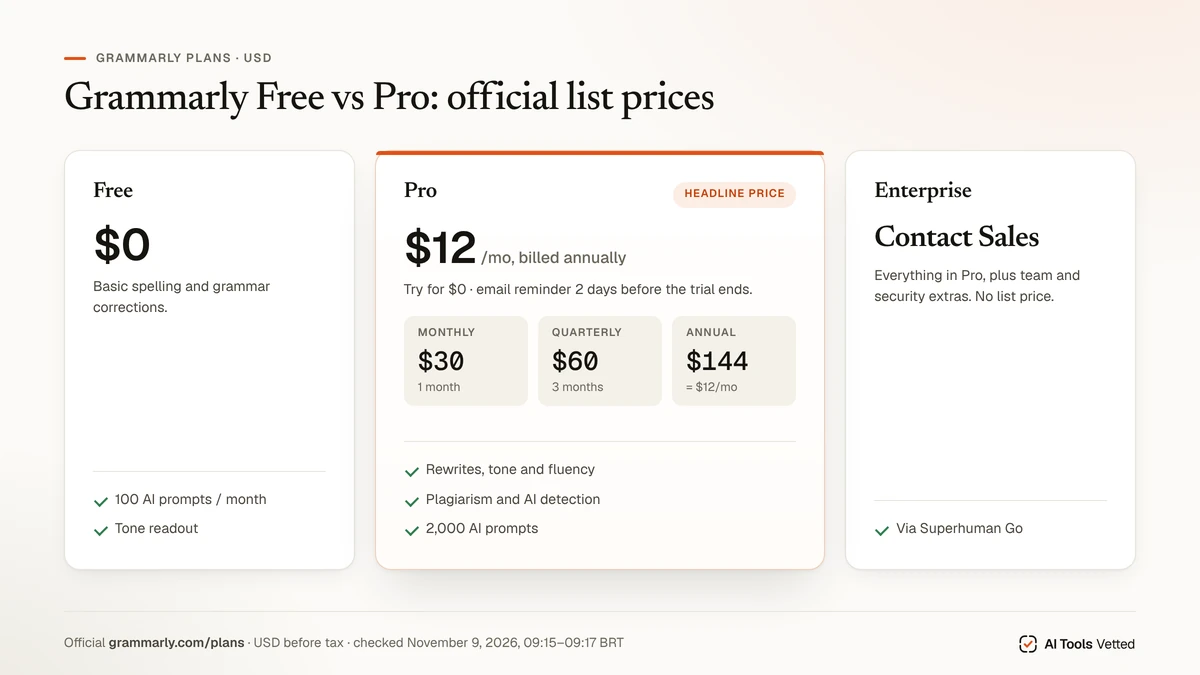
Official figures from grammarly.com/plans on November 9, 2026 (09:15–09:17 BRT).
Visible cards:
| Plan | Headline price shown | Notes from the page |
|---|---|---|
| Free | $0 USD / month | “Write without spelling and grammar mistakes.” Create account. |
| Pro | $12 USD (per month framing) | “Try for free”; “Email reminder 2 days before trial ends”; “Try for $0.00” / “$0 payment today.” |
| Enterprise | Contact Sales | “Everything in Pro, plus…” team/security extras; available through Superhuman Go. |
Embedded plan JSON on the same page (regular Pro personal plans we read) listed:
| Billing period | Regular price (USD) | Period |
|---|---|---|
| Monthly | $30 | 1 month |
| Quarterly | $60 | 3 months |
| Annual | $144 | 12 months (matches the ~$12/mo headline: 144 ÷ 12) |
Other plan IDs appear in the same JSON (promo/tier variants such as $25 monthly or Superhuman Basic Pro $15). We cite the clear Free / Pro / Enterprise cards plus the Monthly $30 · Quarterly $60 · Annual $144 Pro set that matches the public $12/mo annual story. Tax and checkout promos can differ.
| Plan | List price (USD) | What the page emphasizes |
|---|---|---|
| Free | $0 / month | Basic corrections, see writing tone, 100 AI prompts / month |
| Pro (annual) | $144 / year (~$12 / mo) | Rewrites, tone, fluency, plagiarism + AI detection, 2,000 AI prompts / member / month |
| Pro (monthly) | $30 / month | Same Pro feature set on month-to-month billing |
| Pro (quarterly) | $60 / quarter | Same Pro feature set on 3-month billing |
| Enterprise | Contact Sales | Pro plus org security, support, Superhuman Go positioning |
Free vs Pro: what you actually unlock
From the Free / Pro / Enterprise comparison on grammarly.com/plans (November 9, 2026):
Free includes
- Write without mistakes (spelling/grammar)
- See your writing tone
- Generate text with 100 AI prompts / month
Pro adds (“Everything in Free, plus”)
- Rewrite full sentences with a click
- Adjust your writing tone
- Write fluently in English
- Unlimited personalized suggestions
- Detect plagiarism and AI-generated text (“Detect AI generated text” / “Catch accidental plagiarism” in the matrix)
- Generate text with 2,000 AI prompts / member / month
- Style guide: 1 on Pro (Unlimited on Enterprise)
- Brand tones: 1 on Pro (Unlimited on Enterprise)
Still Free-unavailable (Pro/Enterprise only in the matrix we read): adjust tone, rewrite full sentences, fluency, inclusive language, consistent citations, AI-text detection, plagiarism catch.
Enterprise adds proactive AI, dedicated support, BYOK encryption, custom roles and a long list of admin/security controls. Contact Sales—no self-serve dollar amount on the page.
Agents listed in product navigation (Resume Builder, Citation Finder, AI Grader, Reader Reactions) are product surfaces on the site; we did not separately meter agent quotas beyond the prompt limits above.
What it does well
Grammarly’s strength is presence: corrections and suggestions where you already write, not only inside one editor tab. Free is enough to catch obvious mistakes and see tone. Pro is the plan that turns Grammarly into a rewrite-and-clarity layer with originality checks.
For teams, Pro’s single style guide and brand tone are a starting point; Enterprise is the path when SSO, SCIM, DLP and custom roles show up as requirements on the matrix.
If your daily friction is “this sentence is awkward in Gmail / Docs / CMS,” Grammarly Pro is aimed at that job more than a standalone paraphraser is.
Where it falls short
We did not run our own long-term writing test and do not claim one. Limits below come from the official plan scope and from recurring themes in public complaint boards and independent reviews—attributed, not scored by us.
- Suggestions can feel aggressive. Independent reviews and Trustpilot threads often complain about noisy or unwanted rewrites. Tune suggestion intensity in-product rather than accepting every underline.
- Billing and cancel friction appear in public complaints. Trustpilot and BBB complaint listings recurrently mention billing, renewals and refunds. That is not a lab result of ours—read Grammarly’s own cancel article before you start a trial (linked in FAQ).
- Rewrites ≠ long-form article generator. Pro rewrites sentences and raises AI prompt limits; it is not positioned on the plans page as a research-to-SEO article suite. For that job see our best AI content writer guide.
- Paraphrase depth. Grammarly lists a paraphrasing tool in its tools menu, but multi-mode paraphrase workflows are still QuillBot’s center of gravity—see Grammarly vs QuillBot rather than replaying that head-to-head here.
Grammarly alternatives
Keep this short—full shortlists live elsewhere.
Want deeper paraphrase modes → QuillBot
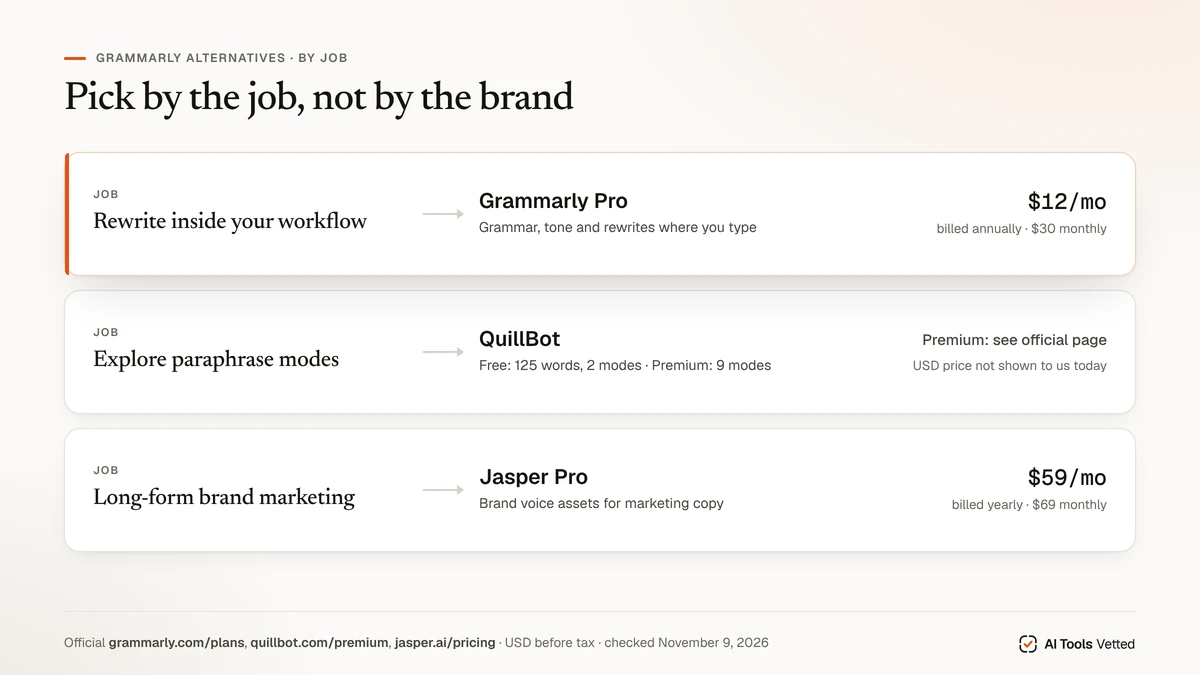
QuillBot is the paraphraser-first option (Free word cap + Premium modes). On November 9, 2026 our browser session on quillbot.com/premium rendered BRL (Premium R$20.83/mo billed annually; Free R$0), so we are not publishing a USD Premium figure from that session. Free limits visible today included paraphrase up to 125 words and 2 modes. Full Premium review: QuillBot review. Head-to-head: Grammarly vs QuillBot.
Want more writing assistants / cheaper checkers → alternatives guide
For a wider Free/Pro checker field (LanguageTool, ProWritingAid and others), use our Grammarly alternatives guide instead of expanding this review into a listicle.
Want long-form marketing copy → Jasper
Jasper Pro was $59/seat/month billed yearly or $69/month billed monthly on jasper.ai/pricing November 9, 2026, with a free trial promoted on the page. Choose Jasper when brand voice assets matter more than in-browser grammar. Details: Jasper AI review.
How we evaluated
We read Grammarly’s official plans page (US English, USD) on November 9, 2026, including the visible Free / Pro / Enterprise cards and the embedded Monthly $30 · Quarterly $60 · Annual $144 Pro prices, mapped Free vs Pro feature claims from the same page, opened QuillBot Premium and Jasper pricing the same morning, and noted Superhuman Platform / Superhuman Go wording on Grammarly’s page. We summarized recurring billing themes from public Trustpilot and BBB listings without treating them as our own scores.
This is a research-based review, not an output-quality benchmark. We did not run our own long-term test, assign accuracy scores or claim “we tested” Grammarly. Public prices can differ from a later checkout quote. Raw captures sit under fila/artigos/raw-A59A60A61-20261109/.
FAQ
Is Grammarly free?
Yes. The Free plan is $0/month and includes basic spelling/grammar corrections, seeing your writing tone, and 100 AI prompts per month, per grammarly.com/plans on November 9, 2026.
How much does Grammarly Pro cost in 2026?
On November 9, 2026 the page showed a $12/mo Pro headline with a $0 trial CTA, while embedded Pro list prices were $30 monthly, $60 quarterly and $144 annually. Enterprise is Contact Sales.
Is Grammarly worth it?
If you live in email and docs and will use rewrites, tone and originality checks, Pro is the plan that matches that job. If you only need occasional corrections, Free is enough. If paraphrase modes are the job, start with QuillBot; if long-form brand marketing is the job, start with Jasper or our best AI content writer shortlist.
Grammarly vs QuillBot?
Different centers of gravity: Grammarly for in-workflow correction/rewrite; QuillBot for multi-mode paraphrasing. Full comparison: Grammarly vs QuillBot.
Does Grammarly check plagiarism / AI text?
On the Free vs Pro matrix we read, detecting AI-generated text and catching accidental plagiarism are Pro (and Enterprise) features—not Free. Grammarly does not promise “undetectable” writing, and neither do we.
How do I cancel Grammarly?
Per Grammarly Support’s How do I cancel my subscription? article: canceling stops automatic renewal; you keep paid features until the current period ends. The article walks through Account → Subscription → Cancel Subscription, and notes App Store / mobile paths. If you started a $0 trial, cancel before it ends if you do not want to be charged—see Grammarly’s trial-cancel help for the trial-specific wording.
Verdict
Grammarly Free is a solid everyday checker. Grammarly Pro is worth the annual ~$12/mo framing when rewrites, tone, plagiarism and AI detection sit in your daily path—and worth skipping when you really needed a paraphraser or a marketing article engine instead. Budget with the dated Free / $30 / $60 / $144 figures above, confirm checkout before you buy, and cancel trials from the official support path if you are only evaluating.
Sources
Official pages and support checked November 9, 2026, 09:15–09:20 BRT:
- Grammarly plans / pricing (Free $0; Pro $12 headline; Monthly $30 · Quarterly $60 · Annual $144; Enterprise Contact Sales; Superhuman Platform footer)
- Grammarly Support: cancel subscription
- QuillBot Premium (browser render in BRL; Learneo, Inc. footer)
- Jasper pricing (Pro $59 yearly / $69 monthly)
- Trustpilot: Grammarly · BBB complaints profile (themes only)
- Internal: Grammarly alternatives · Grammarly vs QuillBot · QuillBot review · Jasper AI review · best AI content writer