
Affiliate disclosure: AI Tools Vetted is reader-supported. Some links below are affiliate links (marked “sponsored”): if you sign up through them, we may earn a commission at no extra cost to you. Our Murf and ElevenLabs links may be affiliate links. The verdict below follows Murf’s official pricing and published features, and we point you to a competitor where it fits you better.
Prices checked October 30, 2026, at 09:19–09:20 BRT on Murf’s official pricing page (USD, before tax), rendered in a browser because the prices load with JavaScript.
Quick take
Verdict in 30 seconds
Murf is a text-to-speech studio for narration: e-learning modules, product demos, explainer videos and presentations. You type or paste a script, pick from 200+ voices, and adjust pronunciation, pauses and, on Business, emphasis. Plans are capped by hours of generated speech per year, not by characters.
Pick Murf if you narrate training or presentation content, want a simple editor with Canva (and, on Business, PowerPoint and Google Slides) integrations, and your yearly output fits within 24 or 96 hours. Skip it if you want to test downloads for free (the free plan has none), need self-serve voice cloning on a small budget (custom clones are an Enterprise add-on), or produce many hours of audio a month. In those cases, ElevenLabs is worth comparing first.
What Murf AI is
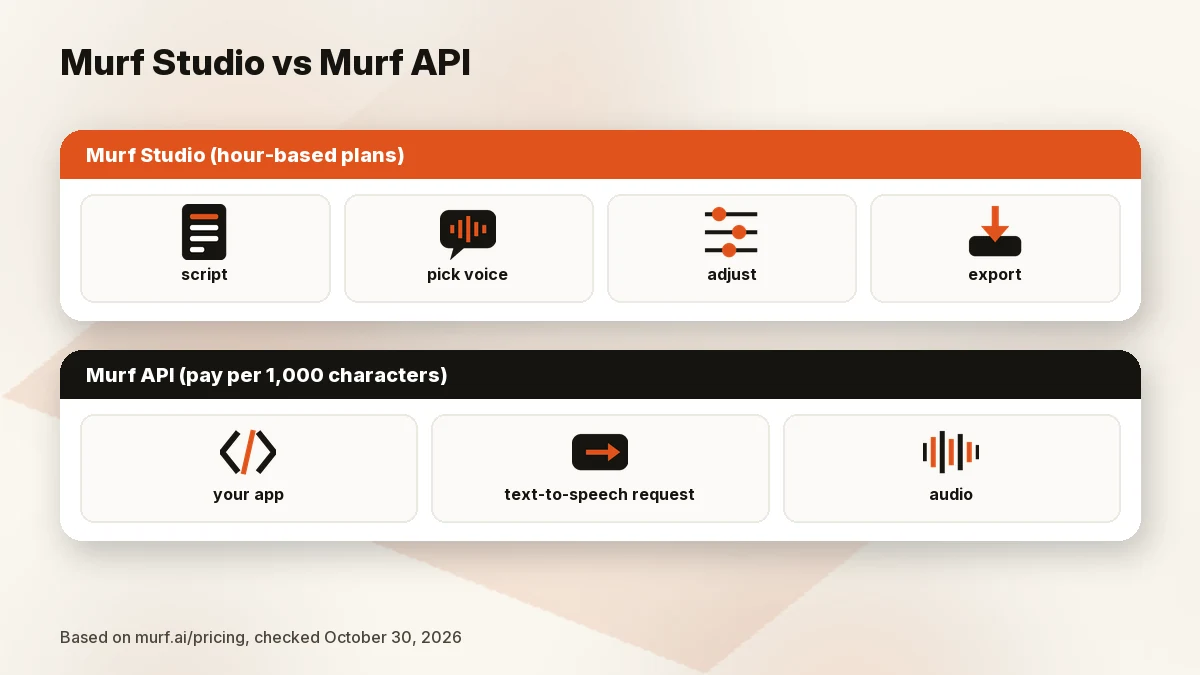
Murf sells three products on one pricing page: Studio (the voiceover editor this review covers), API (text-to-speech for developers and voice agents) and Dub. Studio lists 200+ voices and 30+ languages and accents on paid plans, plus voice styles, pronunciation changes and “MultiNative” voices. The site also lists a voice changer, AI dubbing, transcription and a Canva add-on.
The API is priced separately, per usage. On October 30, 2026 (09:19 BRT), the API tab listed a conversational text-to-speech model at $0.01 per 1,000 characters, studio-quality text-to-speech at $0.03 per 1,000 characters, speech-to-text (beta) at $0.24 per hour, the voice changer at $0.10 per minute and translation at $0.02 per 1,000 characters. The FAQ mentions a “Falcon 2.1” model. If you’re a developer, that’s a different buying decision from Studio.
The company’s footer lists an address in Salt Lake City, Utah.
Murf AI pricing
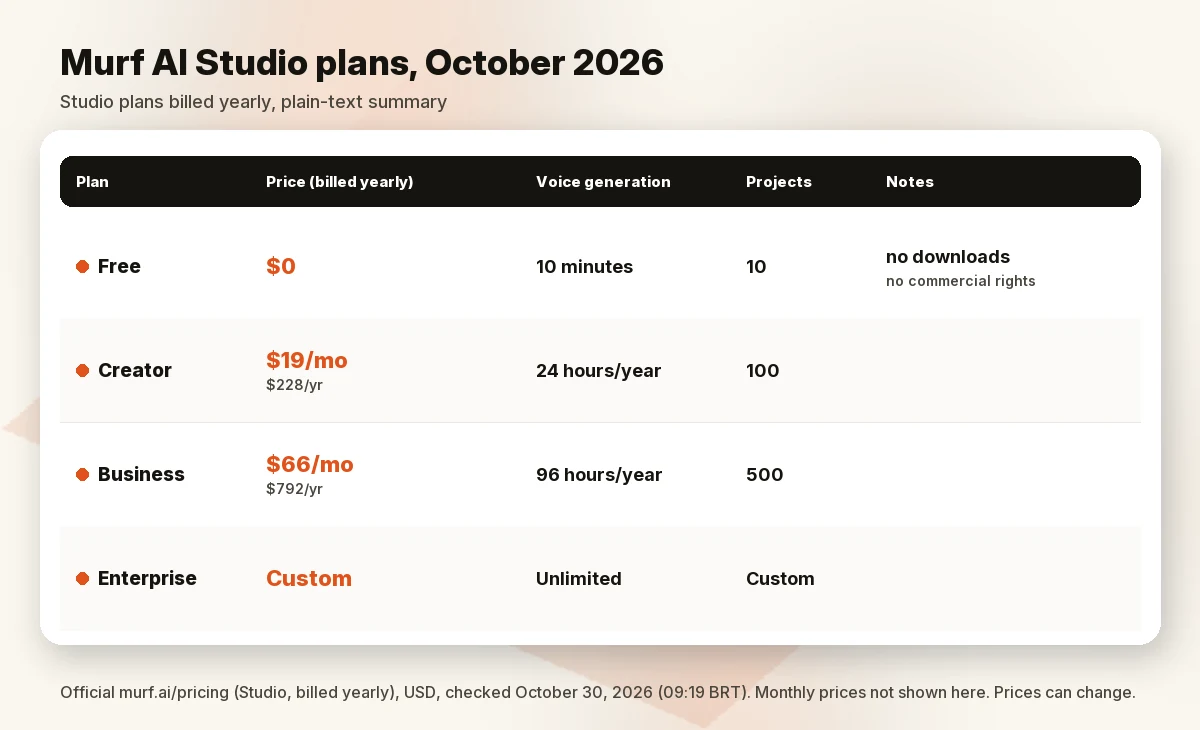
Murf’s Studio tab showed four plans on October 30, 2026 (09:19 BRT). The page has a “Billed Monthly / Billed Yearly (Saved 33%)” switch, and the prices below are the yearly ones. We couldn’t get the monthly view to display, so we don’t list monthly prices. Check them on the page before you buy.
| Plan | Price (billed yearly) | Voice generation | Projects | Key inclusions |
|---|---|---|---|---|
| Free | $0 | 10 minutes total | 10 | Business features to try, no downloads, no commercial rights |
| Creator | $19/mo ($228/yr) | 24 hours a year | 100 | 200+ voices, unlimited downloads, Canva, commercial rights, 1 editor |
| Business | $66/mo ($792/yr) | 96 hours a year | 500 | Adds business license, emphasis, variability, “Say It My Way,” PowerPoint, Google Slides, audio to text (48 hours) |
| Enterprise | Custom | Unlimited | Custom | SSO, “No Training on your Data,” AI translation, custom voice clones (add-on), 5+ editors |
All three self-serve tiers list one editor seat. Murf’s FAQ says a registered business should use the Business plan rather than Creator, because Business carries the business license. Murf also notes that some US states charge sales tax, shown before checkout.
Free plan: what you actually get
The free plan gives you 10 minutes of voice generation, 10 projects and one editor. It lets you try Business plan features, but with no downloads and no commercial rights. Per the FAQ, there is no time limit on the free plan: it lasts until you use the 10 minutes. If you upgrade, unused free minutes move to your account as “Additional minutes.” It’s enough to judge whether the voices suit your script, but not to produce anything you can publish.
Paid plans: hours, seats and yearly limits
Creator and Business are priced by hours of generated speech. On yearly plans, Murf’s FAQ says there’s “just an overall yearly limit,” so you can use more in a busy month and less in a quiet one. On plans with several users, generation time is shared. Projects aren’t refilled every month: the project number is the maximum you can keep in your workspace at once, so you may need to delete old projects or upgrade.
Cancelling is done from “Manage Billing” in your profile, and access continues to the end of the billing cycle. On refunds, the FAQ is strict: “Payments already made against monthly or annual subscriptions would not be eligible for a refund.” Use the free 10 minutes before you pay.
How hour-based limits play out
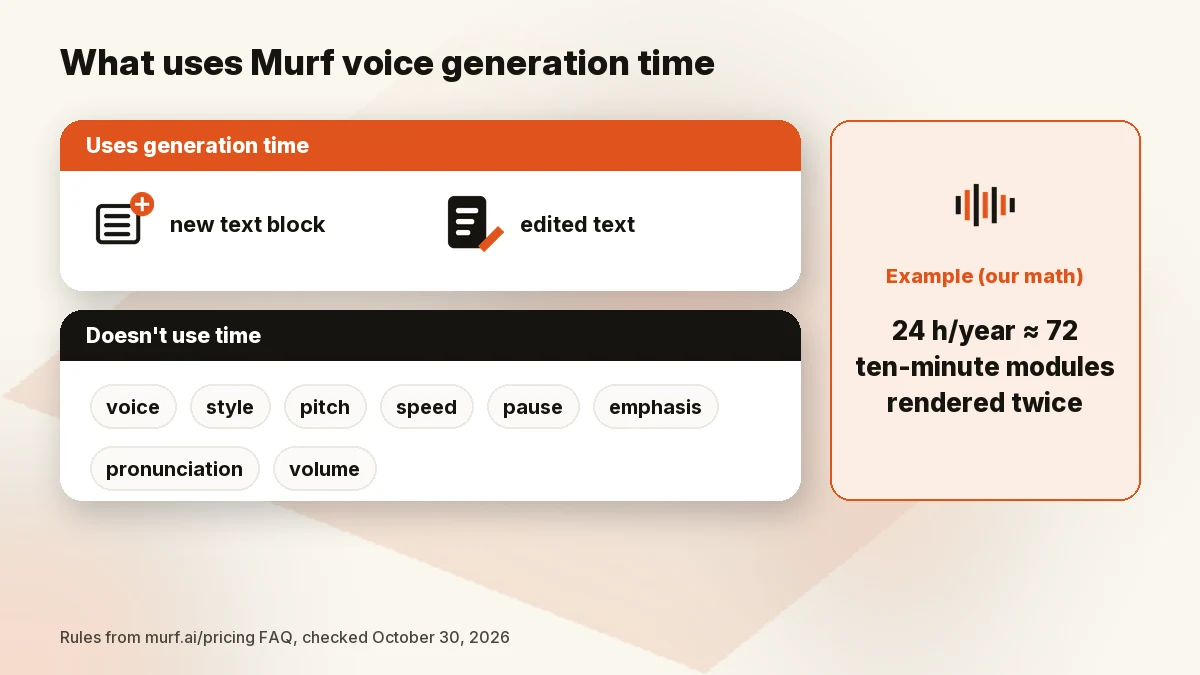
Murf’s FAQ says generation time is “consumed every time you render a newly created text block or modify text in an existing text block.” Changing the voice, style, pitch, speed, pauses, emphasis, pronunciation, punctuation or volume for the same text does not use time. In practice, editing the words costs time; tuning the delivery doesn’t.
Example (our math, not Murf’s): Creator’s 24 hours a year is 1,440 minutes. If you publish a 10-minute training module and rewrite the script enough to re-render it once in full, that module uses about 20 minutes. At that pace, 24 hours covers roughly 72 modules a year, or about six a month. Heavy rewriting lowers that number quickly. Business’s 96 hours would cover about four times as much at the same pace.
Features that matter
From the pricing page’s feature comparison (October 30, 2026):
- Voice controls: pronunciation changes on every plan; emphasis, variability and “Say It My Way” on Business and above.
- Integrations: Canva on all paid plans; PowerPoint plugin, Google Slides and Murf voices for Windows apps on Business and above.
- Exports: unlimited downloads on paid plans, in “Full HD” export quality; Enterprise adds higher bitrate.
- Pronunciation library: personal on Creator and Business; shared on Enterprise.
- Voice cloning: listed only as “Custom Voice Clones (Add-on)” on Enterprise. Murf’s voice-cloning page says using voice duplication without consent can be considered illegal. Only clone your own voice or one you have written permission to use.
- Voice sourcing: Murf’s Ethical AI page says every Murf voice “emerges from active collaboration and explicit consent from its creators.”
- Security: the pricing page lists GDPR and SOC 2 on all plans; SSO and access logs on Enterprise.
Pros and cons
Pros
- Clear yearly prices and hour allowances on the official page.
- Tweaking pitch, speed, pauses or pronunciation doesn’t use generation time.
- Yearly hours can be used unevenly across months.
- Business adds PowerPoint and Google Slides integrations, useful for training teams.
- Commercial rights on all paid plans, including YouTube monetization per the FAQ (as long as your script is original).
Cons
- The free plan has no downloads and no commercial rights.
- No refunds on payments already made, per the FAQ.
- Self-serve plans include one editor seat each.
- Custom voice cloning is Enterprise-only, as a paid add-on.
- Creator’s 24 hours a year can run out fast if you rewrite scripts often.
- Monthly prices weren’t visible to us, so the real cost of monthly billing is unconfirmed here.
Who Murf is for, and who should skip it
Murf fits instructional designers, L&D teams, marketers making product demos, and solo creators narrating slide-based videos. The editor-plus-integrations setup is the reason to choose it.
Skip Murf if:
- You need affordable, self-serve voice cloning.
- You want expressive character voices for audiobooks or games and want to compare options on a free tier that allows downloads.
- You produce many hours of audio a month; the yearly caps get tight.
- You want a free plan you can download from.
Murf vs ElevenLabs in one paragraph
ElevenLabs prices by credits rather than hours. Its official pricing page (October 30, 2026, 09:19 BRT) listed Free at $0 (10,000 credits a month), Starter at $6 a month and Creator at $22 a month, with Pro at $99. The page also showed first-month promo prices of $1 (Starter) and $11 (Creator), but its promo banner still said “Ends September 30” with a zeroed countdown, so those first-month offers may already have ended; confirm at checkout. The page lists commercial use from Starter and Professional Voice Cloning from Creator. If cloning matters to you, that’s a meaningful difference from Murf’s Enterprise-only add-on. Murf is easier to justify for slide and e-learning narration because of its Studio integrations. The two price models differ (hours versus credits), so this isn’t a like-for-like price comparison. Read our full ElevenLabs vs Murf comparison. Check ElevenLabs price
Alternatives
- ElevenLabs: credit-based plans and self-serve voice cloning from its Creator plan (see above).
- More options: our best text-to-speech app list and best AI voice generator for YouTube guide cover other tools, including reader apps like Speechify.
How we evaluated
We read Murf’s official pricing page (Studio and API tabs, including its FAQ), its voice-cloning page and its Ethical AI page on October 30, 2026 (09:19–09:21 BRT). The prices load with JavaScript, so we read them in a browser and saved the rendered text. The yearly prices displayed; the monthly view did not, so we left monthly prices out. We also read ElevenLabs’ official pricing page and cross-checked recent independent reviews to see which older plan names (no longer shown) still circulate. We did not run our own listening test and don’t claim one.
FAQ
Is Murf AI worth it in 2026?
For slide-based and e-learning narration that fits in 24 or 96 hours a year, it can be. Start with the free 10 minutes to hear the voices with your own script. If you need cloning or lots of hours, compare ElevenLabs first.
How much does Murf AI cost?
On October 30, 2026, Murf’s official page listed Creator at $19/mo billed yearly ($228) and Business at $66/mo billed yearly ($792), with Enterprise priced on request. We couldn’t confirm monthly-billing prices.
Is Murf AI free? Can I download on the free plan?
There is a free plan with 10 minutes of voice generation and no time limit, but it has no downloads and no commercial rights.
Can I use Murf voices commercially?
Paid plans include commercial rights. Murf’s FAQ says you can use voiceovers on YouTube and monetize them as long as your text is original. Registered businesses are told to use the Business plan.
Does Murf AI have voice cloning, and on which plan?
On the pricing page, custom voice clones are listed as an add-on on the Enterprise plan only. Use a clone only of your own voice or with the speaker’s written permission.
Murf AI vs ElevenLabs: which is better?
It depends on the job. Murf leans toward narration with presentation integrations; ElevenLabs offers credit-based plans with cloning from Creator. See ElevenLabs vs Murf.
Bottom line
Murf is a straightforward narration studio with easy-to-read limits: hours a year, projects kept at once, one editor per self-serve plan. It suits training and presentation work. The free plan can’t export, refunds aren’t offered on payments made, and cloning sits behind Enterprise, so try the free minutes before you commit.
Last updated: October 30, 2026.
Sources
Official pages checked October 30, 2026, 09:19–09:21 BRT (USD):
- Murf pricing (Studio and API tabs, FAQ; browser render 09:19–09:20 BRT)
- Murf voice cloning (09:21 BRT)
- Murf Ethical AI (09:21 BRT)
- ElevenLabs pricing (09:19 BRT)