
Affiliate disclosure: AI Tools Vetted is reader-supported. Some links below are affiliate links (marked “sponsored”): if you sign up through them, we may earn a commission at no extra cost to you. Our Synthesia and InVideo links are affiliate links. Our HeyGen link is a plain link: we don’t earn anything from it. Picks follow official pricing and published features, not commissions.
Prices checked October 26, 2026, at 01:04–01:09 BRT on each vendor’s official US pricing page (USD); Synthesia’s pricing page was read again at 06:58 BRT and is the version quoted below.
Quick take
Verdict in 30 seconds
Synthesia turns a script into a video read by an AI avatar, in many languages, without a camera or a studio. Its pricing page, help center and policies are written for companies: training, onboarding, internal communication, compliance and multilingual content.
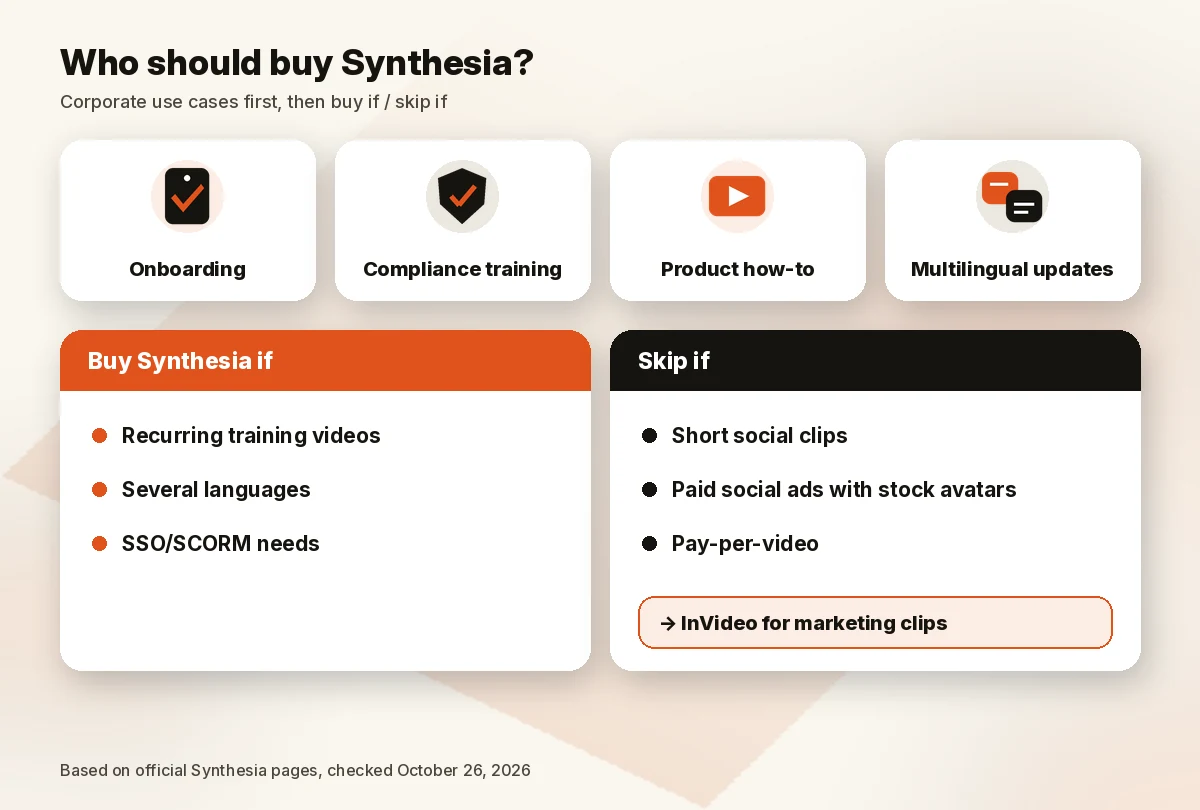
Buy Synthesia if you produce recurring training or explainer videos, need them in several languages, and want enterprise basics like SSO, SCORM export and clear consent rules for avatars. Skip it if you mainly make short marketing clips for TikTok, Reels or YouTube: InVideo fits that job better, and Synthesia’s own policy limits stock avatars in paid social ads. Start on the free Basic plan before paying, because purchases are non-refundable.
What Synthesia is: AI avatars for business video
Synthesia is a London-based company (Synthesia Ltd). You type or paste a script, pick an avatar and a voice, and the platform renders a presenter video. You can also import a PowerPoint, dub existing videos and translate them.
The pricing page lists 140+ languages and voices, 125+ stock avatars on Starter (240+ on Enterprise), personal avatars of yourself or a colleague, interactive videos, surveys, roleplays and an AI video agent called Syren. Enterprise adds SAML/SSO, live collaboration, brand kits and SCORM export for learning management systems (LMS).
That’s why we treat Synthesia as a corporate video tool rather than a creator tool. If you want the broader picture, our best AI video generators guide compares it with prompt-to-video tools.
Synthesia pricing
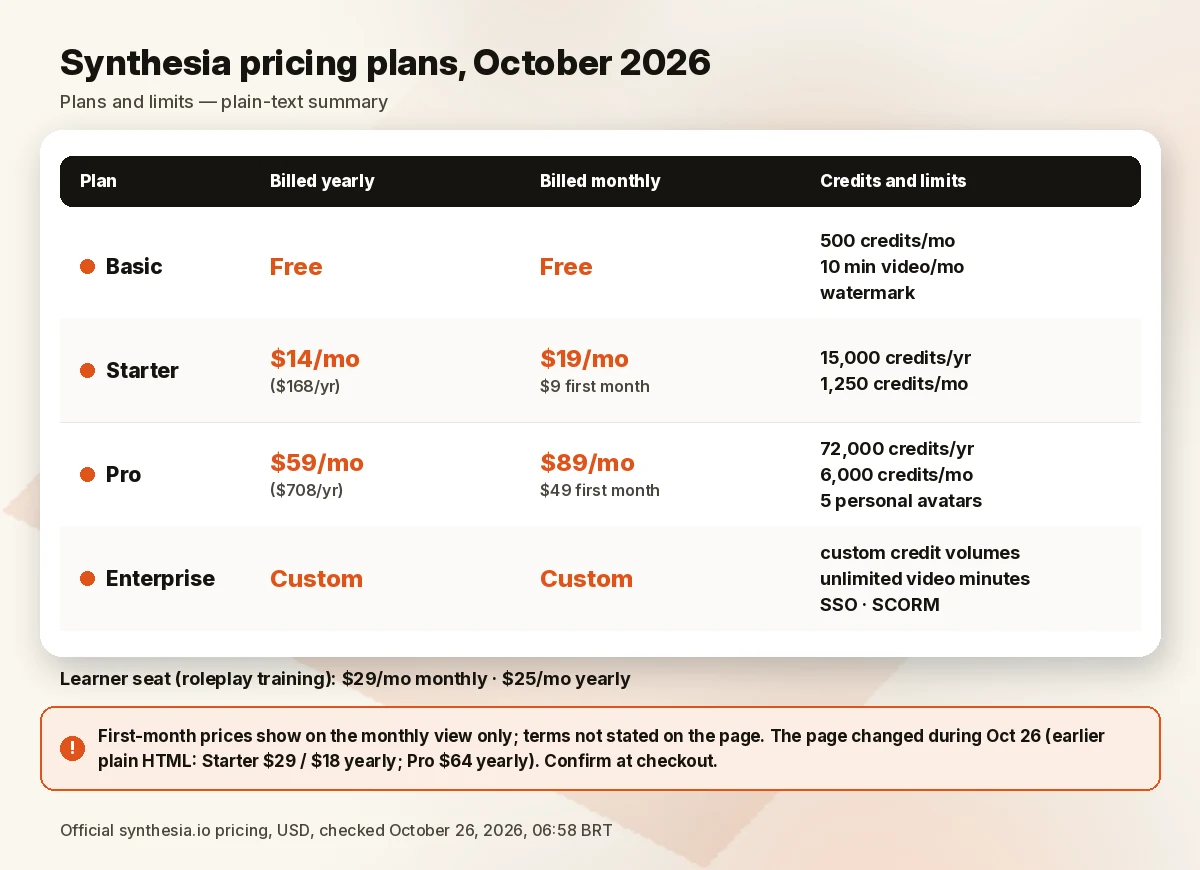
Here is what Synthesia’s official pricing page showed in a US browser on October 26, 2026 (06:58 BRT), in both the Yearly and Monthly views.
| Plan | Billed yearly | Billed monthly | Credits | Video included (Synthesia’s estimate) | Key extras |
|---|---|---|---|---|---|
| Basic | Free | Free | 500/mo | 10 min/mo | Watermark, 9 avatars, 1 editor |
| Starter | $14/mo | $19/mo ($9 first month) | 15,000/yr or 1,250/mo | ~150 min/yr or ~12 min/mo on top of Basic | Downloads, no logo, 125+ avatars, 3 guests |
| Pro | $59/mo | $89/mo ($49 first month) | 72,000/yr or 6,000/mo | ~720 min/yr or ~60 min/mo on top of Basic | 5 personal avatars, interactive videos, 180+ avatars, priority support |
| Enterprise | Custom | Custom | Custom | Unlimited video minutes | SSO, SCORM, 1-click translation, unlimited personal avatars |
Billed yearly, the page shows $168 a year for Starter and $708 a year for Pro, and labels them “3 months free” and “4 months free” against the monthly price. The first-month prices ($9 and $49) appear only in the Monthly view, and the page doesn’t say who qualifies, so treat them as an offer to confirm at checkout. A learner seat (for roleplay training) is a separate add-on at $29/month billed monthly or $25/month billed yearly. Pro is also sold at higher credit levels (for example 12,000 credits a month at $176); pick one in the plan selector to see its price.
Price caveat: Synthesia changed its pricing page more than once on October 26. When we first read it at 01:04 BRT, the plain HTML listed Starter at $29 a month ($18/mo billed yearly) and Pro at $64/mo billed yearly, while the fully loaded page showed Starter at $19 ($14/mo billed yearly) and Pro at $59/mo billed yearly. When we read it again at 06:58 BRT, the plain HTML and the loaded page (two separate loads in a US browser) matched the table above, and the first-month offers had appeared in the Monthly view. Treat the table as what the page displayed at 06:58 BRT and confirm the final price, and whether the first-month offer applies to you, at checkout. The plan cards also advertised limited-time promo credits for Syren, Synthesia’s AI video agent, so check the offer before you buy.
Minutes and credits
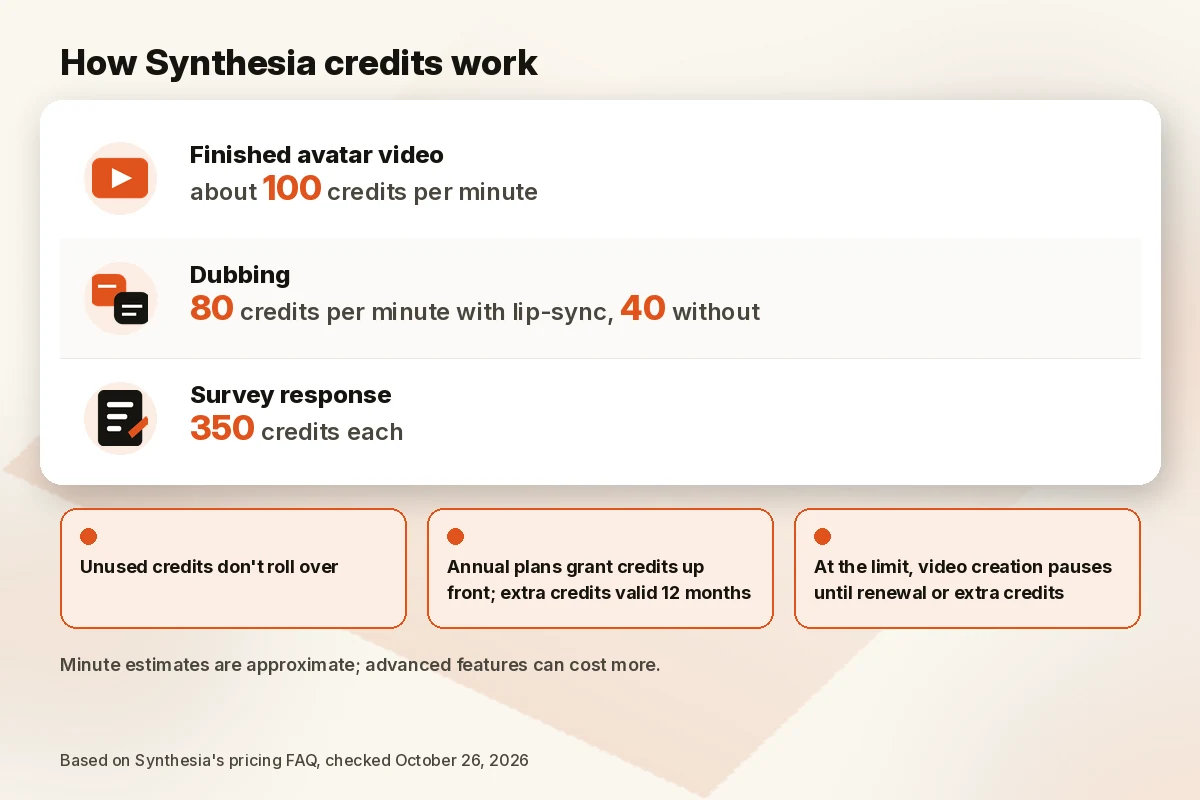
Synthesia now meters usage in credits, then translates them into estimated minutes. Its pricing FAQ says a typical finished minute of avatar video uses about 100 credits. Other published rates: dubbing uses 80 credits a minute with lip-sync or 40 without, and each survey response uses 350 credits. More advanced features can cost more, so the minute estimates are approximate.
The rules that affect budgets:
- Unused credits don’t roll over.
- Annual plans grant credits up front; purchased extra credits are valid for 12 months.
- If you hit your limit, video creation pauses until renewal, unless you buy extra credits or move up a plan.
- Personal avatars of a real person need a separate consent step (see below). A Studio Express-1 avatar is a paid add-on at $1,000 a year, annual billing only.
Free plan and trial
The pricing page doesn’t list a separate free trial of the paid plans, but its Monthly view advertises a first-month price: $9 for Starter and $49 for Pro (then $19 and $89 a month). The page doesn’t state the terms. The Basic plan is free, renews monthly and includes 10 minutes of video creation or dubbing, 500 credits, 9 avatars and one editor. Videos carry a Synthesia watermark, and downloads start on Starter.
Canceling and refunds
Starter and Pro can cancel self-serve: profile icon → Account info → Billing → three-dot menu → Cancel your subscription. Enterprise customers with an order form go through their account team.
Two details to plan for:
- No refunds. Synthesia’s help center and Customer Terms of Service say purchases are non-cancelable and non-refundable, including unused time and forgotten renewals. Support will review charges only for a confirmed technical access problem. Studio Avatars can’t be refunded once delivered.
- You lose your videos. After the billing period ends, you lose access to Synthesia and to all videos in the account. Export anything you want to keep first. If you cancel by mistake, Synthesia says to contact support within 48 hours to reverse it, where possible.
Consent, likeness and AI avatar rules
Because Synthesia creates digital versions of real people, its consent rules are part of the product, and buyers should read them:
- Live consent for personal avatars. Synthesia’s docs say the person in the avatar must record a consent video live; a pre-recorded consent video can’t be uploaded. Photo-based avatars also need a live consent recording from the same person.
- Your responsibility as the customer. The Customer Terms require you to collect the necessary consents and to ensure anyone whose voice or likeness is used is of legal age and gave “free and informed consent.”
- Limits on stock avatars. The Acceptable Use Policy bars using a stock avatar in promoted, boosted or paid social ads without Synthesia’s written consent. It also restricts stock avatars in news, political campaigns and sensitive commentary.
- Deletion. Synthesia says it permanently deletes avatar, video and voice data within 90 days of a deletion request or account termination.
- Moderation and certifications. Synthesia describes content moderation at the point of creation in its responsible AI framework, and its homepage says it is SOC 2 Type II, ISO 27001, ISO 27701 and ISO 42001 certified and GDPR compliant. Those are Synthesia’s statements; ask for audit documents during procurement.
Key features
- Stock and personal avatars: 9 on Basic, 125+ on Starter, 180+ on Pro and 240+ on Enterprise; personal avatars from Starter: 3 on Starter and 5 on Pro, per Synthesia’s comparison table.
- Languages and dubbing: 140+ languages and voices; dubbing into 70+ languages on paid plans and 140+ on Enterprise.
- Training tools: interactive videos, surveys and roleplays (learner seats are sold separately at $29/month, or $25/month billed yearly).
- LMS and sharing: MP4 downloads, a multilingual video player, embeds and SCORM export (listed on Enterprise).
- Admin: SAML/SSO, live collaboration and brand kits on Enterprise.
- API: a developer API, with its own pricing section on the pricing page.
Pros and cons
Pros
- A free Basic plan to try the editor before paying.
- Built around business needs: SSO, SCORM, brand kits and admin on Enterprise.
- Wide language coverage: 140+ languages and voices.
- Clear, published consent rules for personal avatars.
- Published credit rates for video, dubbing and surveys.
Cons
- Purchases are non-refundable, including forgotten renewals.
- Canceling removes access to every video in the account after the period ends.
- Credits don’t roll over, and minute estimates are approximate.
- SCORM, SSO and unlimited minutes require a custom Enterprise contract.
- Stock avatars can’t be used in paid social ads without Synthesia’s written consent.
Who should (and shouldn’t) buy Synthesia
Good fit:
- L&D and HR teams producing onboarding, policy and compliance training.
- Companies that need the same video in several languages.
- Product and support teams making how-to and explainer videos.
- Teams that need procurement-friendly security and consent paperwork.
Not a good fit:
- Creators making short-form social video or faceless YouTube channels.
- Advertisers who want stock avatars in paid social campaigns.
- Anyone who wants to pay per video: Synthesia plans are recurring subscriptions.
On Synthesia reviews on Reddit: treat community threads as individual user reports, not verified findings, and check each post’s date: Synthesia’s plans now run on credits, so older posts about minute limits may be out of date.
Synthesia alternatives
| Tool | Entry price (official) | Best for | Link |
|---|---|---|---|
| Synthesia Starter | $14/mo billed yearly ($19 monthly; $9 first month), confirm at checkout | Training and business explainer videos | Check Synthesia price |
| InVideo Starter | $10/seat/mo billed annually during 50%-off offer ($20 monthly) | Short marketing and social videos from prompts | Check InVideo price |
| HeyGen Creator | $29/mo (monthly) | Avatar videos for creators and marketing | HeyGen pricing |
InVideo is the better match when the goal is marketing content. It generates videos from prompts with a range of AI models; on October 26, 2026, Plus was $30/seat/mo billed annually ($60 monthly) with 2,000 credits a month, under a 50%-off annual offer, so confirm at checkout. See InVideo vs Pictory and our best AI video generator for YouTube guide.
HeyGen is the closest avatar-video competitor. Its pricing page showed a Free plan with 3 watermarked videos a month (up to 1 minute each), Creator at $29/mo and Pro at $49/mo. Our Synthesia vs HeyGen comparison goes deeper. If you need to edit your own recordings instead, see our best AI video editors.
How we evaluated
We didn’t run output tests, and we don’t publish results we haven’t measured. On October 26, 2026, we read Synthesia’s official pricing page, homepage, help center articles on billing, refunds and deletion, its Customer Terms of Service, Acceptable Use Policy, responsible AI page and personal avatar docs, and compared them with InVideo’s and HeyGen’s official pricing pages the same morning. We scored:
- Price for a typical team: monthly and yearly cost at each tier.
- Usage limits: credits, minute estimates, rollover and overage rules.
- Fit: whether features match corporate training and communication needs.
- Trust and consent: published rules for avatars, likeness and data deletion.
- Exit costs: refunds and what happens to your videos after canceling.
We didn’t use vendor-reported user counts, customer logos or rankings as evidence.
FAQ
Is Synthesia worth it in 2026?
For companies that make recurring training or multilingual explainer videos, yes: it’s built for that, with consent rules and enterprise features to match. For short social videos, a cheaper marketing-focused tool like InVideo is usually the better fit.
How much does Synthesia cost?
On October 26, 2026 (06:58 BRT), the live US page showed Basic free; Starter $14/mo billed yearly or $19 monthly (first month $9); Pro $59/mo billed yearly or $89 monthly (first month $49); Enterprise custom; learner seats $29/month ($25 billed yearly). The page changed more than once that day and the first-month offers show only in the Monthly view, so confirm at checkout.
Synthesia vs HeyGen: what’s the short take?
Synthesia leans toward corporate training, with SCORM and SSO on Enterprise. HeyGen’s plans are aimed more at creators and marketers, from $29/mo for Creator. See Synthesia vs HeyGen.
Does Synthesia have a free plan?
Yes. Basic is free and renews monthly with 10 minutes of video creation or dubbing, 500 credits and 9 avatars. Videos are watermarked and can’t be downloaded on Basic.
Is Synthesia good for YouTube or TikTok?
Generally not as a first choice. It’s designed for business video, and its Acceptable Use Policy restricts stock avatars in paid social ads without written consent. For short-form marketing, look at InVideo.
How do I cancel Synthesia?
On Starter or Pro, go to Account info → Billing → three-dot menu → Cancel your subscription. Access lasts until the end of the billing period, then you lose access to your videos, so export them first. Payments aren’t refunded.
Verdict
Synthesia is a solid buy for its intended audience: teams that need training, onboarding and multilingual videos with avatars, under clear consent and security rules. Start on Basic, budget with the credit rates above, and remember that payments aren’t refundable. If your goal is marketing clips for social media, put InVideo on your shortlist instead.
Next step: Check Synthesia price · Check InVideo price
Sources
Official pages checked October 26, 2026, 01:04–01:09 BRT (USD); Synthesia pricing re-read at 06:58 BRT:
- Synthesia pricing (06:58 BRT, plain HTML and rendered, monthly and yearly views; earlier read ~01:04 BRT HTML, ~01:06–01:08 BRT rendered) · Synthesia homepage (~01:04 BRT)
- Synthesia help: manage plan and billing (~01:08 BRT) · Synthesia help: refund and billing policy (~01:08 BRT)
- Synthesia Customer Terms of Service (~01:08 BRT) · Synthesia Acceptable Use Policy (~01:08 BRT)
- Synthesia docs: personal avatars (~01:08 BRT) · Synthesia help: deletion time frame (~01:08 BRT) · Synthesia responsible AI (~01:08 BRT)
- InVideo pricing (~01:09 BRT) · HeyGen pricing (~01:09 BRT)