
Affiliate disclosure: AI Tools Vetted is reader-supported. Some links below are affiliate links (marked “sponsored”): if you sign up through them, we may earn a commission at no extra cost to you. Our Synthesia, InVideo and Pictory links are affiliate links. Google, Runway, Kling and HeyGen links are plain links, and we earn nothing from them. Our ranking follows the official facts and independent reviews cited below, not commissions.
Last updated October 18, 2026 · Prices checked October 18, 2026 on each vendor’s official pricing page (USD, US pages unless noted).
Quick picks by job
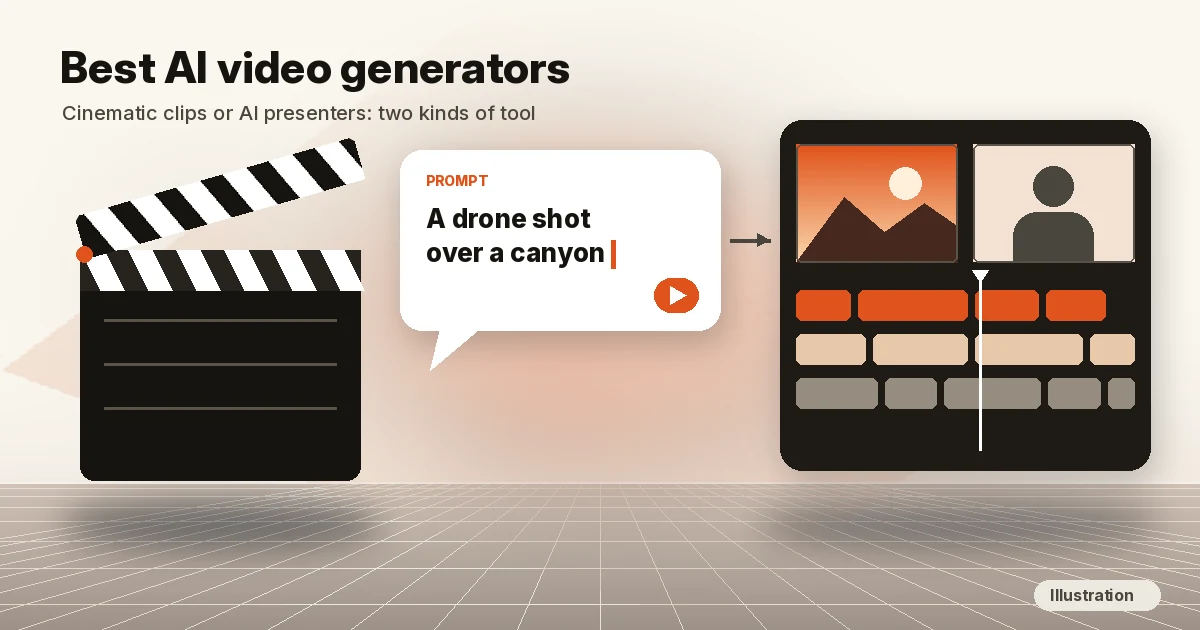
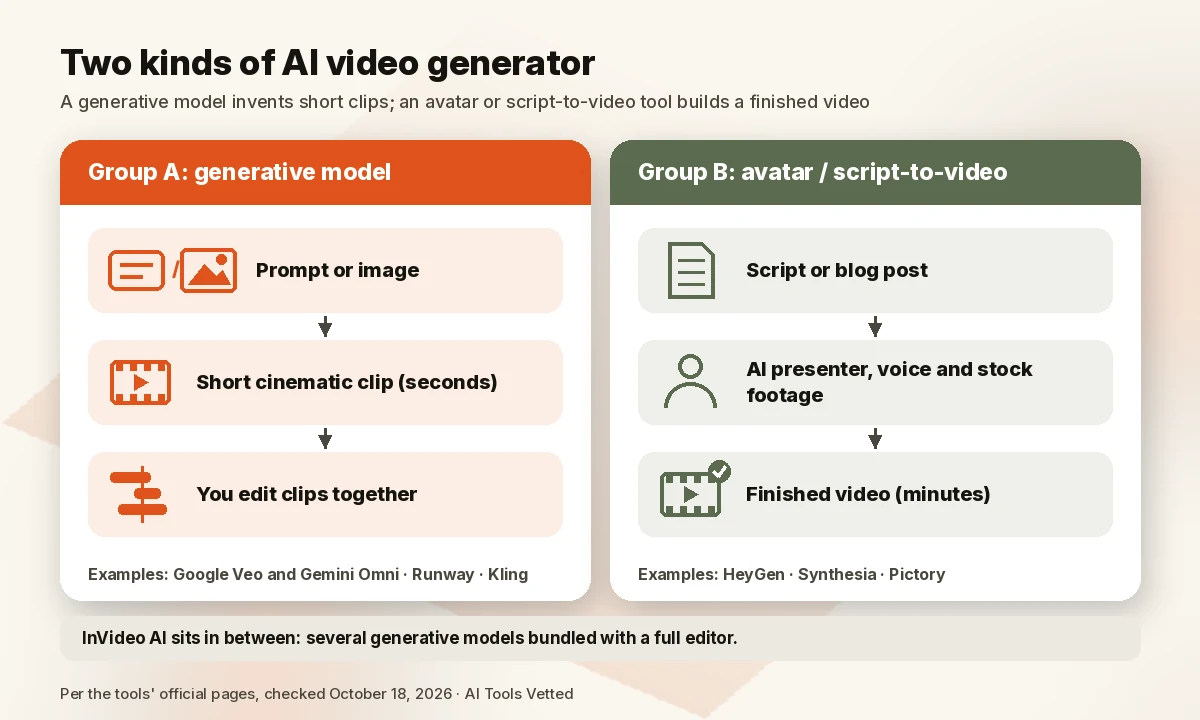
“AI video generator” now means two different products. One kind is a generative model (Google Veo and Gemini Omni, Runway, Kling) that invents a short clip from a text prompt or an image: a drone shot over a canyon, a product spinning on a table. The other kind is an avatar or script-to-video tool (HeyGen, Synthesia, Pictory) that turns a script into a longer video with a presenter, voiceover or stock footage. InVideo AI sits in between, bundling several generative models with a full editor.
We split them: Group A ranks generators for cinematic clips, Group B ranks avatar, training and script-based tools. Every price comes from the vendor’s own page, checked today.
Comparison table
| Tool | Group / type | Best for | Free plan | Watermark | Paid from (checked Oct 18, 2026) |
|---|---|---|---|---|---|
| Google Veo and Gemini Omni (Gemini, Flow) | A: generative models | Realistic clips with audio | Free Flow access with limited Nano Banana Pro (images); no video listed | Invisible SynthID watermark on Omni videos (Google) | Google AI Plus $4.99/mo (video generation, Omni Flash, 200 Flow credits); full Veo 3.1 on Ultra from $99.99/mo |
| Runway | A: generative models | Creative control, image-to-video | 125 one-time credits | “No watermarks” listed from Standard | $12/mo billed yearly ($15 monthly) |
| Kling | A: generative model | Kling-native features, commercial use listed | Basic (free) | “Brand watermark removal” listed on paid plans | Promotional prices; see the official plans page |
| InVideo AI (Check InVideo price) | A/B: multi-model hub plus editor | Teams that want many models and an editor in one bill | Free plan with limited credits (weekly reset; see help) | Not stated on the pricing page | $10 per seat/mo billed yearly ($20 monthly) |
| HeyGen | B: avatar videos | Creators, marketers, team training | 3 videos a month, up to 1 minute | Watermark removal starts on Creator | Creator $29/mo ($24/mo billed yearly) |
| Synthesia (Check Synthesia price) | B: avatar videos | Training-focused teams, enterprise L&D | Basic: 10 minutes a month, 500 credits | Free videos carry a Synthesia watermark | Starter $14/mo billed yearly ($19 monthly); Pro $59/mo billed yearly ($89 monthly) |
| Pictory (Check Pictory price) | B: script-to-video with stock | Blogs, scripts and long videos into clips | 14-day free trial | “No watermark” listed on paid plans | $25/mo billed yearly ($29 monthly) |
Sources, checked October 18, 2026 (InVideo free-plan help and Pictory annual credits rechecked October 22, 2026; Synthesia pricing rechecked October 26, 2026, 06:58 BRT): Google AI plans; Runway pricing; Kling plans; InVideo pricing; HeyGen pricing; Synthesia pricing; Pictory pricing.
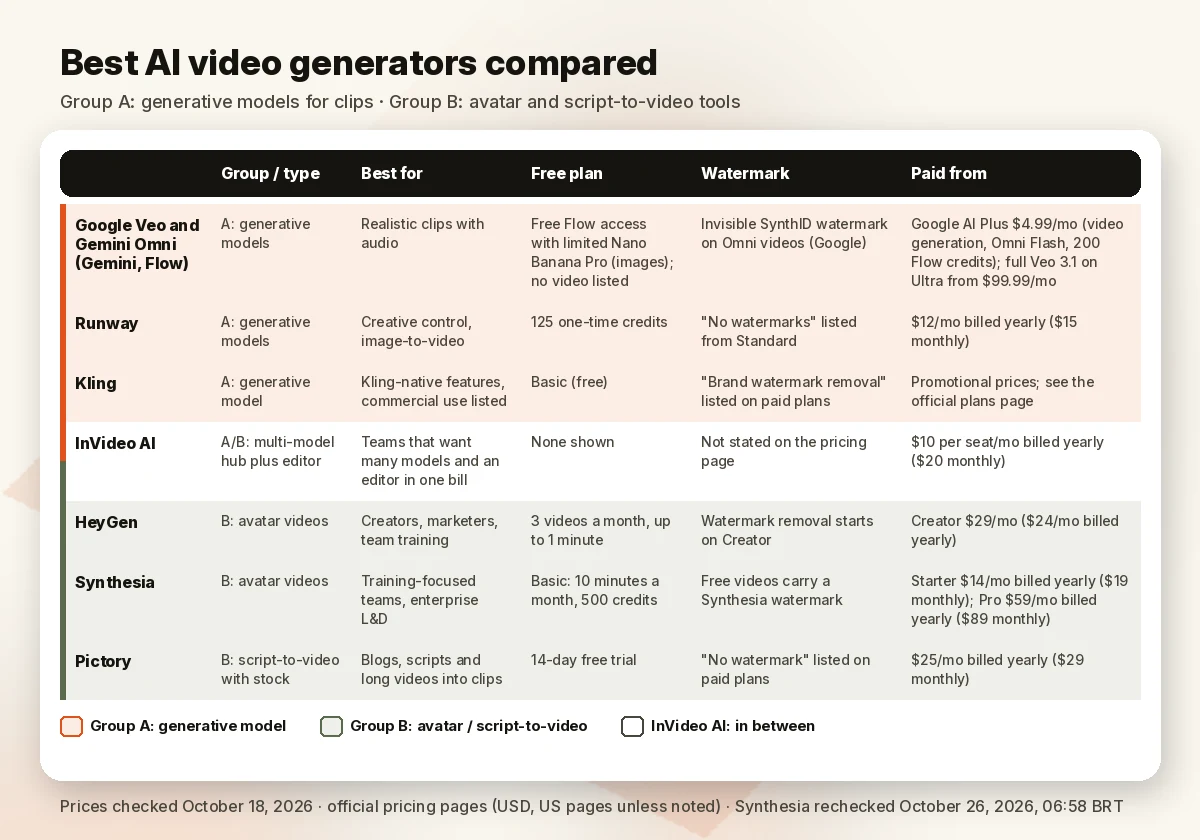
Credits aren’t comparable across tools; compare what a plan produces per month.
Best AI video generators, ranked
We ranked each group on the same five things: output quality as reported by independent hands-on reviews (PCMag and CNET), fit for the job, the free plan and watermark rules, how clearly usage is explained, and official price. Full method under “How we evaluated.”
Group A: text-to-video and image-to-video generators
1. Google Veo and Gemini Omni (in Gemini and Flow): best for realistic clips with sound
Google has two video model lines, both in the Gemini app and Flow, Google’s “AI creative studio.” Veo is the established one. Gemini Omni, announced at Google I/O 2026, is Google’s “new model that can create anything from any input — starting with video,” and its first model, Gemini Omni Flash, lets you edit videos through conversation (Google). PCMag names Veo 3.1 its best overall AI video generator because it “generally produces the most realistic clips, offers granular control, and delivers passable audio” (PCMag, updated Mar 28, 2026). CNET names Veo 3 the best paid AI video generator for cinematic videos and notes it was the first major-company model to create synchronized audio automatically (CNET, updated Sep 14, 2026).
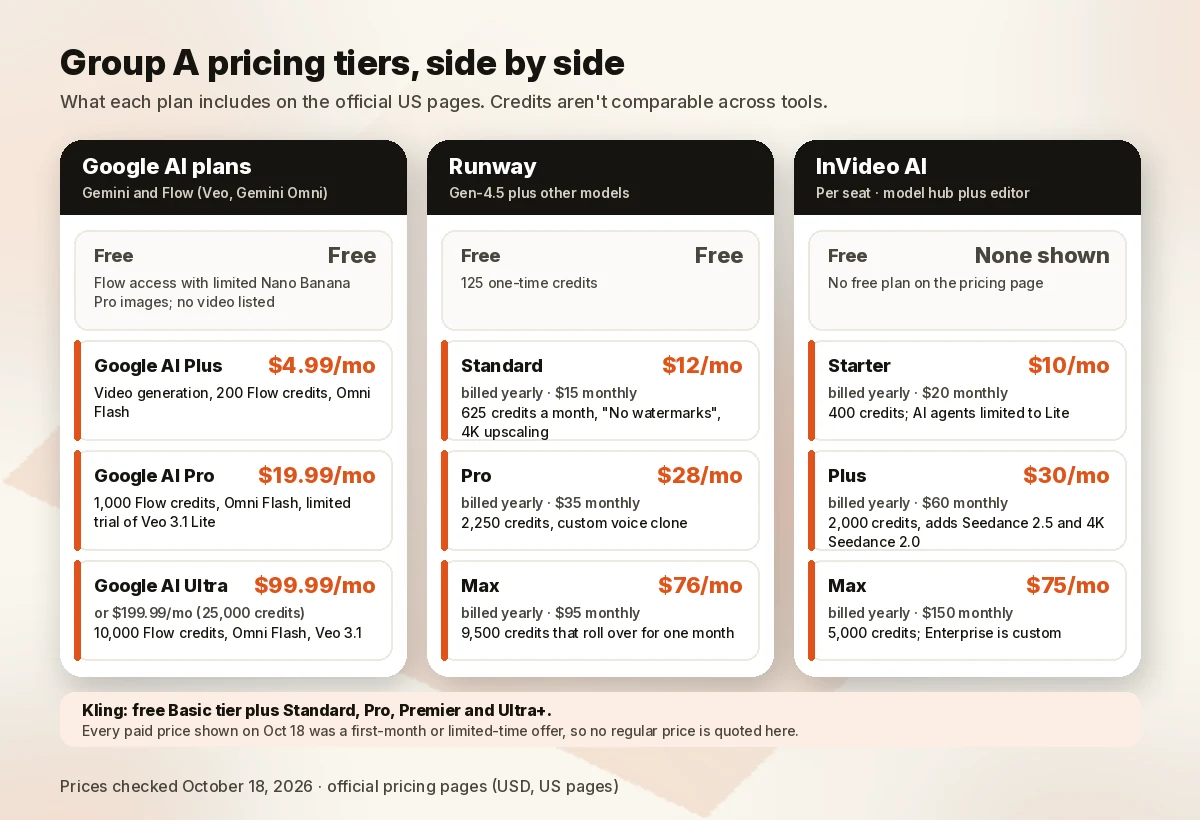
- Pricing (US plans page): Free includes Flow access “including limited access to Nano Banana Pro,” Google’s image model; the plans page doesn’t list video for Free. Google AI Plus is $4.99/month with “access to more features like video generation” and 200 Flow credits “with access to Gemini Omni Flash.” Google AI Pro is $19.99/month with 1,000 Flow credits, Omni Flash and “a limited trial of Veo 3.1 Lite.” Google AI Ultra starts at $99.99/month (10,000 Flow credits) or $199.99/month (25,000), with Omni Flash and, per Google, “video generation with Veo 3.1.”
- Watch out for: Google says Flow features “may vary by Google AI subscription tier, platform (web vs. mobile), and region,” and plans are 18+, with no refunds for partial billing periods. Google says all Omni videos carry its “imperceptible SynthID digital watermark.”
Pros: top-rated realism in independent reviews; native audio; bundled with Gemini and Google apps.
Cons: full Veo 3.1 sits on the $99.99 tier; the Gemini free plan doesn’t list video; you buy a whole AI bundle, not a video tool.
2. Runway: best for creative control
Runway is a creative suite built around its own Gen-4.5 model, and it also lets you run other models (its plan cards list Kling 3.0 and Nano Banana Pro on every paid tier). CNET calls it “an AI-inclined professional’s playground” and “great for brainstorming and animating images,” but notes its videos don’t generate native sound (CNET).
The pricing page converts credits into seconds. On Standard, 625 credits a month equals “52s of Gen-4.5, 104s of Gen-4 Turbo, or 78 Gen-4 Images (1080p).”
- Pricing: Free gives 125 one-time credits. Standard is $12/month billed yearly ($15 monthly) for 625 credits a month, with “No watermarks” and 4K upscaling. Pro is $28/month billed yearly ($35 monthly) for 2,250 credits, a custom voice clone and unlimited 4K upscaling. Max is $76/month billed yearly ($95 monthly) for 9,500 credits that roll over for one month.
- Watch out for: Gen-4.5 burns 60 credits per 5 seconds, so Standard buys under a minute of top-model video a month.
Pros: clear credits-to-seconds math; several models in one plan; watermark-free from the cheapest paid tier.
Cons: no native audio in CNET’s review; top-model minutes are short on lower plans.
3. Kling: best if you want Kling’s newest models directly
Kling is a generative video model with its own web app. Its plans page highlights Kling 4.0 with “native 30s-generation and multiple keyframes,” and the plans table shows a Kling 4.0 discount on the Pro tier and above. The earlier Kling 3.0 is also available inside Runway and InVideo.
- Pricing: there’s a free Basic tier and four paid tiers (Standard, Pro, Premier and Ultra+). On October 18 every paid price on the page was a first-month or limited-time offer (Standard, for example, showed “$6.99 / 1st mo”), so we aren’t quoting a regular monthly price. Check the official plans page for the current US price.
- Commercial use and watermark: each paid tier lists “Brand watermark removal” and “Generated content is for commercial use.” The free Basic tier doesn’t list either.
Pros: commercial use stated in writing on paid plans; long single generations on Kling 4.0; also available inside other tools.
Cons: promotion-heavy pricing makes the real monthly cost hard to read; free tier lacks watermark removal.
4. InVideo AI: best all-in-one model hub with an editor
InVideo is now a hub: one credit balance runs third-party models (its pricing table lists Seedance, Kling 3.0, MiniMax and Veo 3.1) plus a full timeline editor on every plan. InVideo says the models are “available at their original API pricing.”
- Pricing (per seat): Starter is $10/month billed yearly ($20 monthly) for 400 credits. Plus is $30/month billed yearly ($60 monthly) for 2,000 credits and adds Seedance 2.5 and 4K Seedance 2.0. Max is $75/month billed yearly ($150 monthly) for 5,000 credits. Enterprise is custom.
- Watch out for: InVideo says “Unused credits don’t roll over.” Starter limits its AI agents to the Lite version and excludes the Seedance 2.5 and 2.0 models. The pricing page itself does not list a free plan, but InVideo’s help center documents a free plan with limited credits that reset weekly (Monday 00:00 UTC) and no card required (help article).
Pros: many models plus an editor in one bill; free guest seats on Plus and Max.
Cons: free credits are limited and reset weekly; unused paid credits expire monthly; prices are per seat.
What happened to OpenAI Sora?
It’s gone. OpenAI’s help center says “The Sora web and app experiences were discontinued on April 26, 2026,” and “The Sora API will be discontinued on September 24, 2026.” If you still have content there, OpenAI says to export it at sora.chatgpt.com/sunset (OpenAI Help Center: Sora discontinuation). OpenAI’s API deprecations page lists the Videos API and the sora-2 and sora-2-pro models with a shutdown date of September 24, 2026, so that date has now passed. CNET removed Sora from its list for the same reason.
Why not Adobe Firefly or Midjourney?
Adobe Firefly is a strong contender: CNET ranks it first among AI video generators, mainly for commercial safety inside Adobe apps, and PCMag calls it “Most Versatile.” It isn’t in our table yet because Adobe’s Firefly plans page didn’t display prices when we checked on October 18, 2026, and we only rank tools whose official plans and prices we could read that day. See Adobe’s Firefly plans for current pricing. Midjourney is an image-first product: CNET describes its video model as a way to “animate your existing Midjourney images.”
Group B: avatar and script-to-video tools
1. HeyGen: best avatar videos for creators and marketers
HeyGen turns a script into a video with a talking AI avatar, including one of yourself, plus voice cloning and translation. Its free plan includes Avatar IV and one custom avatar (3 videos a month, up to 1 minute each). Synthesia’s free plan gives more time (10 minutes a month).
- Pricing: HeyGen’s FAQ says “the Creator plan costs $29/month (or $24/month if you pay annually),” Pro “starts at $49/month,” and Business “costs $149/month plus $20/seat/month.” Creator includes 600 credits, videos up to 30 minutes, 1080p, watermark removal, voice cloning and 175+ languages and dialects. Pro adds 4K export.
- For training teams: Business lists “SCORM Export,” “LMS Integrations,” “SAML/ SSO” and interactive video with quizzes.
Pros: usable free plan; 175+ languages from Creator; 4K on Pro.
Cons: the free plan is watermarked and capped at 1-minute videos; SCORM and SSO need the $149/month Business plan.
For a head-to-head, read our Synthesia vs HeyGen comparison.
2. Synthesia: a training-focused enterprise option
Synthesia centers its plans on training: survey responses and roleplays are built into every plan, including Free, and you can add learner seats. Its LMS features (SCORM export, SAML/SSO) and “1-Click Translations into 140+ languages” are on Enterprise, which has custom pricing. HeyGen lists SCORM, LMS integrations and SSO at a published $149/month, so choose Synthesia for its training focus, not those features alone.
- Pricing: Basic is $0 a month with 10 minutes of video creation or dubbing and 500 credits, but “Videos carry a Synthesia watermark.” Pro is $89/month billed monthly for 6,000 credits (up to about 60 extra minutes of video), 5 personal avatars and 180+ stock avatars, or $59/month billed yearly ($708 a year, 72,000 credits a year). The monthly view also advertised a first-month price of $49. Enterprise is custom. Synthesia says yearly billing saves “up to 4 months.” Learner seats for roleplay training are $29/month ($25 billed yearly). The page changed more than once on October 26 (our 01:04 BRT read of the plain HTML showed $64/month yearly for Pro); these are the prices on the page at 06:58 BRT, so confirm at checkout.
- Starter price: $19/month billed monthly (the monthly view advertised a $9 first month) or $14/month billed yearly ($168 a year, 15,000 credits a year). On October 18 the page showed conflicting Starter prices, so we waited to quote one; at 06:58 BRT on October 26 the plan cards and the comparison table agreed. Starter includes 1,250 credits a month (up to about 12 extra minutes), downloads and removal of the Synthesia logo. Check the official pricing page before you buy, since the first-month terms aren’t stated on it.
Pros: the most free video time in this group (10 minutes a month); surveys and roleplays on every plan; 125+ avatars from Starter.
Cons: free videos are watermarked; SCORM and SSO are Enterprise-only at custom pricing; Synthesia’s first-month offers ($9 Starter, $49 Pro) show only in the monthly view and their terms aren’t stated.
3. Pictory: best for turning scripts and blog posts into videos
Pictory builds a video from text you already have, using stock footage, AI voices and captions. Paid plans include Getty Images and Storyblocks stock, ElevenLabs voices in 29 languages and a small pool of AI credits.
- Pricing: Starter is $25/month billed yearly ($29 monthly) with “No watermark.” Professional is $35/month billed yearly ($59 monthly) and adds custom avatars and voice cloning. Team is $119/month billed yearly ($199 monthly) for 3+ users. Pictory advertises “Annual Pricing (save up to 40%).”
- Free trial: 14 days, with 3 video projects.
- Watch out for: Pictory says “We currently don’t offer refunds,” so use the trial before paying. Annual plans grant generative AI credits upfront (Starter: 24,000 a year, usable for up to 360 minutes of generated video; Professional: 72,000 / up to 1,080 mins/yr; Teams: 216,000 / up to 3,600 mins/yr).
Pros: fastest path from existing text to a finished video; licensed stock and voices included; no watermark on paid plans.
Cons: no refunds; not a cinematic generator; the yearly discount needs a yearly commitment.
Best by use case
- Cinematic B-roll, ads and short films: Google Veo or Gemini Omni for realism and sound; Runway for more control and clear per-second costs.
- Shorts and vertical clips: Google says Gemini Omni is available “in YouTube Shorts Remix and the YouTube Create app to users (18+) at no cost” (Google I/O 2026).
- YouTube videos: see our best AI video generator for YouTube guide.
- Training, onboarding and internal comms: HeyGen Business for SCORM, LMS and SSO at a published price; Synthesia if you want a training-focused platform with enterprise support.
- Avatar marketing videos and translation: HeyGen.
- Blog post or script to video: Pictory.
- Many models plus an editor for a team: InVideo AI.
- Voiceovers only: see the best AI voice generator for YouTube.
AI video generator vs AI video editor
A generator creates footage that didn’t exist: a clip, an avatar, a scene. An editor works on footage you already have, cutting silences, adding captions or reframing for vertical video. Most projects use both. If your raw material is your own recordings, start with our guide to the best AI video editors.
Free plans and watermarks
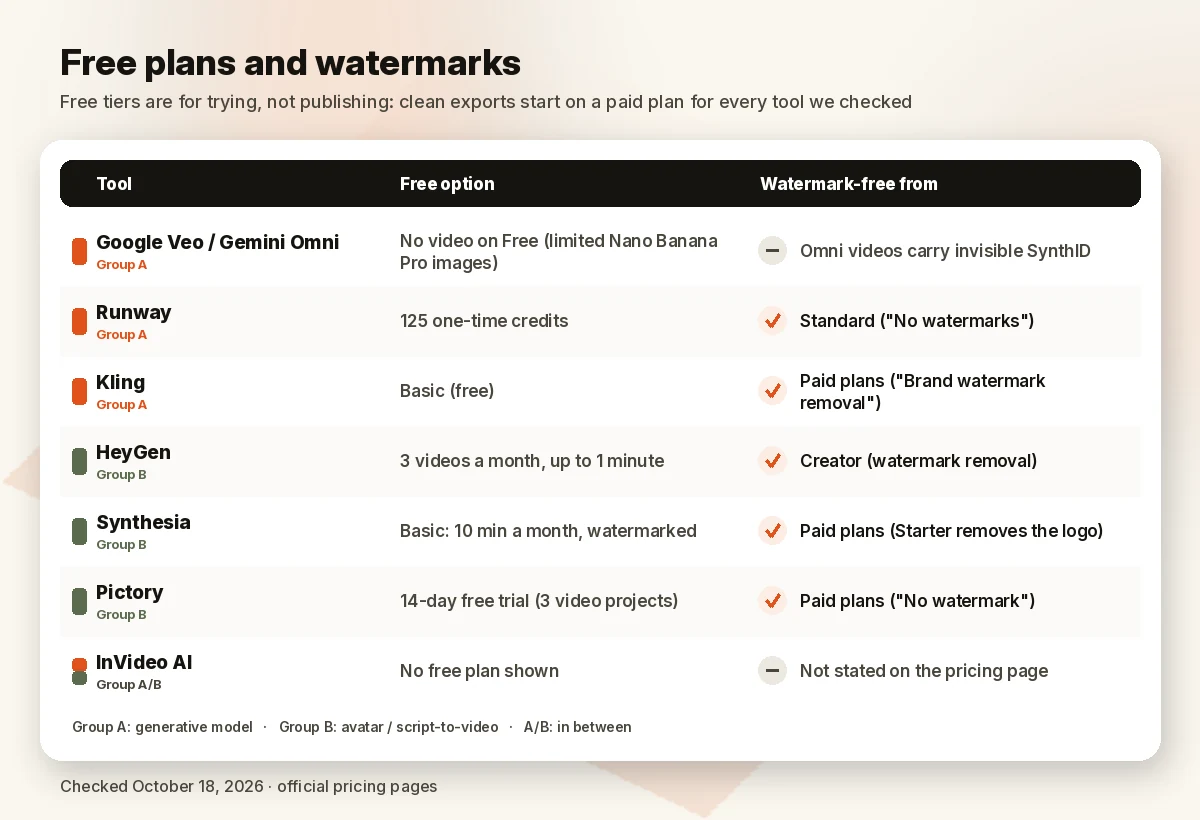
Free tiers here are for trying, not publishing. Synthesia states its free videos “carry a Synthesia watermark.” HeyGen, Runway and Kling list watermark removal or “No watermarks” only on paid tiers. Pictory offers a 14-day trial instead of a free forever plan; InVideo documents a free plan with limited weekly credits in its help center (not on the pricing summary); and Google’s free plan doesn’t list video at all. Clean exports start on a paid plan for every tool we checked, and even paid Gemini Omni videos carry Google’s invisible SynthID watermark.
How we evaluated
We read each vendor’s official pricing page on October 18, 2026, in US dollars, from a US location. On October 22, 2026 we rechecked Pictory’s annual generative credits and InVideo’s free-plan help article, and on October 26, 2026 (06:58 BRT) we rechecked Synthesia’s plan prices, so this guide stays consistent with our InVideo vs Pictory comparison. For quality we relied on hands-on reviews from PCMag and CNET, cited where used; we haven’t run our own generation runs for this guide. We weighted reported quality, fit for the job, free plan and watermark rules, clarity of usage, and official price. We ranked only tools whose official plans and prices we could read on the day, so Adobe Firefly (prices not displayed on its plans page on October 18) isn’t ranked yet, and image-first Midjourney isn’t ranked. Commissions don’t affect order: HeyGen, which pays us nothing, ranks above Synthesia.
FAQ
What is the best AI video generator right now? For realistic short clips, Google’s models: PCMag names Veo 3.1 its best overall, CNET calls Veo 3 the best paid option for cinematic video, and Google’s newer Gemini Omni Flash comes with every paid Google AI plan. Runway is the pick if you want more control and clear per-second credit costs. For avatar and training videos, look at Group B instead: HeyGen or Synthesia.
Is there a free AI video generator without a watermark? Not among the tools here, based on their pricing pages: watermark-free exports start on paid plans (see “Free plans and watermarks”).
What is the best AI video generator for YouTube? Faceless explainers suit Pictory, talking heads suit HeyGen, and B-roll suits Google’s models or Runway. Our best AI video generator for YouTube guide goes deeper.
Can I use AI-generated videos commercially? Often, on paid plans, but read each tool’s terms. Kling’s paid tiers state “Generated content is for commercial use.” For the other tools, check the terms of service before running ads with the output.
What’s the difference between an AI video generator and an AI video editor? A generator creates new footage from a prompt, image or script; an editor improves footage you already shot. See our best AI video editors guide.
Which AI video generator is best for avatars and training videos? HeyGen for most teams: its Business plan ($149/month) lists SCORM export, LMS integrations and SSO. Synthesia is the training-focused alternative, with surveys and roleplays on every plan and SCORM, SSO and 140+ languages on Enterprise (custom pricing).
Verdict
For cinematic clips, start with Google Veo and Gemini Omni if you pay for Google AI, or Runway for a dedicated creative tool. Pick Kling for its newest models, or InVideo AI for many models plus an editor. For on-screen presenters, choose HeyGen, or Synthesia if you want a training-focused enterprise platform. Choose Pictory to turn existing text into video. Recheck pricing before you upgrade.
See Google AI plans · See HeyGen plans · Check Synthesia price
Sources (official pages, checked on October 18, 2026)
- Google AI plans (Gemini, Flow, Omni, Veo): https://gemini.google/subscriptions/ (09:13 and ~09:30 BRT)
- Google, Introducing Gemini Omni: https://blog.google/innovation-and-ai/models-and-research/gemini-models/gemini-omni/ · 100 things we announced at I/O 2026: https://blog.google/innovation-and-ai/technology/ai/google-io-2026-all-our-announcements/ (~09:30 BRT)
- Runway pricing: https://runway.com/pricing (09:10 BRT)
- Kling membership plans: https://app.klingai.com/global/membership/membership-plan (09:32 BRT)
- InVideo AI pricing: https://invideo.io/pricing/ (09:13 BRT)
- InVideo free plan help: https://help.invideo.io/en/articles/9380226-can-i-use-invideo-ai-for-free (rechecked October 22, 2026 ~22:15 BRT)
- Pictory annual generative credits: rechecked October 22, 2026 ~22:15 BRT on pictory.ai/pricing
- Synthesia plans (Starter, Pro, first-month offers, learner seat): rechecked October 26, 2026 06:58 BRT on synthesia.io/pricing (HTML + rendered US, monthly and yearly views)
- HeyGen pricing and FAQ: https://www.heygen.com/pricing (09:29 BRT)
- Synthesia pricing: https://www.synthesia.io/pricing (09:32 BRT)
- Pictory pricing: https://pictory.ai/pricing (09:10 BRT)
- OpenAI Help Center, Sora discontinuation: https://help.openai.com/en/articles/20001152-what-to-know-about-the-sora-discontinuation · API deprecations: https://developers.openai.com/api/docs/deprecations (~09:30 BRT)
- Independent reviews: PCMag, The Best AI Video Generators for 2026 (updated Mar 28, 2026); CNET, Best AI Video Generators of 2026 (updated Sep 14, 2026)