
Affiliate disclosure: AI Tools Vetted is reader-supported. Some links below are affiliate links (marked “sponsored”): if you sign up through them, we may earn a commission at no extra cost to you. Our Descript, InVideo and Pictory links are affiliate links. Our HeyGen mention is a plain link: we don’t earn anything from it. Picks follow official pricing and published features, not commissions.
Prices checked October 26, 2026, at 01:04–01:09 BRT on each vendor’s official US pricing page (USD).
Quick take
Verdict in 30 seconds
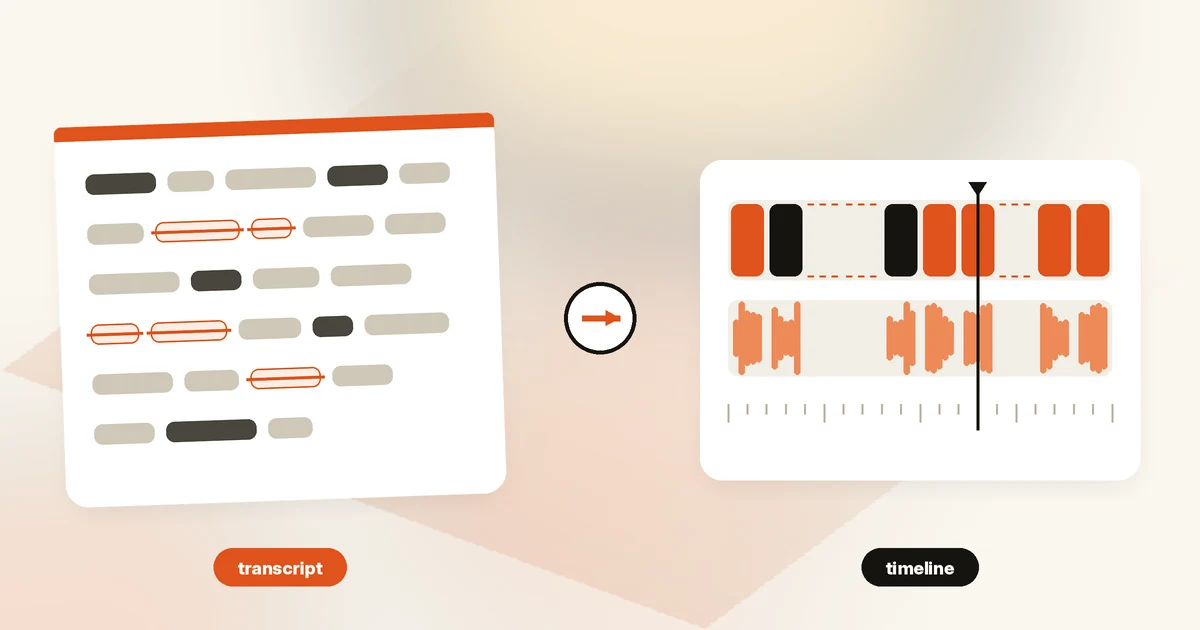
Descript is an editor first. You upload or record audio and video, Descript transcribes it, and you cut the media by editing the text. On top of that sit AI tools like Studio Sound, filler-word removal, clip creation and Underlord, which Descript calls “your AI video editor.” It can also generate media, but that’s not the core reason to buy it.
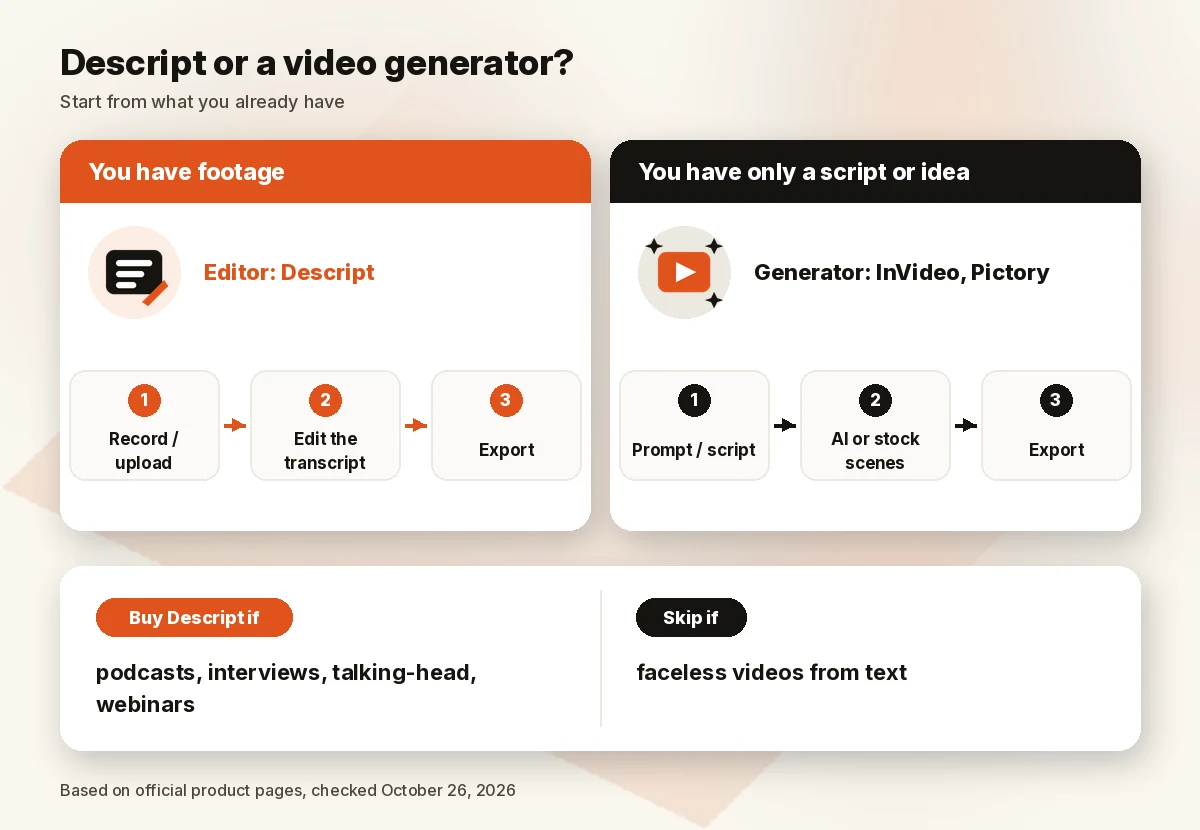
Buy Descript if you edit talking-head video, podcasts, interviews, courses or webinars and you’d rather work in a document than a timeline. Skip it if you want a tool to make a video from a prompt or a blog post with no footage of your own: that’s the job of a generator like InVideo or Pictory. Start on Free (no card required) before you pay, because the limits that matter are media hours and AI credits, not features.
What Descript is: an editor, not a pure generator
Descript’s homepage sums up its pitch as “edit your video by editing the text.” The workflow is simple to describe: your recording becomes a transcript, and deleting a sentence in the transcript deletes that part of the video or audio. Descript transcribes in 25 languages, according to its pricing page.
Around that core, the current plans add:
- Recording: a built-in recorder and remote “Rooms” for up to 10 participants.
- AI clean-up tools: Studio Sound, Remove Filler Words, Green Screen and Eye Contact.
- Underlord: an AI agent that can apply edits and tools when you ask it to.
- AI Speech: text-to-speech, including custom voice clones, plus the option to regenerate parts of a video.
- Generation: Descript’s Creator card lists “generate video with the latest AI models,” and its Business card adds custom avatars from a photo or text. Its comparison table, however, marks AI avatars as included from Hobbyist (limited on Free).
That’s why we review Descript as an editor. If your starting point is raw footage, Descript fits. If your starting point is a script with no footage, see our best AI video generators guide.
Descript pricing
Here is what Descript’s official US pricing page showed on October 26, 2026 (01:04 BRT). All paid prices are per person, per month.
| Plan | Annual billing | Monthly billing | Media hours/mo | AI credits/mo | Export | Seats |
|---|---|---|---|---|---|---|
| Free | $0 | $0 | 1 (60 min) | 100 (one-time) | 720p | 1 |
| Hobbyist | $16/mo | $24/mo | 10 | 400 | 1080p, no watermark | 1 |
| Creator | $24/mo | $35/mo | 30 | 800 | 4K | Up to 3 (billed separately) |
| Business | $50/mo | $65/mo | 40 | 1,500 | 4K | Up to 5 (billed separately) |
| Enterprise | Custom | Custom | Sized to team | Sized to team | — | Custom |
Billed yearly, that works out to $192 a year for Hobbyist, $288 for Creator and $600 for Business per person (our math: monthly rate × 12). Descript advertises “saving up to 35% over monthly plan”; on the posted prices we calculate 33% for Hobbyist, 31% for Creator and 23% for Business.
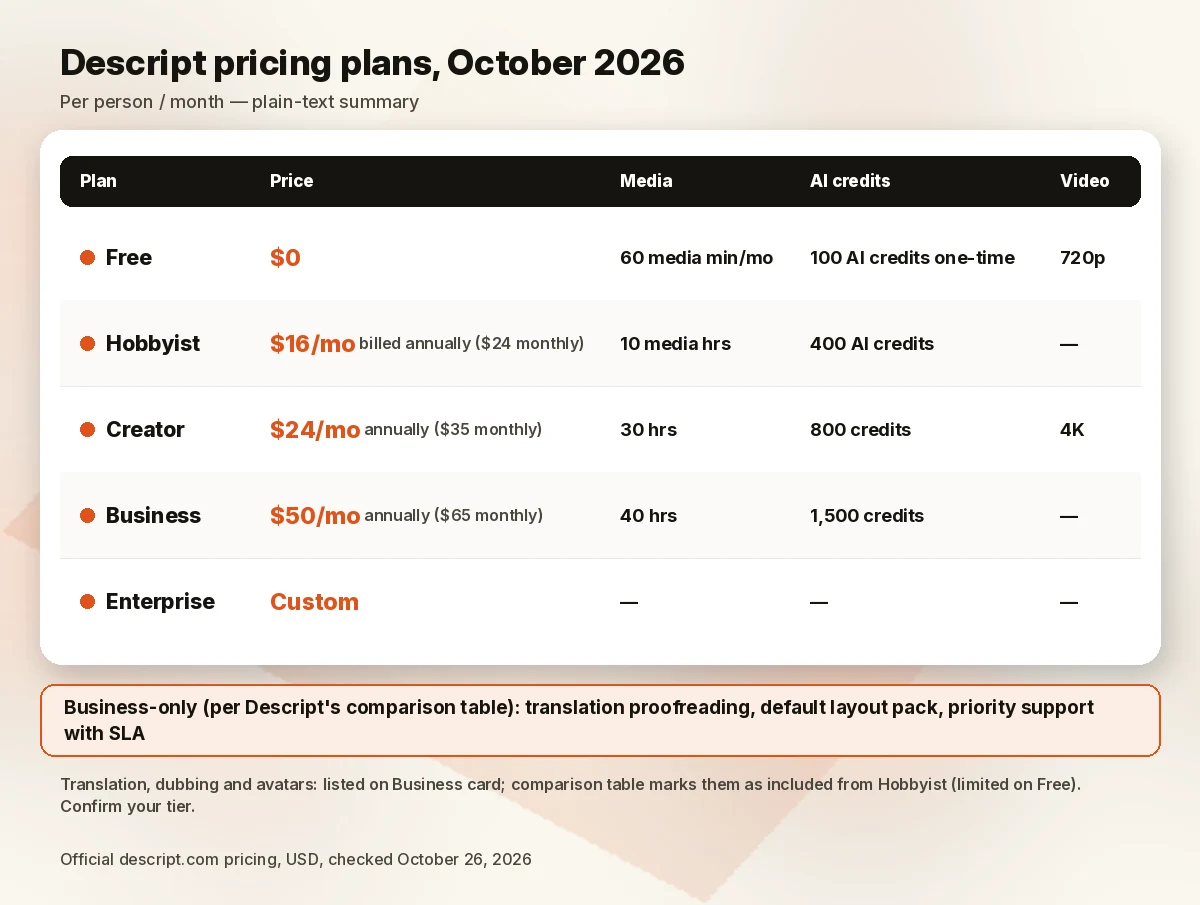
Other differences between tiers that matter in practice: storage (5 GB on Free, 100 GB on Hobbyist, 1 TB on Creator, 2 TB on Business), stock media (Free only searches the first five results; Creator gets the unlimited stock library), and extras Descript lists on its Business card, such as Brand Studio, translation and dubbing into 30+ languages with proofreading, custom avatars and priority support. Descript’s comparison table marks translation, dubbing and avatar generation as included from Hobbyist up (limited on Free) and shows only translation proofreading, a default layout pack and priority support with an SLA as Business-only, so confirm which tier covers your use. Enterprise adds SSO/SCIM, SOC 2 Type II documentation, an opt-out from model training and custom data retention.
Media hours and AI credits
Descript meters two things. Media hours track media you upload or record in Descript, whether or not you transcribe it. AI credits are spent on AI features such as Underlord, Studio Sound, Green Screen, Eye Contact and AI-generated media and avatars.
A few rules from Descript’s help center are worth knowing before you choose a tier:
- Allowances reset each billing cycle and don’t roll over.
- Each editor seat adds to a shared pool that any editor on the drive can use.
- Chatting with Underlord uses a few credits per message, even if no tool runs.
- Studio Sound and Remove Filler Words are capped at 30 credits per file per use.
- Underlord’s costs are “non-deterministic”: they depend on media length, model and what the AI generates, so Descript doesn’t publish a fixed price per action.
If you run out, top-ups are available on Creator and Business only. On October 26, 2026, AI credit bundles were 350 credits for $35, 1,000 for $80 and 4,000 for $200; media-hour bundles were 5 hours for $25, 20 for $80 and 50 for $150. Top-ups expire after 12 months and are used after your plan allowance.
Free plan and trial
The pricing page doesn’t advertise a free trial of paid plans. The Free plan is the trial: no credit card, 60 media minutes a month, 100 AI credits one time, 720p export and a 5 GB limit. That’s enough to try transcript editing on a short recording, but not enough to judge Underlord on real projects.
Canceling and refunds
You cancel inside the app: App Settings → Plan → Change plan → Downgrade to Free → Cancel subscription. Your paid plan stays active until the end of the billing cycle, then the account drops to Free, and your projects stay accessible.
Descript’s refund policy is short: plan refunds are possible within 48 hours of the invoice date, editor-seat refunds within 7 days, and top-ups are non-refundable. There are no prorated refunds. Upgrades apply immediately and are prorated; downgrades and annual-to-monthly switches apply at the end of the cycle.
Key features
- Text-based editing: cut, rearrange and delete media by editing the transcript.
- Studio Sound: an AI audio clean-up tool for voice recordings, metered in AI credits.
- Remove Filler Words and Create Clips: included from Hobbyist up.
- Underlord: access on Hobbyist, and “full Underlord + 20+ AI tools” on Creator and Business.
- AI Speech and voice clones: custom voice clones and video regeneration from Hobbyist up.
- Captions and translation: caption translation in 61 languages; dubbing in 30+ languages (listed on the Business card; the comparison table marks it as included from Hobbyist).
- Hand-off to other editors: timeline export to Premiere, Final Cut and Pro Tools, among others.
Pros and cons
Pros
- Text-based editing lets you cut talk-driven content without working in a traditional timeline.
- A real Free plan with no card required.
- Clear, published annual and monthly prices for every self-serve tier.
- Published top-up prices, plus a 30-credit cap on Studio Sound and filler-word removal.
- Exports timelines to Premiere, Final Cut and Pro Tools, so you aren’t locked in for finishing.
Cons
- Underlord credit costs vary per request, which makes monthly budgeting harder.
- Media hours and AI credits don’t roll over.
- Top-ups aren’t available on Free or Hobbyist.
- A short refund window: 48 hours from the invoice date for plans.
- Translation proofreading and priority support with an SLA are Business-only ($50/mo billed annually), and Descript’s page is unclear on whether translation, dubbing and custom avatars start at Hobbyist or Business.
Who should (and shouldn’t) buy Descript
Good fit:
- Podcasters and interview shows who edit long recordings.
- YouTubers who make talking-head or tutorial videos.
- Course creators and marketers cutting webinars into clips.
- Small teams that want a shared pool of hours and credits.
Not a good fit:
- Faceless channels that need video generated from a script with stock footage: look at InVideo or Pictory.
- Editors who need deep, frame-level effects work as their main tool.
- Anyone who needs heavy generative use on a fixed budget, since Underlord costs vary.
A note on Descript reviews on Reddit: community threads are individual user reports, not verified findings, and many were written before the current Hobbyist/Creator/Business plans and credit rules. Check a post’s date against the plan limits above before you rely on it.
Descript alternatives
Descript, InVideo and Pictory get compared a lot, but they do different jobs.
| Tool | Entry price (official) | Main role | Link |
|---|---|---|---|
| Descript Hobbyist | $16/mo billed annually ($24 monthly) | Edit your own recordings by text | Check Descript price |
| InVideo Starter | $10/seat/mo billed annually during 50%-off offer ($20 monthly) | Generate videos from prompts with AI models | Check InVideo price |
| Pictory Starter | $25/mo billed annually | Turn scripts, articles and stock media into videos | Check Pictory price |
| HeyGen Creator | $29/mo (monthly) | AI avatar presenter videos | HeyGen pricing |
InVideo is the pick when you start from an idea, not footage. Its pricing page on October 26, 2026, showed Starter at 400 credits a month and Plus at $30/seat/mo billed annually ($60 monthly) with 2,000 credits, both under a 50%-off annual offer, so confirm the price at checkout.
Pictory is built for turning scripts and blog posts into videos with stock footage, AI voices and avatars. Starter was $25/mo billed annually (shown as down from $29) with 24,000 credits a year; Professional was $35/mo billed annually.
HeyGen is an avatar video tool, not an editor. Its Free plan allowed 3 watermarked videos a month on October 26, 2026. We mention it for context only.
For a wider comparison, see InVideo vs Pictory, our best AI video editors list and, if voice is your main need, our best text-to-speech app and best AI voice generator for YouTube guides.
How we evaluated
We didn’t run output tests, and we don’t publish results we haven’t measured. On October 26, 2026, we read Descript’s official pricing page, homepage and help center articles on media minutes and AI credits, top-ups, cancellation and refunds, and compared them with InVideo’s, Pictory’s and HeyGen’s official pricing pages the same morning. We scored:
- Price for a typical creator: cost per seat per month and per year at each tier.
- Usage limits: media hours, AI credits, rollover and top-up rules.
- Fit: whether the product matches an editing workflow or a generation workflow.
- Billing clarity: how refunds, cancellations and credit costs are explained.
- Exit costs: what you keep after canceling and whether you can export to other editors.
We didn’t use vendor-reported user counts or customer results as evidence.
FAQ
Is Descript worth it in 2026?
Yes, if you edit your own recordings, especially podcasts, interviews and talking-head videos. Hobbyist at $16/mo billed annually covers 10 media hours a month. It’s less of a fit if you need videos generated from text.
How much does Descript cost?
On October 26, 2026: Free $0; Hobbyist $16/mo billed annually or $24 monthly; Creator $24/mo billed annually or $35 monthly; Business $50/mo billed annually or $65 monthly; Enterprise custom. Prices are per person, per month.
Is Descript an AI video generator or an editor?
It’s an editor at heart: you edit media by editing its transcript. Descript’s plan cards list AI video generation on Creator and custom avatars on Business, though its comparison table marks AI avatars as included from Hobbyist. Generation isn’t the main use case.
Descript vs InVideo vs Pictory: when should I use each?
Use Descript when you already have footage or audio. Use InVideo to generate videos from prompts with AI models. Use Pictory to turn scripts or articles into videos with stock footage and AI voices. See InVideo vs Pictory.
Does Descript have a free plan?
Yes. Free includes 60 media minutes a month, 100 AI credits (one time), 720p export and 5 GB of storage, with no credit card required.
How do AI credits work in Descript?
Credits pay for AI features like Underlord, Studio Sound and Eye Contact. They reset each billing cycle and don’t roll over. Some tools have fixed caps, while Underlord costs vary per request. Creator and Business can buy top-ups starting at 350 credits for $35.
Verdict
Descript is worth paying for if your work starts with a recording. Transcript editing, Studio Sound and filler-word removal cover the core of podcast and talking-head editing, and the Free plan lets you check the workflow first. If your work starts with a script and no footage, put InVideo or Pictory on your shortlist instead.
Next step: Check Descript price · Check InVideo price · Check Pictory price
Sources
Official pages checked October 26, 2026, 01:04–01:09 BRT (USD):
- Descript pricing (~01:04 BRT) · Descript homepage (~01:04 BRT)
- Descript help: media minutes and AI credits (~01:05 BRT)
- Descript help: top-ups (~01:05 BRT)
- Descript help: downgrade or cancel (~01:05 BRT) · Descript help: refund policy (~01:05 BRT)
- InVideo pricing (~01:09 BRT) · Pictory pricing (~01:09 BRT) · HeyGen pricing (~01:09 BRT)