
Affiliate disclosure: AI Tools Vetted is reader-supported. Some links below are affiliate links (marked “sponsored”): if you sign up through them, we may earn a commission at no extra cost to you. Our InVideo, Pictory and Synthesia links may be affiliate links. The verdict below follows InVideo’s official pricing page, help docs and terms, and we point you to a competitor where it fits you better.
Prices checked November 5, 2026, at 19:22 BRT on each vendor’s official pricing page (USD, before tax). Max at $250/seat/mo with 8,000 credits was reconfirmed on invideo.io/pricing at 19:31 BRT.
Quick take
Verdict in 30 seconds
InVideo AI is worth it if you treat it as two products: a full timeline editor that costs no credits to use, and a pay-per-second generation engine that does. The plan price buys you a monthly credit allowance, not a number of finished videos. If you edit your own footage and generate only a few clips or images a month, Starter or Plus is good value. If your workflow is “prompt, reject, prompt again” on premium video models, the credits will go fast and the plan price will understate your real cost.
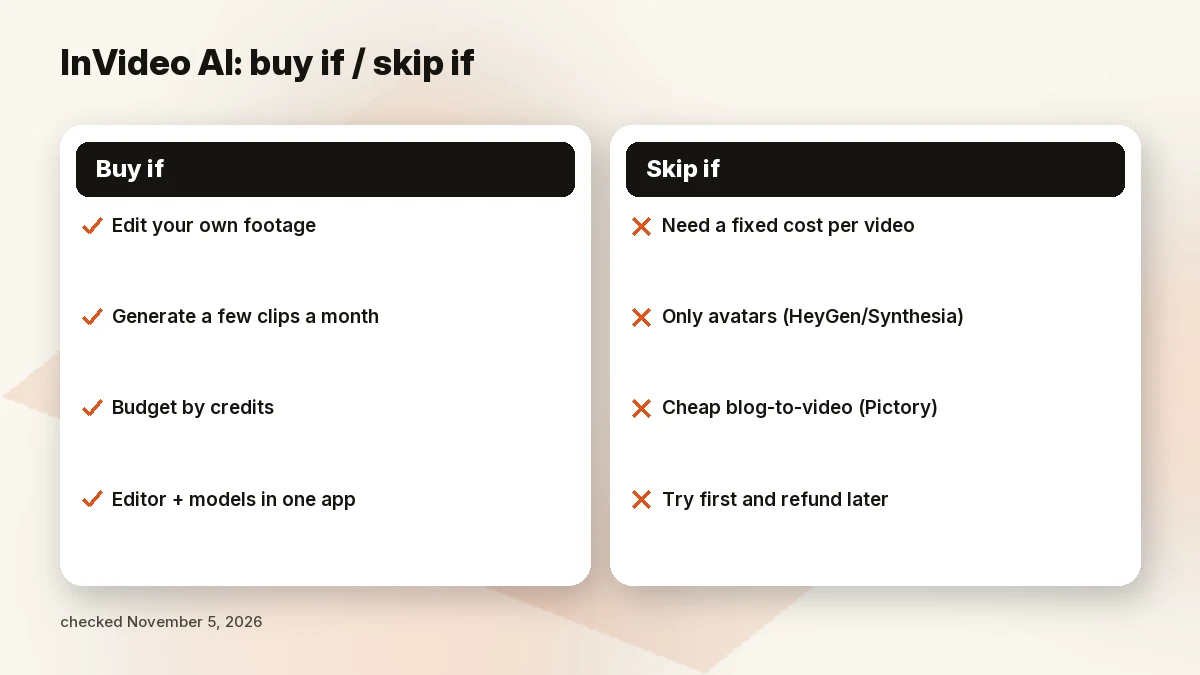
Buy InVideo AI if you want an editor plus generative models in one place, you can estimate how many seconds of AI video you need a month, and you’re happy to budget by credits.
Skip it if:
- You need a fixed, predictable cost per finished video. Credits are charged per model, per second and per resolution, and failed attempts still cost credits.
- You only want an on-screen presenter or avatar. Look at HeyGen vs InVideo or Synthesia.
- You want cheap blog-to-video from text you already have. Pictory is built for that; see our Pictory review.
- You want to try first and claim a refund later. InVideo’s refund rule only covers plans with nothing generated or downloaded.
What InVideo AI is in 2026
InVideo AI is no longer just the “type a prompt, get a stock-footage video” tool many older reviews describe. The current product has three layers. Agents: its own agent, Agent Two (Lite on Starter; Lite, Pro and Ultra on Plus and Max), plus support for outside agents such as Claude or ChatGPT through MCP and a CLI. Models: third-party generative models billed in credits, such as Seedance for video and Nano Banana Pro or GPT Image for images; the pricing page says “all models are available at their original API pricing.” Editor: a timeline editor with color, audio and 3D tools and multiplayer editing, which InVideo says is the same on every plan. That last point matters: you can cut, trim, grade and export without spending a single credit.
InVideo AI pricing: Starter, Plus and Max
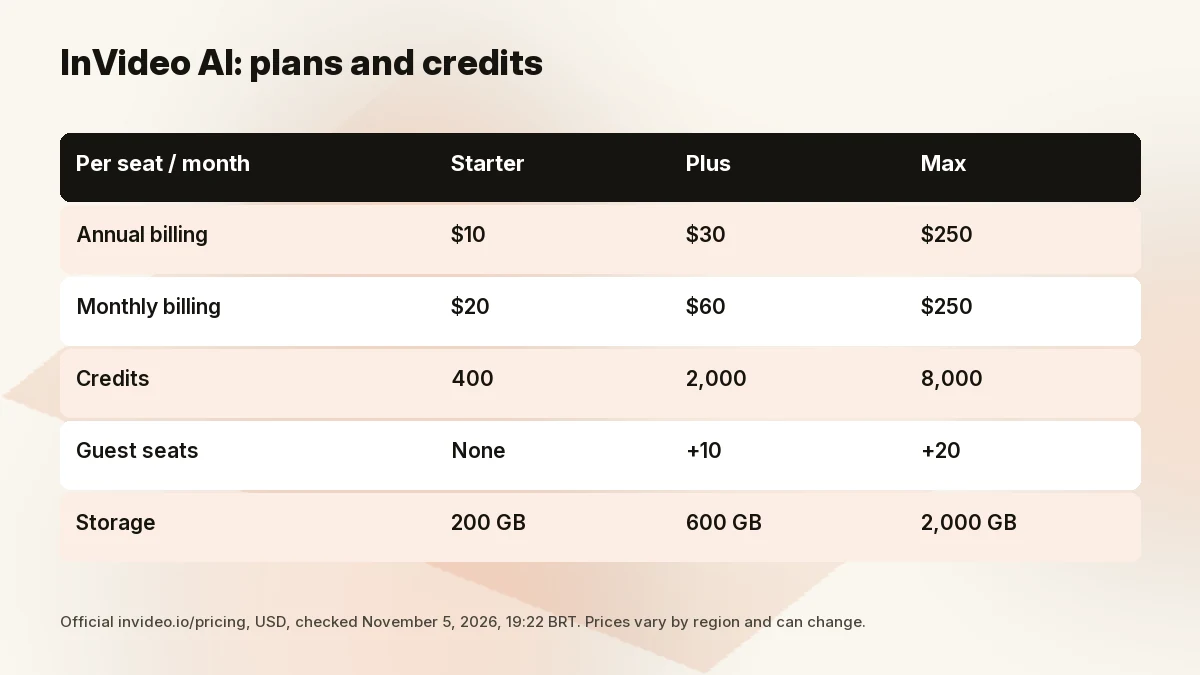
The official pricing page showed these three plans on November 5, 2026, at 19:22 BRT. Prices are per seat, per month. The page didn’t show a free tier in its plan cards today.
| Starter | Plus | Max | |
|---|---|---|---|
| Annual billing (per seat/mo) | $10 | $30 | $250 |
| Monthly billing (per seat/mo) | $20 | $60 | $250 (“no difference compared to monthly”) |
| Credits per seat/mo | 400 | 2,000 (5,000 option) | 8,000 (10,000 and 15,000 options) |
| Guest seats | None | +10 (190 credits each) | +20 (190 credits each) |
| Multiplayer editing | Up to 5 seats | Up to 10 seats | Up to 20 seats |
| Agent Two | Lite only | Lite, Pro, Ultra | Lite, Pro, Ultra |
| Seedance 2.5 / 2.0 4K | No (2.0 Fast and Mini only) | Yes | Yes |
| Premium stock footage | 100 | 200 | 500 |
| Storage | 200 GB | 600 GB | 2,000 GB |
| Early access to new features | No | Yes | Yes |
| “Lowest cost per credit” | No | No | Yes (per InVideo) |
Per-seat prices, annual vs monthly
Starter and Plus are half price on annual billing: the page says Starter saves “$120 per seat compared to monthly” and Plus “$360 per seat,” which matches $10 × 12 versus $20 × 12, and $30 × 12 versus $60 × 12. Max is different. Today’s card lists $250 per seat a month and says “No difference compared to monthly.”
Max’s listed price is much higher than readers may remember from earlier this year. We report only today’s official page: $250 per seat a month with 8,000 credits. Prices can vary by region and change without notice, so reload the pricing page for your region before you buy. A related oddity: InVideo labels Max “lowest cost per credit,” but on the listed numbers our math gives about $0.031 per credit for Max ($250 ÷ 8,000) versus $0.015 for Plus on annual billing ($30 ÷ 2,000). The checkout may apply discounts the static page doesn’t show, so treat that as a reason to double-check, not a verdict.
What the credits are, how they’re spent and when they reset
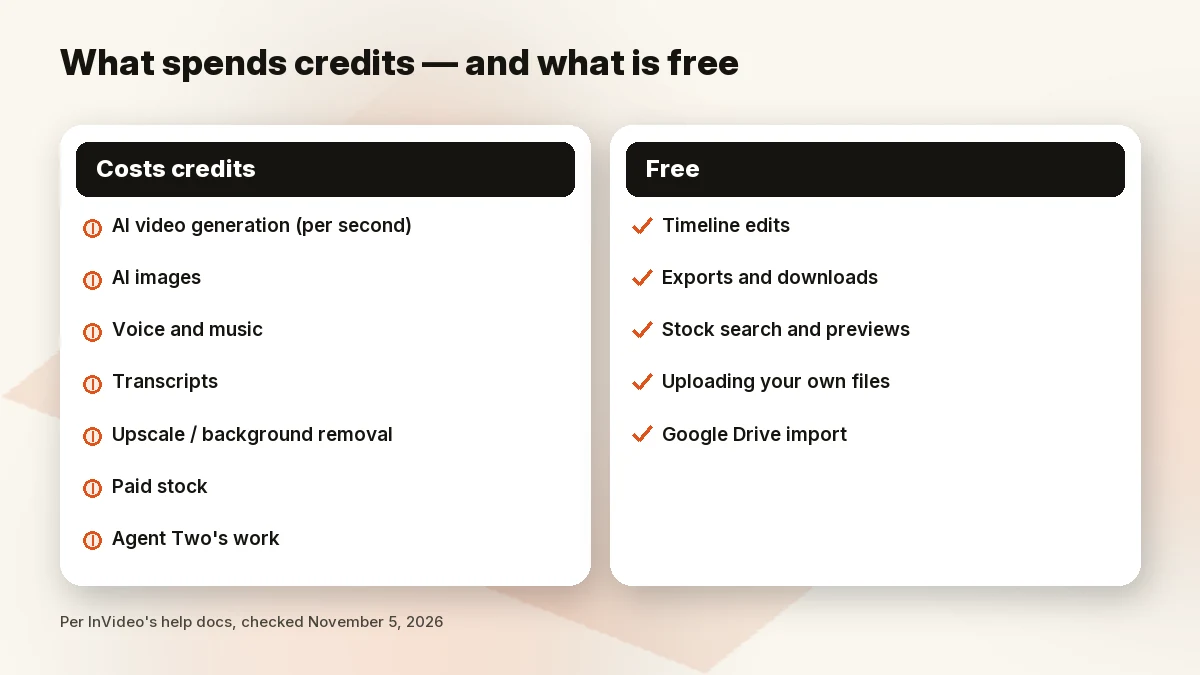
InVideo describes credits as “currency on our platform.” According to its help docs, credits pay for generation (video, images, audio, 3D), transcripts, model operations such as upscaling or background removal, paid stock, and Agent Two’s work. Each model has its own price. Video models charge per second, and resolution, a video input and generated audio all change the rate.
Credits on an active plan reset every month, and unused plan credits don’t roll over. Extra credits you buy “expire after a set period, or when your plan ends, whichever comes first.” The docs don’t state that period on the page we read, so we won’t guess one.
What costs nothing
This is the part many reviews get wrong. InVideo’s help docs state:
- Every edit on the timeline is free, whether you make it or an outside agent does.
- Exporting or downloading content uses no credits (video, audio, a still, or an editable project).
- Searching stock, previewing results, uploading your own files and importing from Google Drive are free.
So a creator who mostly edits their own footage can use InVideo heavily on a small plan. Credits only start to matter when you generate.
Guest seats and storage
Plus adds up to 10 guest seats and Max up to 20, each with 190 credits, per the pricing page. Starter has none. Storage runs from 200 GB on Starter to 2,000 GB on Max. The pricing page’s calculator says “credits are shared per seat,” so a three-seat Starter workspace gets 1,200 credits a month (the page’s own calculator example: “$360 up front for 3 seats”).
The credit trap: why the plan price is not the video price
InVideo’s own plan cards translate credits into output, and those numbers show how fast premium video eats a budget. From the pricing page’s comparison table (November 5, 19:22 BRT):
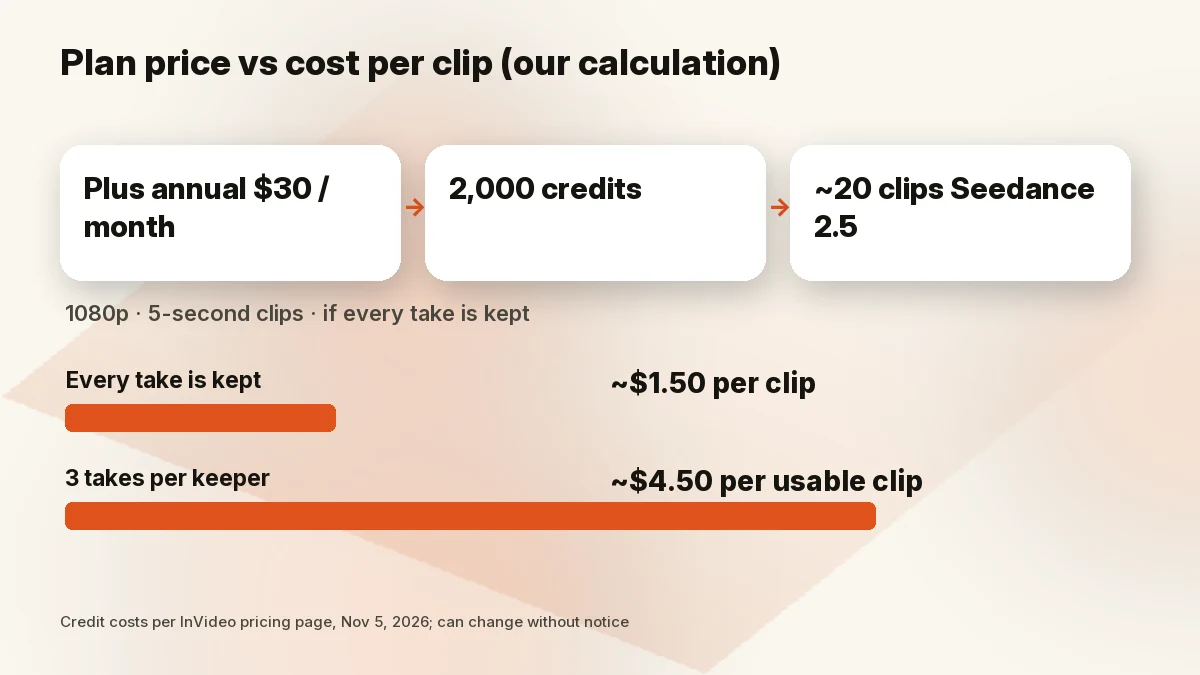
- Seedance 2.5 at 1080p: about 96 credits per 5 seconds.
- Seedance 2.5 at 720p: about 56 credits per 5 seconds.
- Seedance 2.5 Draft: about 24.5 credits per 5 seconds.
- Seedance 2.0 Fast video: about 30 credits each (page calculator).
- Nano Banana Pro image: about 2.5 credits; 4K about 4 credits.
Our math (labelled calculation, not a test): Plus gives 2,000 credits a month. At about 96 credits per 5 seconds of Seedance 2.5 1080p, that’s roughly 20 five-second clips, or about 100 seconds of generated 1080p footage a month. InVideo’s own table says the same: “20 videos.” On annual Plus ($30), that works out to about $1.50 per five-second clip, or roughly $18 per minute of generated 1080p footage, if every generation is a keeper.
That last condition is the trap. InVideo prices every generation call separately (the docs say each call is priced by its dry run), so a retry is a new charge. If you need three attempts to get one usable shot, your real cost per kept clip is three times the math above. Starter’s 400 credits don’t include Seedance 2.5 at all; they cover about 15 Seedance 2.0 Fast videos, per the plan card.
There is a guardrail. The docs say InVideo’s agent “runs a dry run first and tells you the price before it spends anything,” and for any call costing 1 credit or more it waits for your yes. Use it. And remember the line on the pricing page: “We reserve the right to update credit costs at any time, without prior notice.”
Free plan, refunds and cancellation
Free plan. Older help articles described a free plan with a weekly credit quota. Today’s pricing page shows only Starter, Plus and Max in its plan cards, and the old free-plan help link now redirects to a general “Plans” page that doesn’t mention a free tier. We couldn’t confirm a free plan’s limits on November 5, so we won’t describe one. If a free option appears for your region at signup, check its limits there.
Refunds. InVideo’s terms say fees are non-refundable, with one exception: you may request a refund “within seven (7) days of an initial purchase or renewal.” The help article adds the catch: a refund is possible “only if you have not used the plan,” and a plan “counts as used if anything was generated or downloaded in the current billing period.” InVideo reviews each request at its own discretion. App Store subscriptions go through Apple.
Cancellation. You can cancel at any time and the plan stays active until the end of the billing cycle. Switching from annual to monthly takes effect at the end of the current period; upgrades are prorated.
In practice: don’t buy a plan “to try it.” Once you generate or download anything, the refund window is effectively closed.
Key features
- Agent Two. InVideo’s own agent can plan and edit a project and generate media; its work uses credits. Starter gets Lite only.
- Bring your own agent. InVideo supports outside agents (the docs list Claude Code, Cursor, Codex, ChatGPT and Gemini) via MCP and a CLI. An outside agent edits for free and pays credits only for generation, transcripts and paid stock.
- Generative models. Video and image models billed in credits; Seedance 2.5 and Seedance 2.0 at 4K start at Plus.
- Timeline editor. Full timeline, color, audio and 3D tools, keyframes, LUTs and multiplayer editing on every paid plan, with free edits and exports.
- Stock. Premium stock footage allowance per plan (100 / 200 / 500).
- Commercial use. InVideo’s licensing page says you can use the videos you make for commercial work under its terms; stock stays under its own license.
Pros and cons
Pros
- Timeline editing and exports cost no credits, on every paid plan.
- Dry-run pricing: the agent tells you the credit cost before it spends.
- Many generative models in one subscription, billed at what InVideo calls original API pricing.
- Starter and Plus are half price on annual billing.
- Outside agents (Claude, ChatGPT and others) can drive the editor.
Cons
- Plan price isn’t video price: premium models cost credits per second, and retries cost the same.
- Unused monthly credits don’t roll over.
- Credit costs can change “without prior notice,” per InVideo.
- Max’s listed price jumped to $250 a seat, with no annual discount shown today.
- Refunds only within 7 days and only if nothing was generated or downloaded.
- Plans and prices differ by region and by app store.
Who should (and shouldn’t) buy InVideo AI
Editors who generate a little. If most of your work is cutting your own footage and you add a few AI images or short clips, Starter or Plus gives you a capable editor where the core work is free.
Faceless YouTube and social creators. Plus is the realistic entry point because Starter lacks Seedance 2.5 and has only Agent Two Lite. Budget by seconds of generated footage, not by videos. For a wider comparison, see our best AI video generator for YouTube guide.
Teams. Guest seats on Plus and Max make review-and-edit workflows cheaper than buying full seats, but each guest seat comes with only 190 credits.
Skip InVideo if you need a fixed cost per video for a client budget, you only want avatar videos, or your source is mostly blog posts and scripts you want turned into stock-footage videos cheaply.
InVideo alternatives
- Pictory (blog-to-video): better if you start from an article, script or slides. On November 5 (19:22 BRT) its official page listed Starter at $25 a month billed annually ($29 monthly), Professional at $35 ($59) and Teams at $119 ($199), with a 14-day free trial (300 credits). Annual plans grant 24,000 / 72,000 / 216,000 credits a year. See our InVideo vs Pictory comparison and Pictory review. Check Pictory price
- Synthesia (AI presenter videos): better for training and explainer videos with an on-screen avatar. Its official page listed a free Basic plan (500 credits a month), Starter at $19 a month ($9 for the first month) or $14 a month billed yearly, and Pro at $89 a month ($49 first month) or $59 a month billed yearly. Read our Synthesia review. Check Synthesia price
- HeyGen (avatars): if a talking avatar is the whole point, compare it directly in our HeyGen vs InVideo post or on HeyGen’s pricing page (we didn’t check HeyGen’s prices for this review).
For the full ranking, see our best AI video generators and best AI video editors guides.
How we evaluated
We read InVideo’s official pricing page, its help docs (plans and credits, which actions use credits, credit costs, refunds, licensing) and its terms of service, from a US-based view in USD, and recorded the date and time of each check. We cross-checked against recent independent reviews, mainly to spot plans and prices that have since changed. Prices change without notice, so every figure is dated. We didn’t run our own tests of video quality, real credit consumption or support, and we don’t claim to have.
FAQ
Is InVideo AI worth it in 2026?
Yes, if you’ll use the free editor heavily and generate in moderation. No, if you need a predictable cost per video or rely on many retries with premium video models.
How much does InVideo AI cost?
On November 5, 2026 (19:22 BRT), per seat per month: Starter $10 billed annually ($20 monthly), Plus $30 ($60 monthly), Max $250 (no annual discount shown). Prices vary by region.
Is there a free plan?
We couldn’t confirm one on November 5: the pricing page showed only paid plans, and the old free-plan help article now redirects elsewhere. Check at signup for your region.
Do unused credits roll over?
No. Plan credits reset monthly and unused ones don’t roll over. Extra credits expire after a set period or when your plan ends, whichever comes first.
Does editing or exporting use credits?
No. Timeline edits and exports or downloads are free, per InVideo’s help docs.
How does the InVideo refund work?
You can request one within 7 days of a purchase or renewal, but only if nothing was generated or downloaded in that billing period. InVideo decides case by case. Apple handles iOS purchases.
Why are my credits disappearing so fast?
Video models charge per second, higher resolution and generated audio cost more, and every regeneration is charged again. Check the dry-run price before each generation.
InVideo vs Pictory or HeyGen?
Pictory fits text-to-video from existing articles; HeyGen fits avatar videos. See InVideo vs Pictory and HeyGen vs InVideo.
Bottom line
InVideo AI in late 2026 is a strong editor with a generation meter attached. The editing and exporting are free on any paid plan; the generation is where the money goes. Start on Plus annual if you need the better video models, run the dry run before every generation, and price your month in seconds of footage, not in videos.
Last updated: November 5, 2026.
Sources
Official pages checked November 5, 2026, 19:22–19:25 BRT (USD):
- InVideo pricing (plans, credits, FAQ, comparison table)
- InVideo docs: plans and credits (last updated Nov 2, 2026)
- InVideo docs: which actions use credits (last updated Nov 2, 2026)
- InVideo docs: credits and what they cost
- InVideo docs: refunds (last updated Nov 3, 2026)
- InVideo terms of service
- Pictory pricing
- Synthesia pricing